
SDLC Models Pick the Best for Your 2026 Software Projects
· 31 min read
Why SDLC Models Matter Today
Building good software is a big job. It’s not just about writing computer code. You also need to plan things out, design how it will work, build it step by step, test it to make sure it’s perfect, and then keep it running smoothly. This entire process is known as the Software Development Life Cycle, or SDLC for short. It’s like a roadmap for making software.
However, figuring out the best roadmap to follow can be tricky. There are many different ways, or models, for how the software development life cycle can work. In 2026, the world of technology changes very fast. New tools and ideas, like Artificial Intelligence (AI), are constantly coming out. This rapid pace means that picking the right model for your software life cycle development is more important than ever.

If you choose the wrong approach, it can cost a lot of time, money, and even stop your project from being successful. This is why understanding each model software development life cycle is so crucial for any team building software today. In fact, many people agree that the software development life cycle usually has about seven main steps, from planning to keeping the software updated and running well [^1].
This article will help you understand all of this better. We will give you clear definitions for the different model software development life cycle choices.
We’ll show you the good things and bad things about each one. You’ll also learn a simple way to pick the best model for your specific project. Plus, we’ll talk about how new ideas like DevOps and AI fit into today’s software life cycle development to make things even better.
To stay on top of how AI is changing software development and more, you might find our newsletter helpful. Get clear daily AI updates from The AI Newsletter Worth Reading.

[^1]: What is the Software Development Lifecycle (SDLC)?
What is the Software Development Life Cycle (SDLC)? Core Concepts
The Software Development Life Cycle (SDLC) is like a detailed plan for building software. Imagine you’re building a house. You wouldn’t just start nailing boards together, right? You’d plan it, draw it, build it step-by-step, check everything, and then keep it in good shape. The SDLC does the same thing for software. It’s a way to make sure that software projects are done in an organized way, from the first idea to keeping the software running long-term. This structured approach helps teams make high-quality software that meets everyone’s needs, finishes on time, and stays within budget.
The goal of any software life cycle development is to create a framework that helps teams work together effectively. It aims to reduce risks, improve quality, and make the whole process predictable. By following a clear model software development life cycle, companies can avoid common problems like getting lost, running out of money, or building something that nobody actually wants.
The Main Steps in the Software Development Life Cycle
While different teams might call the steps by slightly different names, most agree that the life cycle of software development has several key phases.
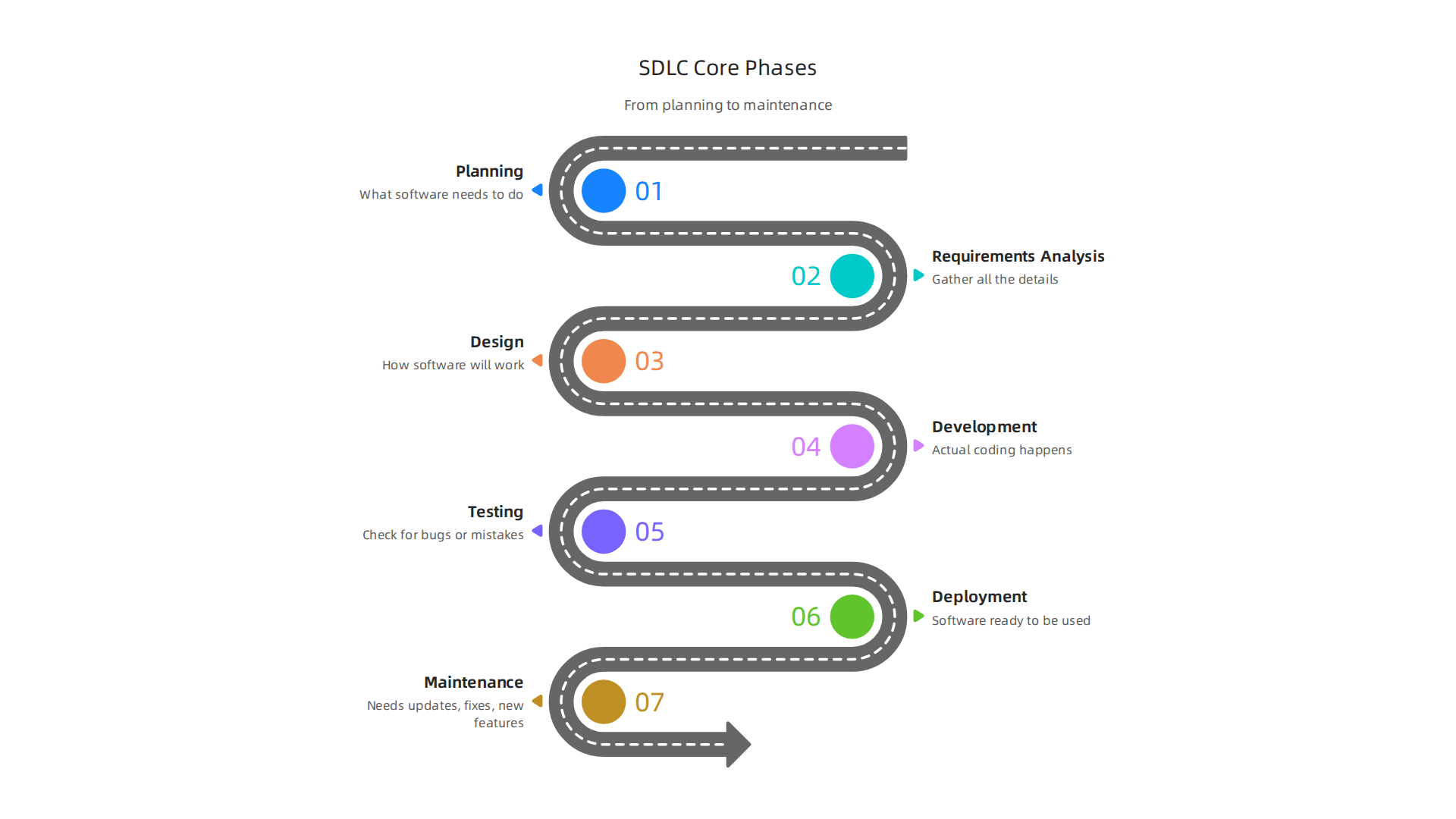
You might see 6 or 7 stages mentioned, but they generally cover the same ground. Here are the core ideas behind these steps:
- Planning: This is where you figure out what the software needs to do. What problem will it solve? Who will use it? What features are most important? This stage also looks at if the project is even possible and what resources (like people and money) will be needed. Think of it as drawing up the first rough sketches for the house.
- Requirements Analysis: Here, you get more specific about the "what." You talk to users and stakeholders to gather all the details. This creates a clear list of what the software must be able to do. This stage defines the "wish list" for the project.
- Design: In this step, the team decides how the software will work. This includes things like how the user will interact with it, what the database will look like, and how different parts of the software will connect. It’s like an architect drawing up the detailed blueprints for the house.
- Development/Implementation: This is where the actual coding happens. Software engineers write the program based on the design plans. They build the software piece by piece, turning ideas into working code.
- Testing: Once the code is written, it needs to be checked carefully. Testers look for bugs or mistakes to make sure the software works as it should and meets all the requirements. They try to "break" the software to find any weak spots.
- Deployment: After testing, the software is ready to be used. It’s put into action, meaning it’s installed on servers or released to users. This is like moving into the finished house.
- Maintenance: Even after deployment, the work isn’t over. Software often needs updates, fixes, or new features added over time. This stage keeps the software running smoothly and improves it based on user feedback or new needs. This is like doing repairs and renovations on your house over the years.
Understanding these steps is crucial for anyone involved in software. To learn more about how to study new technologies like AI in this fast-changing field, consider exploring resources on how to study AI for software development in 2026.
Why Do We Have Different SDLC Models?
You might wonder why there isn’t just one single way to go through these steps. Actually, there are many different approaches, or "models of software development life cycle." The reason for this is simple: not all software projects are the same. A small app for a single user is very different from a huge system for a bank. Some projects need to be built very quickly, while others require careful planning over a long time.
That’s why different model software development life cycle options exist. They offer different ways to organize these seven steps. Some models are very strict with their plans, moving from one step to the next only when the previous one is fully done. We call these "plan-driven" models. Other models are more flexible and involve doing small parts of the project over and over, constantly improving it. These are known as "iterative" models. Still others focus on continuous updates and changes, which we call "continuous" models. We will look at these different ways of working in more detail next. The right model makes a big difference in how successful a software project will be Software Development Life Cycle (SDLC).
The previous section talked about why different ways of building software exist. Now, let’s dive into one of the oldest and most straightforward approaches: the Waterfall model. This is a classic example of a "plan-driven" model software development life cycle.
Waterfall and Plan-Driven Models: When Predictability Wins
Imagine building a product where every single step must be finished perfectly before you can move to the next. That’s the core idea behind the Waterfall model. It’s a very clear and step-by-step way of managing the software life cycle development. Each phase flows downwards, like a waterfall, into the next one. You finish planning, then requirements, then design, then coding, then testing, and finally, deployment and maintenance. There’s not much going back once a phase is complete.
How the Waterfall Model Works
The Waterfall model follows the seven main steps of the software development life cycle in a strict order:
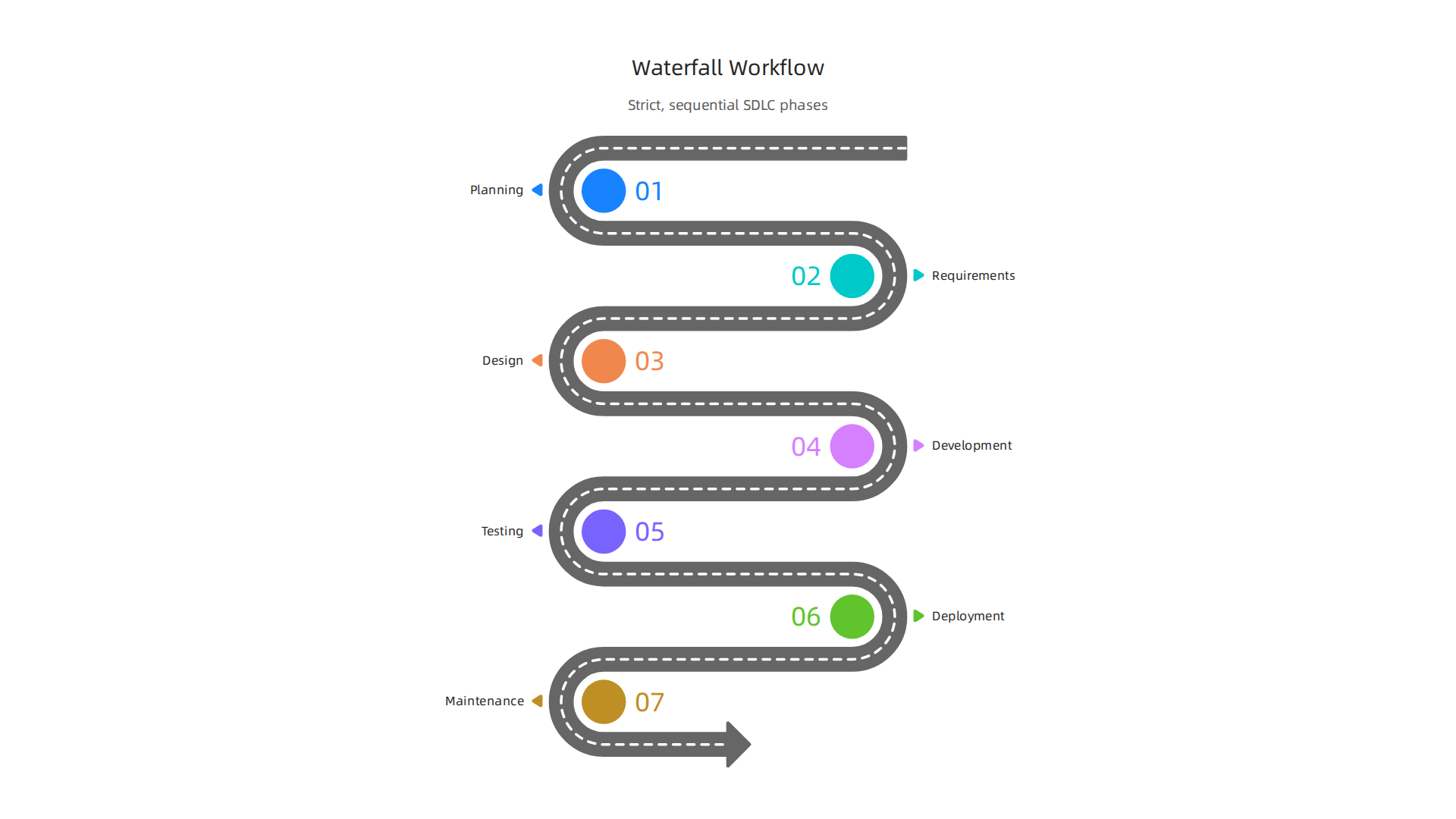
- Planning: You decide what the software needs to do from the very start.
- Requirements: You write down every single detail of what the software must have.
- Design: You create a full blueprint of how the software will be built, down to the smallest parts.
- Development: You write all the code based on the design.
- Testing: You check everything to make sure it works as planned.
- Deployment: You give the finished software to users.
- Maintenance: You fix bugs and make small updates over time.
Once one stage is done and approved, you move to the next. You usually don’t revisit earlier stages. This makes it a very linear process. This model is one of the many structured ways to guide software projects through defined phases to ensure quality and manage risks, as explained in resources about the Software Development Life Cycle (SDLC).
Strengths of Plan-Driven Models
The Waterfall model, and other plan-driven models of software development life cycle, offer some big benefits:
- Clear and Easy to Understand: Everyone on the team knows what to do and when. The steps are very straightforward.
- Strong Documentation: Because you plan everything upfront, there are lots of documents. This helps if new people join the team or if you need to remember why certain decisions were made years later.
- Predictability: For projects with very stable requirements, it’s easier to guess how long it will take and how much it will cost. This predictability is a key reason why some teams choose this model software development life cycle.
Common Problems with Waterfall
While it sounds good for some projects, the Waterfall model isn’t perfect for everything. Its biggest weakness is its lack of flexibility.
- Changes are Hard: If the customer changes their mind or new needs pop up halfway through the project, it’s very difficult and costly to go back and change earlier steps.
- Late Feedback: Users don’t get to see or try the software until it’s almost finished. This means big problems might only be found at the very end, which can be expensive to fix.
- Not for Complex Projects: For projects where needs are likely to change, or where you’re building something completely new and aren’t sure of all the details yet, Waterfall can lead to big problems.
When Plan-Driven Models Are a Good Fit
Even in 2026, with many new ways of working, plan-driven models still have their place. They are best when:
- Requirements are Very Stable: The customer knows exactly what they want, and it’s unlikely to change.
- Projects are Small or Simple: For less complex software, the rigid structure can work well.
- Regulated Industries: In areas like medical devices or aerospace, where strict rules and lots of paperwork are needed, the detailed documentation of a Waterfall-like software life cycle development is important.
- Fixed-Scope Contracts: If a company agrees to build something specific for a fixed price and time, the detailed planning helps manage expectations.
However, for most software projects today, especially those that need to adapt quickly, different models are often preferred. To stay informed about the rapidly changing landscape of software development and how different approaches are evolving with new technologies like AI, you might find daily insights valuable.
Get clear daily AI updates from The AI Newsletter Worth Reading.
Understanding the trade-offs of each model, like Waterfall, helps you make smart choices for your projects. You can explore a broader overview of the various Mastering the Software Development Lifecycle Models, AI, and Best Practices for 2026 to see how different approaches compare.
The Waterfall model, with its strict, step-by-step approach, can be tough when project needs change. Actually, in today’s fast-moving world, most software projects need to be much more flexible. This is where Agile and iterative models of software development life cycle come in. They are a big shift from the old "plan-first" ways. Instead of trying to plan everything perfectly at the start, Agile teams embrace change and work in small, repeating cycles.
What Makes Agile Different?
Agile is more than just a set of steps; it’s a way of thinking about building software. It focuses on four main ideas:
- People and Talking: It’s more important for team members to talk and work together than to follow strict rules.

- Working Software: Getting a small, working piece of software to users often is better than waiting for a big, perfect plan.
- Working With Customers: Keeping customers involved and getting their ideas all the time helps make sure the software is what they truly need.
- Responding to Change: Being able to change plans quickly is better than sticking to an old plan that no longer works.
This model software development life cycle helps teams build products that customers actually want.
How Iterative Models Work
Instead of one long sequence, Agile uses short, repeated cycles, often called "sprints" or "iterations." Each sprint is like a mini-project. It usually lasts 1 to 4 weeks. In each sprint, the team:
- Plans a small amount of work.
- Builds that small part of the software.
- Tests it.
- Shows it to the customer to get feedback.
Then, they start a new sprint, taking into account what they learned. This constant feedback loop helps find problems early and makes sure the software grows in the right direction. It makes the life cycle of software development much more adaptable.
Popular Agile Approaches: Scrum and XP
Two common ways to use Agile principles are Scrum and Extreme Programming (XP).
-
Scrum: This is one of the most widely used models of software development life cycle. In 2026, about 63% of teams using Agile methods for their software use Scrum, and many organizations combine it with other approaches for a "hybrid" model [1]. Scrum uses specific roles:
- Product Owner: Decides what needs to be built.
- Scrum Master: Helps the team follow Scrum rules and removes roadblocks.
- Development Team: Builds the software.
Teams work in sprints and have quick daily meetings to check progress.
-
Extreme Programming (XP): XP focuses on specific engineering practices to make software better and adapt to changes easily. This includes things like two programmers working on one computer (pair programming) and writing tests before writing the actual code (test-driven development). XP is great for making very high-quality software in a flexible way.
Why Agile is So Popular
Agile models are very popular in 2026. Data shows that almost all organizations, about 97%, use Agile methods in some way [2]. And about 75% of companies in the U.S. actively use Agile ideas [3]. This is because Agile helps teams:
- Be Flexible: They can quickly change direction if customer needs shift or new ideas come up.
- Deliver Faster: By showing working software often, teams can get useful products out sooner.
- Improve Quality: Constant testing and feedback help catch problems early.
- Keep Customers Happy: Customers are involved throughout the process, so they get what they really want.
Agile projects also tend to have a higher success rate. One report shows a 75% success rate for Agile projects, which is much better than traditional methods [4]. This approach is especially good for big or complex projects where the final needs aren’t perfectly clear at the start. It also works well for smaller teams that need to move fast. If you’re looking to integrate new tools and practices, understanding how to use AI for software development in 2026 can greatly enhance these iterative processes.
[1] Agile and Scrum statistics you need to know (2026)
[2] State of Agile 2026: Insights, Trends, and Key Findings
[3] Agile Adoption in 2026: What the Latest Statistics Tell Us …
[4] Agile Statistics 2026: Growth, Success Rates, and Trends
Agile ideas made software teams faster and more flexible. But to truly keep up in 2026, many teams also use DevOps. DevOps is a way of thinking that brings together development (Dev) and operations (Ops) teams. It’s not just about tools; it’s about changing how people work and talk to each other. The main goal is to make the entire life cycle of software development smooth and quick, from writing code to getting it to users and keeping it running well.
DevOps helps teams release new software faster and more reliably. It does this by making sure everyone shares responsibility and works towards the same goals.

This approach really changes the traditional model software development life cycle by breaking down walls between teams.
What are CI/CD Pipelines?
A big part of DevOps is using what we call CI/CD pipelines. CI stands for Continuous Integration, and CD stands for Continuous Delivery or Continuous Deployment. Think of a pipeline as an automated path that your software takes from when a developer writes new code until it reaches the users. This speeds up the software life cycle development a lot.
- Continuous Integration (CI): This means developers frequently add their new code changes to a main shared codebase. Each time new code is added, an automated system builds the software and runs quick tests to make sure everything still works. This helps catch problems early.
- Continuous Delivery (CD): After CI, Continuous Delivery means the software is always ready to be released to users at any time. All changes are tested and packaged. The decision to actually release is still made by a person.
- Continuous Deployment (CD): This takes it one step further. If all tests pass, the new software is automatically sent out to users without anyone needing to give final approval.
These practices help teams ship software quickly and often. Automating as much as possible is key to a successful CI/CD pipeline, making the whole process much faster and less prone to errors [1]. For a deeper dive into optimizing these processes, you can learn more about mastering the software development lifecycle models, AI, and best practices for 2026.
Common CI/CD Pipeline Stages
A typical CI/CD pipeline has several important steps:
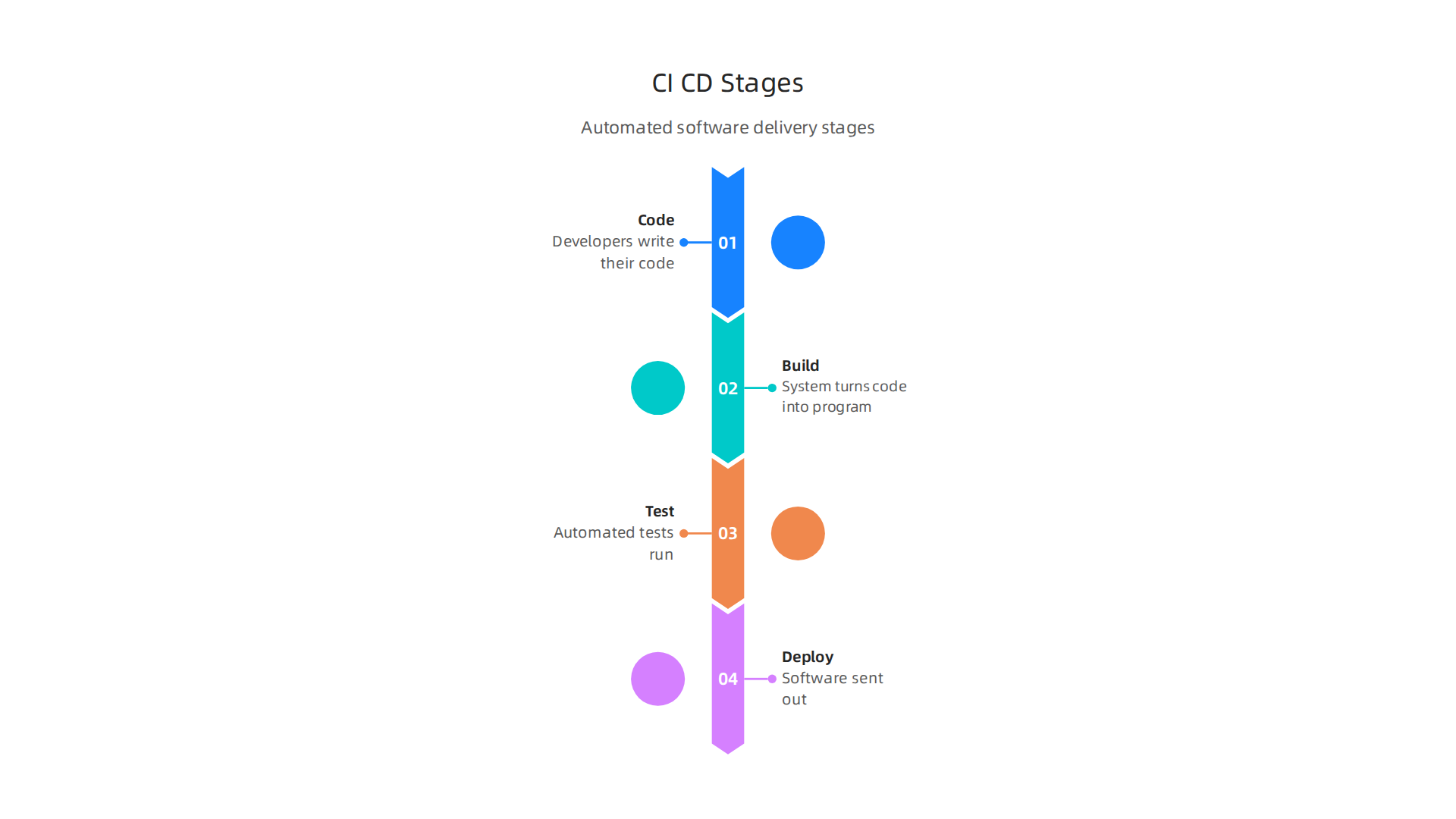
- Code: Developers write their code and save it.
- Build: The system takes all the new code and turns it into a working program.
- Test: Automated tests run to check for bugs and make sure new changes did not break old features. For example, developers should run unit tests on every commit to validate individual parts.
- Deploy: If all tests pass, the software is then sent out. This might be to a testing environment or directly to users, depending on whether it’s Continuous Delivery or Deployment.
To keep up with best practices in CI/CD, it’s wise to automate everything you can.
This helps you reach a "continuous automation" state.
Measuring Success in CI/CD
To know if your CI/CD efforts are working, you need to track certain numbers, or "metrics." These help teams see how well they are doing and where they can get better. Some important metrics for CI/CD pipelines include:
- Lead Time: This is the average amount of time it takes for a new code change to go from a developer’s computer all the way to being live for users [2].
- Deployment Frequency: How often new software is released.
- Change Failure Rate: How often new releases cause problems or failures.
- Mean Time to Recovery (MTTR): How long it takes to fix a problem once it happens.
These are often called DORA metrics, and they give valuable insights into how well a team is delivering software [3]. Keeping an eye on these helps teams make better decisions and improve their models of software development life cycle.
For those who want to stay on top of the latest advancements, especially in AI which increasingly impacts software development, staying informed is critical. Get clear daily AI updates from The AI Newsletter Worth Reading.
While CI/CD pipelines help speed up the life cycle of software development for many, it’s also true that different types of projects need different ways of working. This is why many other models of software development life cycle are still important in 2026. Choosing the right model software development life cycle helps teams build software in the best way for their specific needs [1]. Let’s look at some of these helpful models.
Lean Software Development
Lean thinking is all about removing waste and focusing on what truly brings value to the customer. Imagine you’re building a toy car. A Lean approach would make sure every part you add makes the car better or more fun, and you wouldn’t spend time on things that don’t matter to the child playing with it.
Lean principles help teams:
- Build only what is needed.
- Deliver software in small, quick steps.
- Always be looking for ways to improve.
This model works well for projects where the team needs to be very efficient and deliver value quickly without a lot of extra work.
Kanban
Kanban is a visual way to manage work. Think of it like a whiteboard with sticky notes. Each note is a task, and you move it across different columns like "To Do," "Doing," and "Done." This makes it easy to see what everyone is working on and what’s next.
Key ideas of Kanban:
- Visualize workflow: See all tasks clearly.
- Limit work in progress: Don’t start too many things at once.
- Manage flow: Keep work moving smoothly.
Kanban is great for teams that need to handle changes often and want a flexible way to keep track of their tasks. It helps improve the software life cycle development by making bottlenecks easy to spot.
V-Model
The V-Model is a very structured model software development life cycle that focuses on testing. It looks like the letter "V." On one side of the "V," you plan and design the software, going from big ideas to small details. On the other side, you test each part, starting with the smallest pieces and then testing the whole system. Every step of development has a matching testing step.
This model is especially good for projects where:
- Safety is very important (like software for airplanes or medical devices).
- Requirements are clear from the start.
- Mistakes must be found and fixed early.
The V-Model helps ensure high quality because testing is built into every stage of the process.
Spiral Model
The Spiral Model is all about managing risks. It works in cycles, or "spirals," around and around. In each spiral, teams identify risks, plan, build a small part of the software, and then check it. This allows them to learn and adjust before moving to the next spiral. It’s like building a house one room at a time, checking for problems after each room is done before starting the next.
The Spiral Model is best for:
- Very large projects.
- Projects with unclear requirements.
- New and complex systems where there are many unknowns.
This model software development life cycle reduces big surprises because risks are handled step by step.
When to Choose These Variants
Picking the right software life cycle development model depends on many things. There’s no single best answer.
- Lean: Choose Lean when you need to be very efficient, cut out waste, and deliver value quickly, especially if your requirements might change over time.
- Kanban: Use Kanban for ongoing projects, maintenance, or when you need a flexible way to manage tasks and limit how much work is happening at once. It’s great for visualizing work and keeping things flowing.
- V-Model: Pick the V-Model for critical projects where quality, safety, and thorough testing are paramount, and requirements are very stable.
- Spiral Model: Go for the Spiral Model when you’re working on big, complex, or risky projects where requirements are not fully known at the start, and you need to manage risks carefully throughout development [2].
Teams often even combine parts of these models of software development life cycle to create a hybrid approach that fits their unique situation. Getting it right can truly drive software innovation with strategic research and development. Understanding the strengths and weaknesses of each model is key to making a good choice for any life cycle of software development [3].
When it comes to picking a model software development life cycle, factors like the size of your team, the type of industry, and the kind of product you’re building all play a part [4].
When thinking about which model software development life cycle to pick, it’s true that many things play a part, like your team size and the kind of product you’re building. There’s no single best answer that fits everyone. The trick is to have a clear way to think about your choices. This helps make sure you pick the best way to build your software.
Choosing the Right SDLC Model: Frameworks, Checklists and Trade-offs
Picking the right software life cycle development model needs a good plan. It’s like choosing the right tools for a specific job. You wouldn’t use a hammer to cut wood, right? In 2026, many companies are looking for ways to be flexible and fast, and AI tools are changing how we build things.
Many teams today use Agile methods because they are good for projects where things change a lot. In fact, most organizations, about 97%, use some form of Agile development today, and these projects often have a higher chance of success [1, 2]. But even with Agile being very popular, other models of software development life cycle still have their place, especially for certain kinds of projects.
Here’s a simple way to think about choosing your model software development life cycle:
What to Think About When Choosing
- Team Size:
- Small teams: Flexible models like Kanban or simple Agile methods often work best. They help everyone stay on the same page easily.
- Large teams: More structured Agile approaches or even a mix of models might be needed to keep everyone organized.
- Regulatory Rules:
- Strict rules: If you’re building software for hospitals or banks, you need clear steps and lots of testing. Models like the V-Model, which focuses on thorough checks, are very helpful here. Also, when using AI, remember that certain industries like healthcare need special care to protect data, such as making sure AI tools are HIPAA-Compliant.
- Fewer rules: You can be more flexible with less strict projects.
- How Much Will the Product Change?
- Changes often: If you expect new ideas or changes from customers, Agile or Lean models are great. They let you adjust as you go.
- Stays mostly the same: If you know exactly what you need from the start, a more traditional model might work.
- Using AI Tools:
- AI tools are becoming very common in software development in 2026 [3]. They can help with coding, testing, and even planning.
- When using AI, think about how your chosen model lets you use these tools. Flexible models can fit AI help into daily work better. Always make sure your AI guidelines are clear and easy to follow, just like any other coding rule [4]. To really get the most out of new tech, you might want to consider how AI mastering for custom software teams can help your group.
A Simple Checklist for Your Project
Use these questions to guide your decision for the best life cycle of software development approach:
- How clear are our project goals right now?
- Very clear: V-Model, Waterfall (if not too complex)
- Somewhat clear, might change: Lean, Agile, Scrum
- Not clear, many unknowns: Spiral
- How important is it to handle risks early?
- Very important, big risks: Spiral Model
- Important, but manageable: Agile, V-Model
- Less important: Lean, Kanban
- How fast do we need to deliver parts of the software?
- Quick, small updates: Lean, Agile, Kanban
- Less frequent, larger releases: V-Model, Waterfall
- Do we need strict documentation and checks at every step?
- Yes, for safety or rules: V-Model
- No, flexibility is better: Agile, Kanban
- How much do we plan to use AI in our development process?
- A lot: Models that support quick changes and testing will fit AI-assisted work well.
- A little: Any model can work, but consider how AI can make it more efficient.
By asking these questions, you can start to see which models of software development life cycle fit your project best. Many teams even mix and match parts of different models to create their own unique way of working. Understanding these trade-offs is a big part of successful software building.
Staying on top of new tools and trends, especially with AI, can make a big difference in how you choose and use these models. Get clear daily AI updates and broader technology insights by subscribing to The AI Newsletter Worth Reading.When thinking about which model software development life cycle to pick, it’s true that many things play a part, like your team size and the kind of product you’re building. There’s no single best answer that fits everyone. The trick is to have a clear way to think about your choices. This helps make sure you pick the best way to build your software.
Choosing the Right SDLC Model: Frameworks, Checklists and Trade-offs
Picking the right software life cycle development model needs a good plan. It’s like choosing the right tools for a specific job. You wouldn’t use a hammer to cut wood, right? In 2026, many companies are looking for ways to be flexible and fast, and AI tools are changing how we build things.
Many teams today use Agile methods because they are good for projects where things change a lot. In fact, most organizations, about 97%, use some form of Agile development today, and these projects often have a higher chance of success [1, 2]. But even with Agile being very popular, other models of software development life cycle still have their place, especially for certain kinds of projects.
Here’s a simple way to think about choosing your model software development life cycle:
What to Think About When Choosing
- Team Size:
- Small teams: Flexible models like Kanban or simple Agile methods often work best. They help everyone stay on the same page easily.
- Large teams: More structured Agile approaches or even a mix of models might be needed to keep everyone organized.
- Regulatory Rules:
- Strict rules: If you’re building software for hospitals or banks, you need clear steps and lots of testing. Models like the V-Model, which focuses on thorough checks, are very helpful here. Also, when using AI, remember that certain industries like healthcare need special care to protect data, such as making sure AI tools are HIPAA-Compliant AI Coding Guide for Healthcare Developers.
- Fewer rules: You can be more flexible with less strict projects.
- How Much Will the Product Change?
- Changes often: If you expect new ideas or changes from customers, Agile or Lean models are great. They let you adjust as you go.
- Stays mostly the same: If you know exactly what you need from the start, a more traditional model might work.
- Using AI Tools:
- AI tools are becoming very common in software development in 2026 [3]. They can help with coding, testing, and even planning.
- When using AI, think about how your chosen model lets you use these tools. Flexible models can fit AI help into daily work better. Always make sure your AI guidelines are clear and easy to follow, just like any other coding rule [4]. To really get the most out of new tech, you might want to consider how AI mastering for custom software teams can help your group.
A Simple Checklist for Your Project
Use these questions to guide your decision for the best life cycle of software development approach:
- How clear are our project goals right now?
- Very clear: V-Model, Waterfall (if not too complex)
- Somewhat clear, might change: Lean, Agile, Scrum
- Not clear, many unknowns: Spiral
- How important is it to handle risks early?
- Very important, big risks: Spiral Model
- Important, but manageable: Agile, V-Model
- Less important: Lean, Kanban
- How fast do we need to deliver parts of the software?
- Quick, small updates: Lean, Agile, Kanban
- Less frequent, larger releases: V-Model, Waterfall
- Do we need strict documentation and checks at every step?
- Yes, for safety or rules: V-Model
- No, flexibility is better: Agile, Kanban
- How much do we plan to use AI in our development process?
- A lot: Models that support quick changes and testing will fit AI-assisted work well.
- A little: Any model can work, but consider how AI can make it more efficient.
By asking these questions, you can start to see which models of software development life cycle fit your project best. Many teams even mix and match parts of different models to create their own unique way of working. Understanding these trade-offs is a big part of successful software building.
Staying on top of new tools and trends, especially with AI, can make a big difference in how you choose and use these models. Get clear daily AI updates and broader technology insights by subscribing to The AI Newsletter Worth Reading.
Evolving the SDLC: Hybrid Models, AI Integration, and Future Trends
Moving beyond a simple checklist, the world of software building keeps changing.

In 2026, finding the right model software development life cycle means looking at new ways of working. Teams are not just picking one model anymore. They are mixing and matching different ideas to create a way that works best for them. This is how hybrid models are born.
The Rise of Hybrid Models
Many teams find that no single software life cycle development model fits all their needs perfectly. So, they combine the best parts of different models. For example, they might use Agile’s flexibility for quick changes, DevOps practices for smooth and continuous delivery, and some structured planning from traditional models for very important or risky parts of a project. This blend makes a flexible life cycle of software development that can adapt to different challenges.
This approach means you might start with a clear plan for some parts, but stay very open to changes for others. It allows teams to be fast where they need to be, but careful when it really matters. It’s all about making the models of software development life cycle work for your team, not the other way around.
AI Integration in the SDLC
A big change in 2026 is how much we use AI tools in software development. AI is helping teams at every step of the model software development life cycle, from writing initial code to finding bugs and even planning. It can make the process faster and help find mistakes quicker.
However, using AI also brings new things to think about. Teams need clear rules for how to use AI tools, just like they have rules for how people write code. It’s important to treat code made by AI like it’s from a new team member. It needs to be reviewed and checked carefully before it becomes part of the main product [1]. In fact, setting up clear guidelines for AI is key to making sure it helps and doesn’t create new problems, as discussed in the "SDLC AI Radar 2026" report [2].
Here are some points to consider when bringing AI into your life cycle of software development:
- Clear Guidelines: Make sure everyone knows how to use AI coding tools. These guidelines should be easy to understand and follow [3].
- Careful Review: Always check code created by AI. Think of it as a first draft that needs human eyes and approval [4].
- Measure Impact: To see if AI is truly helping, track how much time it saves or how it affects things like how long it takes to finish a task [5]. This can include looking at metrics for CI/CD pipelines to see improvements [6].
- Governance and Security: For sensitive projects, like in healthcare, strict rules and security checks are needed for AI tools to protect data [7]. Policies about permissions and data boundaries will be central for AI coding products after 2026 [8].
To learn more about putting these new tools into practice, explore guides on how to use AI for software development in 2026 and effective prompt engineering.
The future of the software life cycle development is about being smart and flexible. It means using new tools like AI wisely while still keeping good controls in place. Staying updated on these trends is super important for anyone building software today.
To keep up with the fast pace of AI and tech trends, make sure to get clear daily AI updates and broader technology insights.
The AI Newsletter Worth Reading
Summary
This article explains why choosing the right Software Development Life Cycle (SDLC) model matters in 2026 and describes the common models teams use today. It defines the seven core SDLC phases—planning through maintenance—and compares plan-driven approaches like Waterfall with iterative methods such as Agile, Scrum, and XP. You’ll learn how DevOps and CI/CD pipelines speed delivery and which DORA metrics to track, plus when to use variants like Lean, Kanban, V‑Model, or Spiral. The guide also offers a practical checklist for selecting a model based on team size, regulatory needs, risk tolerance, delivery speed and AI usage, and explains how hybrid models and AI tools fit into modern development. After reading, you should be able to pick or design an SDLC approach that fits your project, introduce DevOps practices, and apply basic governance when using AI in development.