
How to Study AI for Software Development in 2026
· 21 min read

Introduction
The world of software development is moving fast. Really fast. In 2026, 84% of developers now use or plan to use AI tools in their work, up from 76% just a year earlier. That is a massive jump in a very short time. And nearly half of all developers use AI every single day.
These numbers tell a clear story: AI is no longer a future trend. It is the present reality of how code gets written, debugged, and shipped.
But here is the thing. With all this opportunity comes a new challenge. How do you study AI effectively when new tools, models, and techniques appear almost weekly? The sheer volume of information can feel overwhelming.

You might wonder which tools are worth your time. What is the difference between a good code reader and a great one? How do you move from experimenting with AI to truly mastering engineering with it?
You are not alone in feeling this way. The same survey found that 66% of developers say their biggest frustration with AI is solutions that are "almost right, but not quite." That leads to spending more time debugging AI-generated code instead of less.
That is exactly why this guide exists. We built it to give you a clear, structured path for studying AI in a way that actually helps your career and your projects. No fluff. No hype. Just a practical approach to learning what matters, using the best AI tools available, and integrating them into your daily workflow.
Along the way, we will cover topics like Claude code plugins, how to use a code reader effectively, and how to build real skills that set you apart. Whether you are a seasoned engineer or someone just starting your journey, the goal is the same: help you stay informed and become more effective with every update.
The rapid adoption of study ai methods is reshaping the entire development landscape. According to recent data, 88% of organizations now use AI in at least one business function. That means the demand for developers who can work smartly with AI is only growing.
If you want to keep up, you need a strategy. This guide is that strategy. Let us get started.
And if you want to stay ahead of the daily AI news without the noise, consider a reliable source that delivers clear, daily updates. One great option is The AI Newsletter Worth Reading from The Deep View.

It cuts through the clutter so you can focus on what actually matters for your work.
For more context on how AI is reshaping developer workflows, check out our article on Anthropic AI for developers. It dives deeper into one of the most popular AI assistants used by professionals today.
The State of AI in Software Development (2026 Overview)
Let us zoom out and look at where we stand right now. If you think AI in software development is still a nice-to-have, the numbers will change your mind. In 2026, AI is not a trend. It is the foundation of how modern software gets built.
Consider this: 73% of developers now use AI coding assistants regularly, according to recent 2026 industry data from Hashmeta and other verified sources. That is nearly three out of every four developers. And it is not just individual developers adopting these tools. 64% of organizations globally are already in the active use phase of AI deployment, moving past small experiments to full integration.
What does this mean for the work itself? The impact is showing up in three major areas: code generation, testing, and system design.
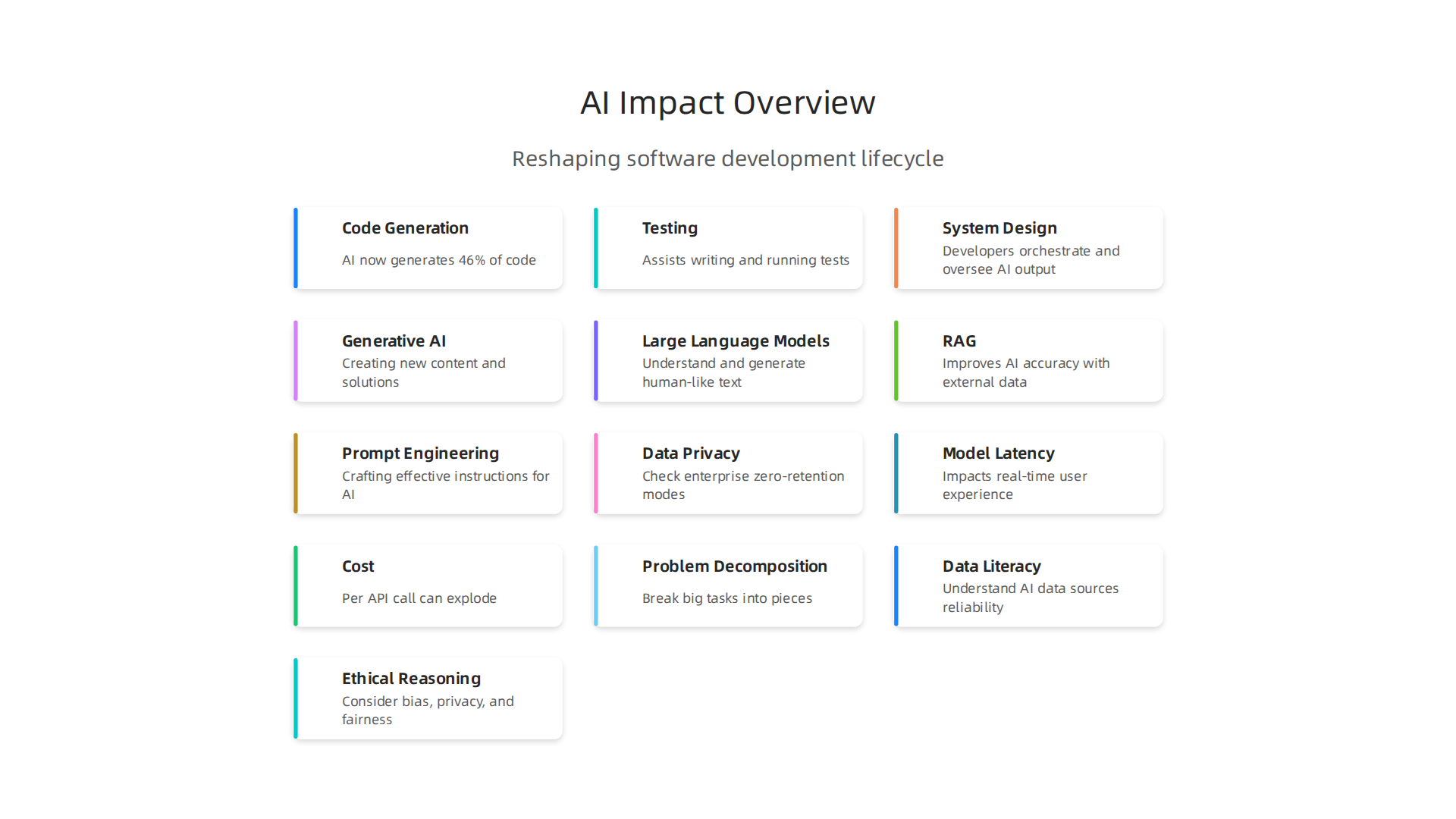
AI now generates 46% of the code in files where GitHub Copilot is active, and that number jumps to 61% for Java. That is a huge chunk of code being produced by machines. But here is the catch. The same research shows that developers still spend a lot of time verifying and debugging that code. The role is shifting from writing every line to orchestrating and overseeing AI output.
In fact, Gartner predicts that by the end of 2026, 75% of developers will spend more time orchestrating and architecting than writing code directly. That is a fundamental shift in what it means to be a developer. Your value is no longer in how fast you type. It is in how well you design systems, prompt AI tools, and verify the results.
This is why understanding the landscape matters so much.

When you know what is real and what is hype, you can set better priorities for your learning. You can focus on the skills that will actually matter tomorrow, not just today.
If you want a deeper look at how AI coding assistants are changing the daily workflow, check out our guide on AI coding assistants 2026.
It covers how tools like Cluely AI and prompt engineering are solving the trust problem with generated code.
The bottom line: AI is already embedded in every layer of software development. Your job now is to study AI with purpose and build the skills that set you apart from the crowd.
Foundational Knowledge for AI Integration
So, how do you actually study AI with purpose? You do not need to become a machine learning researcher overnight. But you do need a solid base to make smart decisions when you use AI tools in your daily work. Without that base, you are just guessing at prompts and hoping for good output.
The smartest approach is to start with the big ideas. Learn the 12 key concepts that every developer should know, like generative AI, large language models, retrieval-augmented generation (RAG), and prompt engineering.
These terms show up in almost every AI tool you will touch. Understanding them helps you see how tools like Copilot, Claude, or any code reader actually work under the hood. You do not need to build a model from scratch, but you do need to know what a model is, what training means, and why hallucinations happen.
Once you have the mental model, move to the practical layer. The best AI tools are built on Python and frameworks like PyTorch, TensorFlow, and cloud AI services. You should be comfortable enough with Python to read scripts, debug model outputs, and tweak parameters. Cloud platforms like AWS, Azure, and GCP now offer managed AI services that let you plug in pre-trained models without deep data science skills. You do not have to master engineering on the math side. You just need to know how to call the right API.
Here is the thing. Trying to learn everything at once will overwhelm you fast. That is why structured learning paths matter. Instead of jumping between random tutorials, follow a program that builds step by step. Microsoft offers a free learning path on AI concepts for developers that starts from the basics and adds complexity naturally. It covers machine learning, generative AI, computer vision, NLP, and more. That kind of structure saves you weeks of wasted effort.
A smart way to stay current while you build your foundation is to subscribe to a daily AI newsletter that cuts through the noise. Get clear daily AI updates from The Deep View Newsletter so you always know what matters and what is hype. It helps you focus your study time on topics that actually move the needle.
When you combine conceptual knowledge with hands-on practice and a clear learning path, you study AI the right way.

You stop feeling lost and start building real confidence. That is the foundation everything else rests on.
AI-Assisted Coding Tools and Workflows
With your foundation in place, it is time to meet the tools that turn your AI knowledge into real coding power. In 2026, AI coding assistants have grown up fast. They are no longer just guessing the next line you want to type. They can explain whole functions, rewrite messy code, and even refactor large sections of your project in seconds. The trick is knowing which tool fits your style and how to use it wisely.
There are many options out there. The best place to start is by looking at a complete ranking of the best AI coding tools of 2026.
That guide shows you how tools like Claude Code, Cursor, and GitHub Copilot stack up against each other. Some tools live inside your terminal. Others give you a full AI-first editor. Each one has strengths for different tasks.
So how do you pick the right one? Think about how you work every day. Do you spend most of your time in VS Code? Then a tool like Cursor, which is built around AI from the ground up, might feel natural. Do you work with huge codebases that have files all over the place? Then a tool like Claude Code, which handles terminal workflows and can read your entire project, could save you hours. The key is to match the tool to your workflow, not the other way around.
No matter which tool you choose, always follow one rule: treat these assistants as a copilot, not an autopilot. Review every line of code they generate. Ask yourself if it fits your project’s style and if it is actually correct. AI can make mistakes, sometimes in clever ways that look right but break things later. A quick review takes seconds and stops bugs before they start.
Building a solid workflow with these tools can really boost how much you get done each day. You can use AI to write boilerplate code, explain unfamiliar libraries, and generate unit tests. That frees up your brain for the harder problems like architecture and debugging. For a deeper look at how these tools fit into modern teams, check out this guide on AI coding assistants in 2026.
The main idea is simple. Learn the tool that matches your work. Use it to speed up routine tasks. Always check the output. When you do that, you get the best of both worlds: human judgment plus machine speed.
Building AI Features into Your Applications
Now that you have the coding tools in place, the next step is to build AI features directly into your own applications. In 2026, it is surprisingly easy to add natural language processing, computer vision, or recommendation engines using prebuilt APIs. Services like OpenAI, Claude, and Google Cloud offer ready-made endpoints that handle the heavy lifting. But easy does not mean thoughtless. You still need a plan.
Before you write a single line of integration code, think about three things: data privacy, model latency, and cost.
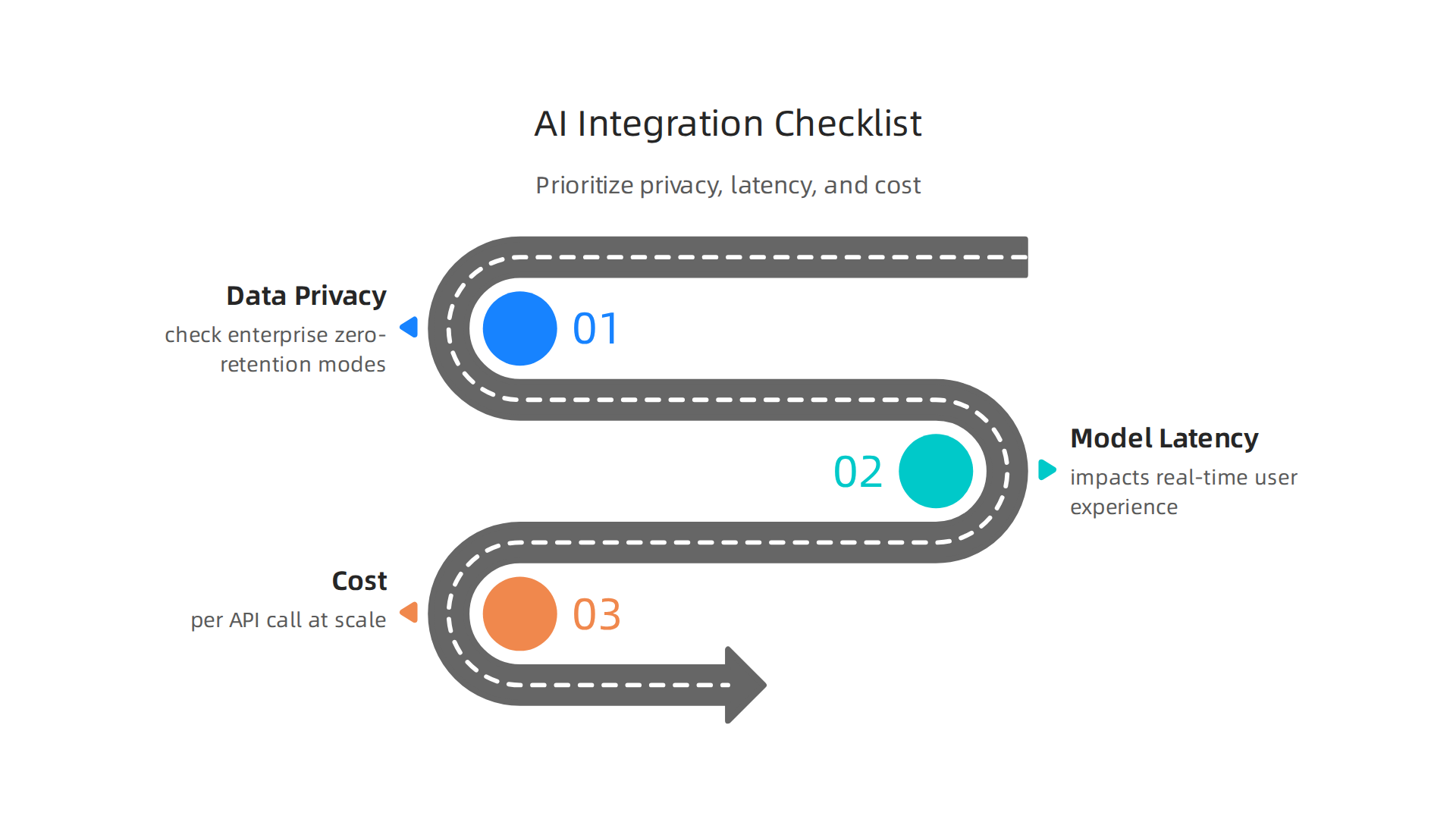
These factors can make or break your feature. For example, sending user data to an external AI API means that data leaves your control. That introduces privacy risks. You should always check whether the provider offers enterprise zero-retention modes. A good overview of these considerations comes from the 2026 guide on AI security best practices, which covers encryption, API gateways, and role-based access.
Latency matters too. If your app needs real time predictions, like a chatbot or image tagger, every extra millisecond hurts the user experience. Some managed services are fast enough. Others might require you to run a smaller model on your own servers. The same goes for cost. Paying per API call works for low volume but can explode as you scale. A smart strategy is to use managed services for common tasks and build custom models for the features that give you a competitive edge.
How do you decide which approach to take? Start by mapping your use case. If you need a simple text classifier, a managed API is a no brainer. If you need a unique recommendation engine that knows your users deeply, you will likely need to fine-tune your own model. And do not forget about monitoring. Set up alerts for latency spikes and error rates. Treat your AI features like any other production service.
The shift toward AI first development is only accelerating. Many teams are now building their entire architecture around AI capabilities. For a broader look at this trend, check out this piece on how AI is the new standard for developers in 2026. It will help you see where the industry is heading.
Keeping up with these best practices is crucial. Stay ahead with trusted sources. The AI Newsletter Worth Reading can deliver daily insights on AI features, data strategies, and the latest tools so you never fall behind.
Optimizing Workflows with AI
You have spent time building AI features into your apps. But what about the work you do every day? Writing tests, reviewing pull requests, fixing bugs, and keeping documentation up to date. These tasks can eat up hours. In 2026, the best teams use AI to take over that grunt work.
AI can automate testing in a big way. Instead of writing test cases by hand, you can ask an AI assistant to generate them from your code. It can also run those tests, spot failures, and even suggest fixes. The same goes for debugging. When a bug appears, an AI tool can scan your code, find the likely cause, and propose a correction. For a deeper look at how AI handles these jobs, check out the Top 6 AI Coding Agents 2026 which tests tools on refactoring, debugging, and documentation.
CI/CD pipelines also benefit. AI driven test selection means the system only runs the tests most likely to catch new bugs. That saves time and compute power. Some tools can even predict which code changes will break the build. That lets you fix problems before they reach production. Add AI to your pipeline and your releases get faster and safer.
Code review is another place where AI shines. Let the tool check for style issues, security holes, and logic errors before a human ever looks at it. That frees up senior developers for deeper conversations about architecture. Documentation is similar. AI can generate docstrings, update readmes, and write changelogs automatically. Fewer bottlenecks, smoother teamwork.
If you want to master engineering workflows with AI, start small. Pick one area like test generation or code review. Try a few tools. See what works. Then expand. The goal is not to replace your team. It is to let them focus on the hard, creative problems that only people can solve.
For more practical ideas on using AI in your daily work, read our guide on AI coding assistants in 2026. It covers how to pick the right assistant and avoid common mistakes.
Strategic Decision Making for AI Adoption
Picking the right AI tools for your team is not just about what is popular. In 2026, the market is full of options. Some are free, others cost a lot. Some work well for small projects, others scale to enterprise systems. And once you commit to a platform, it can be hard to switch. That is called vendor lock-in.
So how do you choose wisely? Start by looking at cost. Not just the price tag but the total cost over time. Training an AI model or running a code reader on your whole codebase can add up. Check if the tool charges per user, per request, or per compute hour. Also think about scalability. Will the tool still work when your team grows from five to fifty? Does it handle large codebases without slowing down? You can find a full list of options to compare in our guide on the best AI coding assistants in 2026. It breaks down what to look for so you do not get locked into the wrong platform.
Vendor lock-in is a real risk. If you build your entire workflow around one AI provider, switching later can be painful. Some vendors make it easy to export your data and models. Others do not. Before you commit, check what happens if you want to leave. Read the fine print. Ask about data portability. A good rule is to pick tools that follow open standards. That way you are not stuck.
Building AI skills across your team is the next step. You cannot just buy a tool and hope people use it. You need a roadmap. Ask yourself: What business goals do we have? Faster releases? Better code quality? Lower bug rates? Then map those goals to specific AI skills. For example, if you want faster releases, focus on AI driven test generation and CI/CD automation. If quality is the goal, study ai tools that do code review and security scanning. Make a plan for your team to learn these skills gradually. Start with one or two tools. Let people experiment. Then scale up.
Finally, foster a culture of continuous learning. AI changes fast. What works today might be outdated in six months. Encourage your team to try new tools, share what they learn, and fail without blame. Set aside time each week for exploration. Some teams hold "AI lunch and learns" where they test a new Claude code plugin or try a different code reader. This keeps everyone curious and ready to adapt.
For a steady stream of practical AI insights that can guide your team’s learning, consider the The AI Newsletter Worth Reading. It delivers clear daily updates on the latest tools and trends so you and your team stay ahead.
Making strategic decisions about AI adoption is not a one-time task. It is an ongoing practice.

Evaluate options carefully, build skills with purpose, and keep learning together. That is how you get real, lasting value from AI.
Staying Current: Overcoming Information Overload
AI changes so fast that just keeping up can feel like a full-time job. New tools pop up every week. Someone releases a better code reader. Another team ships a smarter Claude code plugin. Social media feeds fill with hot takes. Before you know it, you have 30 browser tabs open and no idea where to start. That is information overload.
The first step to beating the noise is to find a signal. You need a source that filters out the hype and tells you what actually matters. A good newsletter can do exactly that. It brings the most important updates straight to your inbox so you do not have to hunt for them. You can use newsletters to study ai developments without spending hours scrolling. Reading one short daily digest is better than trying to read everything.
Beyond newsletters, real learning happens in communities. Developer forums, local meetups, and online groups let you ask questions and hear what other engineers are using in the real world. You might discover the best ai tools for your specific stack by talking to someone who already tried them. Conferences are another great way to accelerate learning. Even a virtual conference can expose you to new ideas and give you a clearer view of where the industry is headed. Check out our guide on AI coding assistants in 2026 for a deeper look at what your peers are using right now.
The second step is to set aside dedicated learning time. If you try to learn AI while juggling your daily work, you will burn out fast. Block one hour each week on your calendar. Call it "learning hour" or "exploration time." Use that hour to test a new tool, watch a short tutorial, or read through the twelve core concepts that every developer should understand. For example, a beginner’s guide to the 12 Key AI Concepts for Developers can give you the foundation you need without overwhelming you. Keep it simple. One concept per week is enough.
Consistency matters more than intensity. Spending 30 minutes every Friday on a new code reader or a Claude code plugin adds up fast. Over time, those small sessions turn into real skills. You will feel more confident when your team debates which AI tool to adopt next.
Remember that mastering engineering in the AI era is not about knowing everything. It is about knowing where to look and how to learn efficiently. Overcome information overload by picking a few trusted sources, joining a community, and protecting your learning time. That is how you stay current without drowning.
Future-Proofing Your AI Skills
AI is moving fast, and the tools you use today might not be the ones you use next year. To stay valuable, you need to look beyond the current hype and focus on the bigger picture. Let’s talk about what is coming and how you can prepare.
Trends That Will Shape the Next Few Years
Three big trends are emerging right now. The first is agentic AI. Instead of just suggesting code, AI agents can plan tasks, run tests, and even open pull requests on their own. Gartner predicts that by the end of 2026, 40% of enterprise applications will include AI agents. That is a huge shift. You can read more about this in Info-Tech’s AI Trends 2026 report, which covers how agentic AI will power exponential change in organizations.
The second trend is multimodal models. These AIs can handle text, images, code, and even audio all at once. A code reader that understands diagrams and documentation alongside your source code is already appearing. The third trend is edge AI, where models run directly on devices like phones or sensors instead of in the cloud. That means faster responses and better privacy.
Skills That Always Matter
The best investment you can make is not learning one specific tool. It is building transferable skills that work no matter what AI you use.
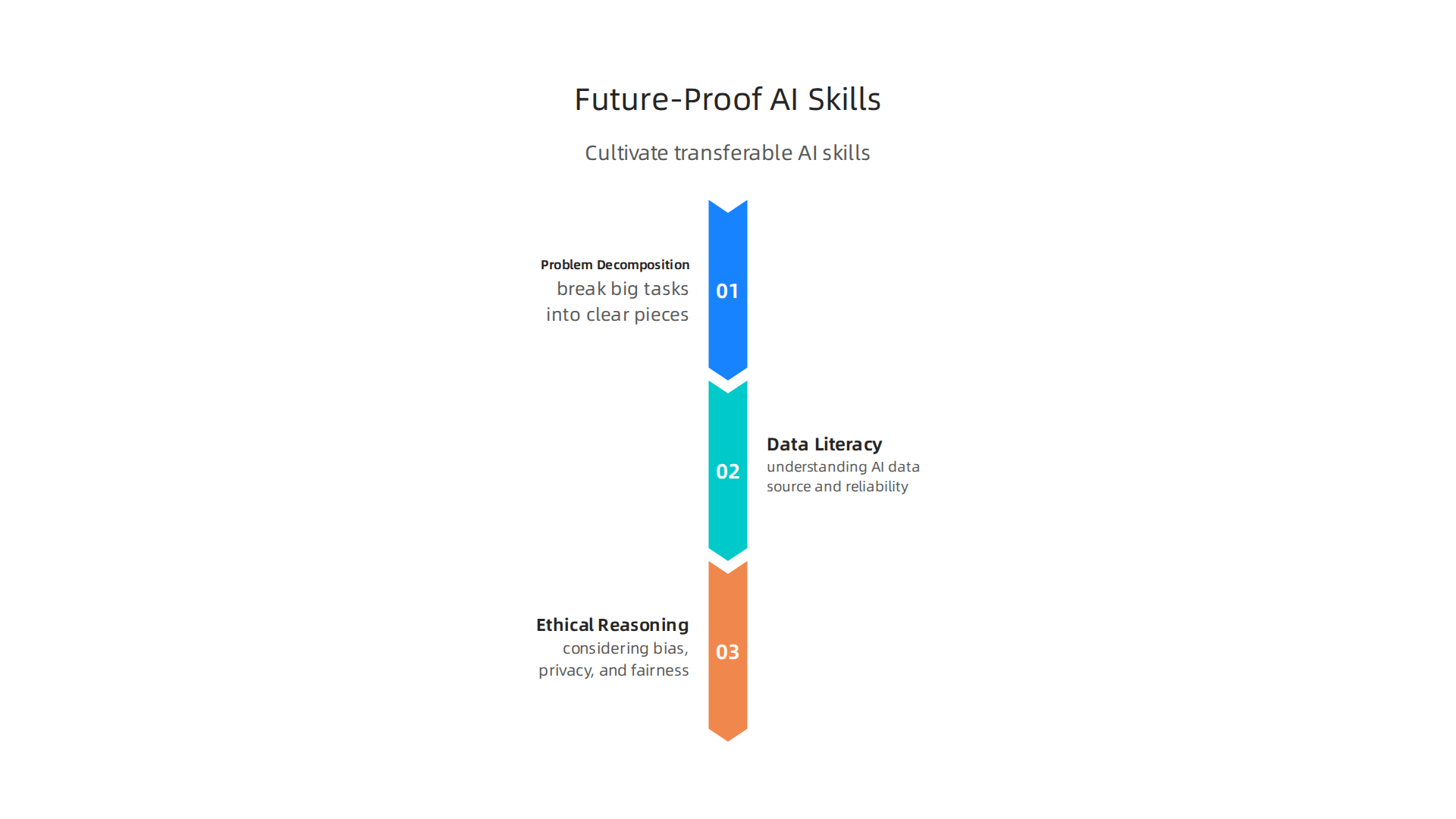
- Problem decomposition — breaking big tasks into small, clear pieces. AI is great at small pieces, but you have to figure out what those pieces are.
- Data literacy — understanding what data your AI needs, where it comes from, and whether it is reliable.
- Ethical reasoning — thinking about bias, privacy, and fairness. As AI takes on more decisions, someone has to ask the hard questions.
These skills help you shift from writing every line of code to becoming an orchestrator who guides AI agents. That is the future of mastering engineering in the AI era.
Keep Experimenting
The best way to stay ready is to try new things often. Pick one new AI tool or framework each month. Test a different code reader. Play with the latest Claude code plugins. See what works for your actual projects. This kind of hands-on learning beats reading articles every time.
If you want a steady stream of signals without the noise, consider subscribing to a newsletter that curates the most important AI updates for developers. For example, The AI Newsletter Worth Reading delivers clear, daily AI updates straight to your inbox. It helps you study ai developments without spending hours searching.
And if you are looking for a deeper dive into how AI is reshaping the developer role, check out our article on AI is the New Standard for Developers in 2026. It explains why experimentation and transferable skills are your best career insurance.
The developers who will thrive are the ones who stay curious, build strong fundamentals, and keep testing new tools. That is how you future-proof your AI skills for whatever comes next.
Summary
This guide explains how developers should study and adopt AI in 2026 with a practical, career-focused approach. It reviews the current landscape—widespread AI use across teams and large shares of code generated by assistants—and explains why your role is shifting toward orchestration and verification. You’ll get a clear foundation: the key concepts to learn, the practical Python and cloud skills you need, and how to pick tools that match your workflow. The article shows how to integrate AI features safely (privacy, latency, cost), optimize day-to-day engineering with AI (tests, reviews, CI/CD), and make strategic platform decisions that avoid vendor lock-in. It also gives tactics to overcome information overload and a plan to future-proof your skills with transferable abilities like problem decomposition and data literacy. After reading, you will know what to learn first, how to evaluate tools, and how to build AI into real projects without getting overwhelmed.