
AWS RDS Mastering Amazon Relational Database Service for Developers in 2026
· 32 min read

Why AWS RDS still matters for developers in 2026
In 2026, building great software often means using powerful and reliable databases. For many developers, managing a database can be a big job, taking time away from creating new features. This is where AWS RDS comes in. AWS RDS, which stands for Amazon Relational Database Service, is a special offering from AWS Amazon that handles most of the hard work of running a relational database for you.

Think of it this way: instead of you having to install, set up, and constantly look after a database on your own servers, AWS RDS does it for you. It’s like having someone else take care of the car maintenance so you can just enjoy driving. AWS RDS supports many popular database engines that developers know and trust, such as MySQL, PostgreSQL, Oracle, Microsoft SQL Server, MariaDB, and even IBM Db2 [https://aws.amazon.com/rds/]. This means you can pick the database that works best for your project without getting stuck with tricky setup tasks [https://docs.aws.amazon.com/AmazonRDS/latest/gettingstartedguide/concepts.html].
While using a managed service like AWS RDS might cost a bit more than running a database entirely by yourself, the benefits are huge. It saves you time and effort that you can then put into building amazing applications. Many organizations using AWS RDS have seen big benefits, including lower costs and better performance, with some reporting a 258% return on investment over three years [https://aws.amazon.com/rds/resources/]. This article will give you clear, practical advice on how to use AWS RDS to its fullest. We will cover important topics like designing your database (architecture), keeping your data safe (security), making sure it runs fast (performance), managing costs, checking its health (observability), and moving your existing databases to AWS RDS (migration).
We understand that staying updated with the newest cloud technologies is key for developers. Our goal is to give you trustworthy information based on solid research and insights from experienced cloud professionals.
To keep up with the fast pace of technology, especially in AI, a great resource is available. The AI Newsletter Worth Reading delivers clear daily AI updates directly to your inbox.
What is Amazon RDS — core concepts and architecture
Building on our introduction, let’s dive deeper into what Amazon Relational Database Service, or AWS RDS, truly is and how it helps developers. AWS RDS is a special service from AWS Amazon that takes away much of the effort of setting up, running, and scaling a database. It manages the basic tasks so you don’t have to.
Think about it like this:
- What AWS RDS handles for you: AWS takes care of the server where the database lives, called provisioning. It also does things like making sure the database software is up to date (patching), keeping daily copies of your data (automated backups), and recovering your database if something goes wrong. This frees up your time, letting you focus on other important parts of your projects. Many developers find this kind of managed service helpful, as it means less time dealing with server upkeep and more time for actual coding [https://instadevops.com/blog/rds-vs-aurora-vs-self-managed-database/].
- What you still handle: While AWS RDS handles the heavy lifting of running the database itself, you’re still in charge of what goes inside it. This means you design how your data is organized (the schema), write the commands to store and get data (queries), and make sure those queries run fast (indexing).
Core Architecture Concepts
To understand aws rds, let’s look at its main parts:
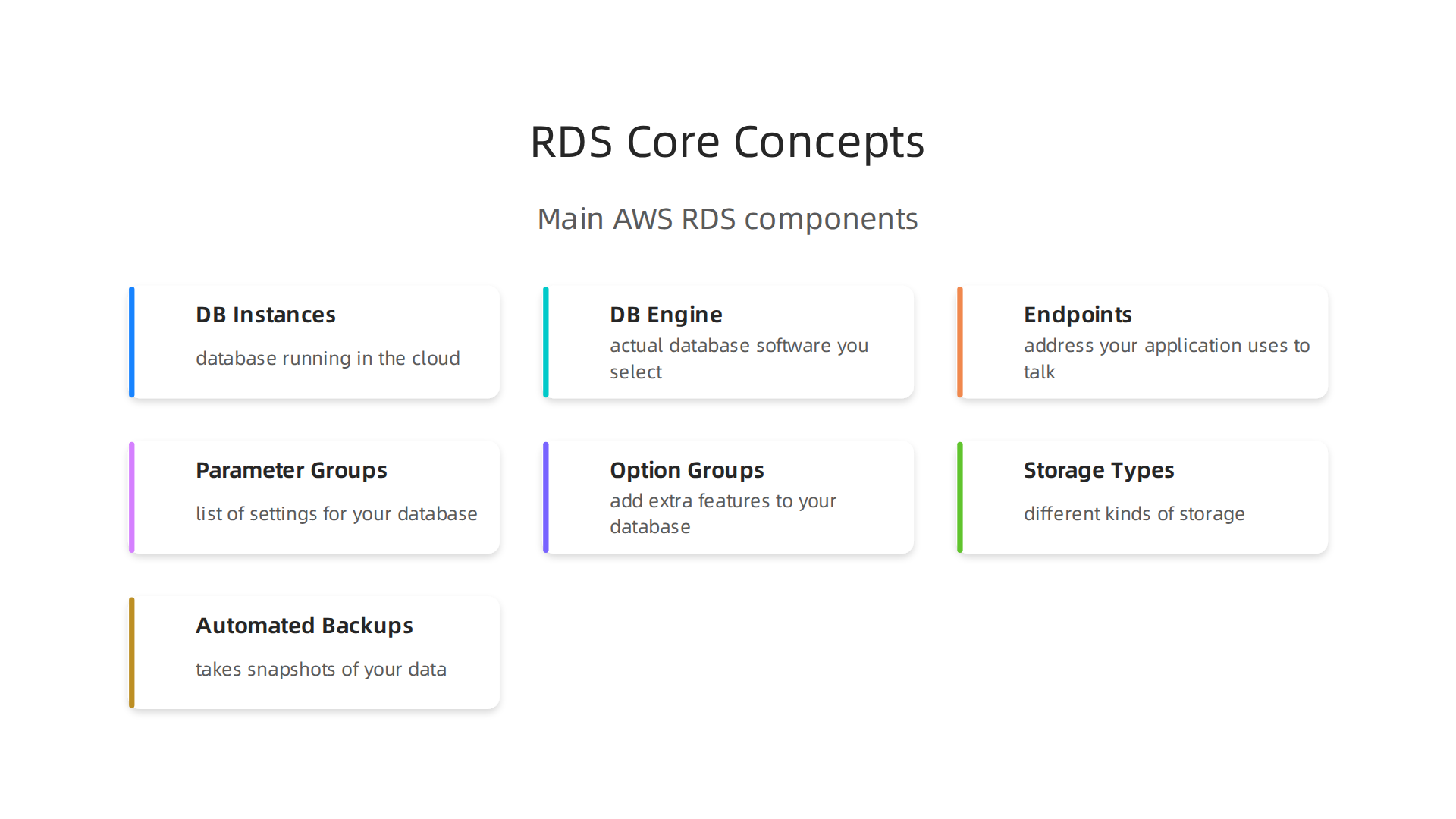
- DB Instances: This is the basic building block. A DB instance is simply a database running in the cloud. You choose what kind of database it runs, like MySQL, PostgreSQL, or Microsoft SQL Server [https://docs.aws.amazon.com/AmazonRDS/latest/UserGuide/Welcome.html]. Each DB instance has its own storage and computing power.
- DB Engine: This refers to the actual database software you select. For example, you might pick PostgreSQL if you need advanced features, or MySQL for web applications [https://docs.aws.amazon.com/AmazonRDS/latest/gettingstartedguide/choosing-engine.html].
- Endpoints: This is like the address your application uses to talk to your DB instance. It’s a special URL that lets your application connect and send queries.
- Parameter Groups: These are like a list of settings for your database engine. You can change things like how much memory your database uses or how long it waits for a connection.
- Option Groups: These allow you to add extra features to your database. For example, some database engines can have special tools or services attached using option groups.
- Storage Types: AWS RDS offers different kinds of storage, such as fast SSD drives for databases that need to respond quickly, or more cost-effective storage for less demanding tasks.
- Automated Backups: As mentioned, AWS RDS automatically takes snapshots of your data. This is crucial for safety, letting you restore your database to a specific point in time if needed. For more details, you can always check the Amazon RDS and Aurora Documentation.
Is AWS RDS Right for Your Project? A Quick Checklist
When deciding if AWS RDS fits your needs, ask yourself these questions:
- Do you need to scale easily? AWS RDS makes it simple to grow your database bigger or smaller as your needs change.
- Are there special rules (compliance) you need to follow? AWS RDS helps meet many industry standards, which is important for things like financial or health data.
- Do you want to reduce the daily work of running a database? If you’d rather focus on application development than database management, aws rds is a great choice.
- Is performance crucial? With different instance types and storage options, you can fine-tune performance.
Understanding these core concepts helps you make better decisions. It also allows you to focus on your application’s architecture and how it integrates with your database. You can learn more about picking the right approaches for your projects by exploring different SDLC models. Knowing how to monitor your AWS services is also key to preventing problems, and you can find out more about AWS status monitoring to keep your database running smoothly.
When you use aws rds, you get to pick from many different database engines. Think of these engines as different kinds of motors for your car; they all do a similar job, but each has its own strengths. Choosing the right one for your project is a big step.

AWS RDS supports popular engines like MySQL, PostgreSQL, MariaDB, Oracle, Microsoft SQL Server, and its own special database called Amazon Aurora. This means you can pick the best fit for your application’s needs, whether it’s for simple web apps or complex data tasks [https://docs.aws.amazon.com/AmazonRDS/latest/gettingstartedguide/concepts.html].
Popular Choices and Their Features
Let’s look at what makes each engine special:
- MySQL: This is a very popular choice for web applications. It’s known for being easy to use and works with many tools and programming languages. Many developers are familiar with it, which makes getting started simple.
- PostgreSQL: If you need more advanced features, PostgreSQL might be for you. It’s great for handling complex data and has strong support for many kinds of data extensions. This means you can add special tools to it more easily than with some other databases [https://docs.aws.amazon.com/de_de/AmazonRDS/latest/gettingstartedguide/concepts.md].
- MariaDB: This engine is a bit like an updated version of MySQL. It’s often chosen for similar reasons as MySQL, offering good performance and a friendly open-source community.
- Oracle and Microsoft SQL Server: These are commercial database engines. This means you usually pay for licenses to use them. They are often picked by larger companies that already use these databases, especially for specific business applications. They come with strong features for big, important tasks.
Amazon Aurora: A Special AWS Database
Amazon Aurora is AWS Amazon’s own database engine. It’s designed to be very fast and reliable, even better than standard MySQL and PostgreSQL. It works just like MySQL or PostgreSQL, so your applications can connect to it easily. But under the hood, it’s built to scale up quickly and keep your data safe, making it a powerful choice for demanding projects.
What to Think About When Choosing
When picking an engine for your aws rds instance, here are a few things to consider:
- Features and Tools: Does the engine have the specific features you need? For example, PostgreSQL has many extensions that add extra power. MySQL has a huge community and many ready-made tools.
- How it Works: Different engines handle things like making copies of your data (replication) or switching to a backup if something breaks (failover) in slightly different ways. AWS RDS helps with these, but understanding the engine’s specifics can be useful. You also want to think about how easily it can grow bigger or smaller (scaling) as your needs change [https://notes.kodekloud.com/docs/AWS-RDS/Different-Database-Engines-in-RDS/Different-Database-Engines-in-RDS/page].
- Cost: While AWS RDS manages the service, the engine choice can impact costs. Commercial engines like Oracle and SQL Server often have licensing fees that add to the price, unlike open-source options such as MySQL or PostgreSQL. Keep this in mind when planning your budget. Getting a full picture of the costs involved is important, as RDS usually adds a managed service fee on top of the raw computing costs [https://securityboulevard.com/2026/06/rds-vs-self-managed-ec2-database-real-tco-2026/].
- Developer Experience: How easy is it for your developers to work with? Some engines use different kinds of SQL (the language for databases), and some have better tools for developers. If you ever need to move your data from one database to another (migration), some engines make this easier than others.
Making the right choice for your database engine is key to a smooth project. It affects how your application performs, how much it costs, and how easy it is to manage over time. Staying up-to-date on all these technical decisions, especially with fast-changing areas like AI, can be tricky.
Get clear daily AI updates from The AI Newsletter Worth Reading.
A smooth project also means a safe project. Keeping your data secure in your aws rds database is super important. When you work with AWS Amazon, they offer many ways to protect your information. Let’s look at how to keep your database safe using encryption, special access rules, and network controls.
Making Your Data Secret with Encryption
Imagine your data is like a secret message. Encryption makes sure only the right people can read it. For aws rds, there are two main ways to encrypt your data:
- Encryption at Rest: This means your data is secret when it’s stored. AWS RDS can encrypt your database, its backups, and any snapshots you take. You can easily turn this on when you create your RDS instance. It uses something called AWS Key Management Service (KMS) to manage the secret keys, so you don’t have to worry about them Encrypting Amazon RDS resources. Even copies of your database called "read replicas" get encrypted too Db Engine-Level Security.
- Encryption in Transit: This protects your data as it moves from your application to your database. You should always use Secure Socket Layer/Transport Layer Security (SSL/TLS) connections. This makes sure that no one can peek at your data while it’s traveling across the internet or within AWS’s network Amazon RDS Security & Compliance.
When setting up encryption, it’s good practice to make sure you use KMS keys only for their intended purpose. Also, when giving people access to these keys, follow the rule of "least privilege." This means giving them only the permissions they absolutely need, and nothing more, as highlighted in the Encryption best practices for Amazon RDS documentation.
Who Gets to Access What: IAM and Database Rules
Controlling who can touch your database is a big part of security. AWS RDS uses a system called AWS Identity and Access Management (IAM).
- IAM Roles: You can use IAM to control who can do things like create, change, or delete your aws rds databases. It’s smart to create special IAM roles that only allow certain actions. This way, if someone’s account is ever hacked, they can’t mess with everything.
- Least Privilege: Just like with encryption keys, you should always give users the fewest permissions possible. This makes your system much safer.
- Database User Accounts: Besides IAM, your database itself has user accounts and passwords. Always use strong passwords and make sure to change them often. For extra safety, you can use multi-factor authentication (MFA) to log in, which asks for a second way to prove who you are Data protection in Amazon RDS.
Protecting Your Database’s Network
Think of network controls as setting up strong fences and gates around your database.
- Private Subnets: Always place your aws rds instance in a private part of your network (a private subnet). This means your database isn’t directly exposed to the internet, making it much harder for attackers to reach.
- Security Groups: Use security groups like specific doors that only allow certain kinds of traffic to your database. For example, you can say only your web server can talk to your database, and only on a specific port. It’s recommended to place your main servers (like EC2 instances) and your RDS database in different security groups for tighter control Amazon RDS Security Guide: Best Practices 2026.
- No Public Access: Turn off public access for your aws rds database whenever you can. This is a key step to keeping it safe from outside threats.
By using these network controls, you make a strong barrier around your data. Staying informed about how to keep all your AWS services running smoothly and securely is vital. Learning about tools that help with AWS status monitoring can help you stay ahead of potential issues.
Keeping Track and Staying Compliant
When you’re dealing with important data, especially for things like iot development services, you need to follow rules and know what’s happening with your database.
- Audit Trails: AWS RDS lets you keep a log of who did what and when. This helps you track changes and investigate anything unusual.
- Compliance: For many businesses, following certain rules (like HIPAA for healthcare data or GDPR for privacy) is a must. AWS RDS helps you meet these standards by providing secure options and tools to manage your data properly. Setting up your aws rds with these security features from the start makes it easier to pass any security checks and proves you’re serious about protecting your information.
A smooth project also means a safe project. Keeping your data secure in your aws rds database is super important. When you work with AWS Amazon, they offer many ways to protect your information. Let’s look at how to keep your database safe using encryption, special access rules, and network controls.
Making Your Data Secret with Encryption
Imagine your data is like a secret message. Encryption makes sure only the right people can read it. For aws rds, there are two main ways to encrypt your data:
- Encryption at Rest: This means your data is secret when it’s stored. AWS RDS can encrypt your database, its backups, and any snapshots you take. You can easily turn this on when you create your RDS instance. It uses something called AWS Key Management Service (KMS) to manage the secret keys, so you don’t have to worry about them Encrypting Amazon RDS resources. Even copies of your database called "read replicas" get encrypted too Db Engine-Level Security.
- Encryption in Transit: This protects your data as it moves from your application to your database. You should always use Secure Socket Layer/Transport Layer Security (SSL/TLS) connections. This makes sure that no one can peek at your data while it’s traveling across the internet or within AWS’s network Amazon RDS Security & Compliance.
When setting up encryption, it’s good practice to make sure you use KMS keys only for their intended purpose. Also, when giving people access to these keys, follow the rule of "least privilege." This means giving them only the permissions they absolutely need, and nothing more, as highlighted in the Encryption best practices for Amazon RDS documentation.
Who Gets to Access What: IAM and Database Rules
Controlling who can touch your database is a big part of security. AWS RDS uses a system called AWS Identity and Access Management (IAM).
- IAM Roles: You can use IAM to control who can do things like create, change, or delete your aws rds databases. It’s smart to create special IAM roles that only allow certain actions. This way, if someone’s account is ever hacked, they can’t mess with everything.
- Least Privilege: Just like with encryption keys, you should always give users the fewest permissions possible. This makes your system much safer.
- Database User Accounts: Besides IAM, your database itself has user accounts and passwords. Always use strong passwords and make sure to change them often. For extra safety, you can use multi-factor authentication (MFA) to log in, which asks for a second way to prove who you are Data protection in Amazon RDS.
Protecting Your Database’s Network
Think of network controls as setting up strong fences and gates around your database.
- Private Subnets: Always place your aws rds instance in a private part of your network (a private subnet). This means your database isn’t directly exposed to the internet, making it much harder for attackers to reach.
- Security Groups: Use security groups like specific doors that only allow certain kinds of traffic to your database. For example, you can say only your web server can talk to your database, and only on a specific port. It’s recommended to place your main servers (like EC2 instances) and your RDS database in different security groups for tighter control Amazon RDS Security Guide: Best Practices 2026.
- No Public Access: Turn off public access for your aws rds database whenever you can. This is a key step to keeping it safe from outside threats.
By using these network controls, you make a strong barrier around your data. Staying informed about how to keep all your AWS services running smoothly and securely is vital. Learning about tools that help with AWS status monitoring can help you stay ahead of potential issues.
Keeping Track and Staying Compliant
When you’re dealing with important data, especially for things like iot development services, you need to follow rules and know what’s happening with your database.
- Audit Trails: AWS RDS lets you keep a log of who did what and when. This helps you track changes and investigate anything unusual.
- Compliance: For many businesses, following certain rules (like HIPAA for healthcare data or GDPR for privacy) is a must. AWS RDS helps you meet these standards by providing secure options and tools to manage your data properly. Setting up your aws rds with these security features from the start makes it easier to pass any security checks and proves you’re serious about protecting your information.
High Availability, Backups, and Disaster Recovery Strategies
After making sure your AWS RDS database is secure, the next important step is to make sure it’s always working and that you can get your data back if something bad happens.
This is where high availability, backups, and disaster recovery come in.
Keeping Your Database Always On: High Availability
High availability means your database stays up and running even if parts of it fail. AWS RDS has smart ways to do this:
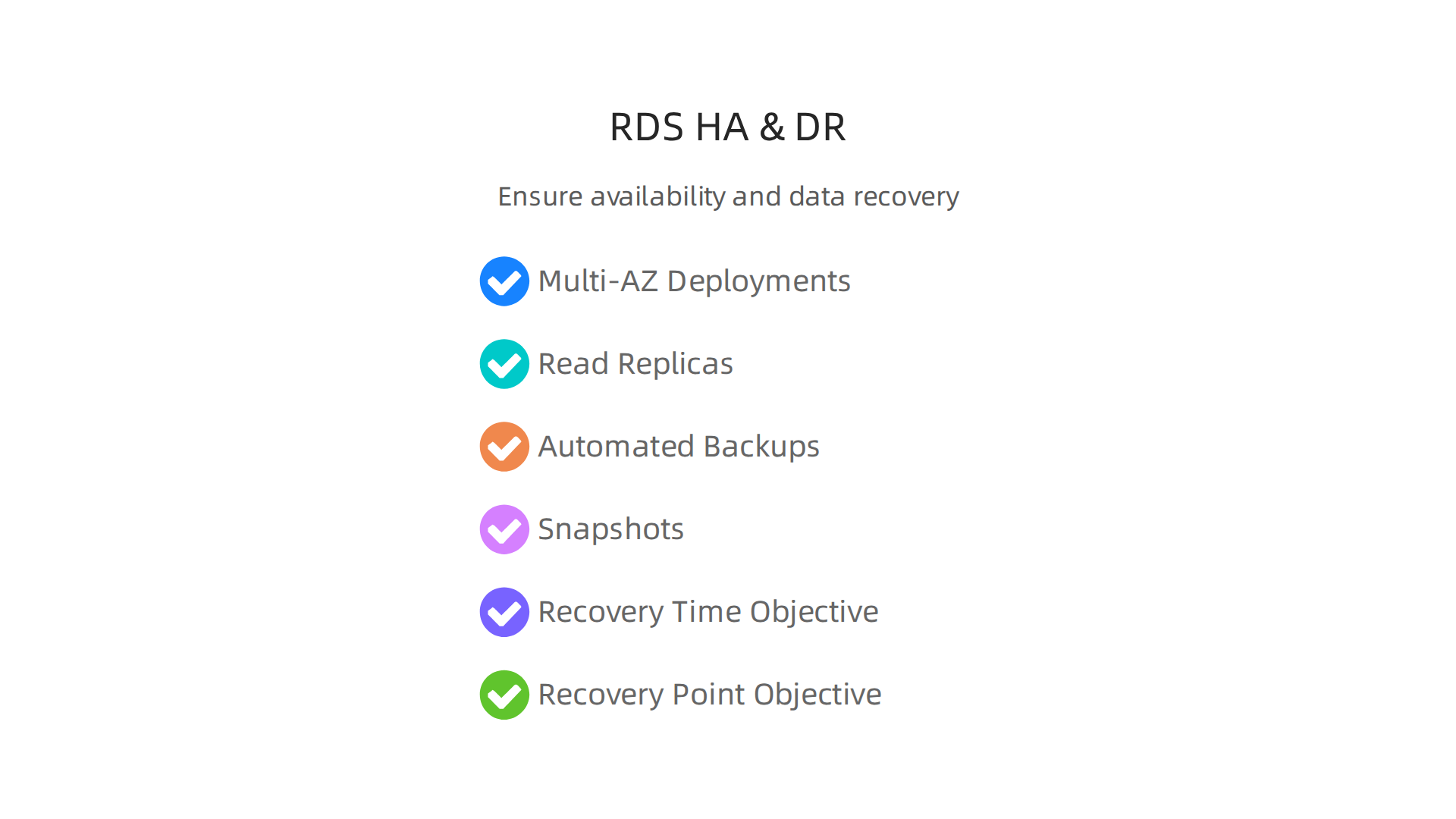
- Multi-AZ Deployments: Think of this as having a live copy of your aws rds database in a completely different location, called an "Availability Zone." If your main database has a problem, AWS automatically switches over to the copy in the other zone. This happens very quickly, so your applications keep working with little to no downtime. Backups are also handled better in a Multi-AZ setup, as they happen on the standby copy to keep your main database fast Implementing a disaster recovery strategy with Amazon RDS.
- Read Replicas: These are extra copies of your database that you can use for reading data. They help take the load off your main database, making your applications faster. You can also use them to recover from a disaster, sometimes even in a different AWS region (cross-region replication). This is like having a copy far away in case of a big problem.
Saving Your Data: Backup Strategies
Even with high availability, having good backups is super important.
- Automated Backups: AWS RDS takes daily backups for you automatically. You can choose how long these backups are kept, which is called the "retention policy."
- Snapshots: These are full copies of your database at a specific moment in time. You can make them manually or through automated backups. Snapshots are great because you can use them to bring your database back to any specific point in time within your retention period. For Multi-AZ setups, AWS works to make these snapshots efficient Optimize Amazon RDS Multi-AZ backups with incremental snapshots. Always remember to encrypt your backups for safety Secure and encrypt backups – Reliability Pillar. A good rule of thumb for any important data, including data from iot development services, is the "3-2-1 rule": keep 3 copies of your data, on 2 different types of storage, with 1 copy offsite AWS Backup and Disaster Recovery Strategies.
Getting Back on Track: Disaster Recovery
Disaster recovery is your plan for getting your systems running again after a major problem, like a region-wide outage.
- Disaster Recovery Runbook: This is like a step-by-step guide that developers should follow to bring your database back. It includes things like how to switch to a backup or a read replica.
- Recovery Time Objective (RTO): This is how much time you can afford for your database to be down. For example, if your RTO is 15 minutes, you need to have your database working again within that time.
- Recovery Point Objective (RPO): This is how much data you can afford to lose. If your RPO is 5 minutes, you can only lose up to 5 minutes of data.
It’s very important to test your disaster recovery plans often. This makes sure that when a real problem happens, everyone knows what to do and your aws rds database can recover quickly. Building strong, resilient systems means not just securing them, but also making sure they can stand strong against unexpected problems. You can learn more about building resilient systems in general to help your projects.
Staying up-to-date on all things tech, including AI and development trends, is crucial for building reliable systems in 2026.
The AI Newsletter Worth Reading: Get clear daily AI updates from The Deep View Newsletter.
Beyond keeping your AWS RDS database safe and always running, it also needs to be fast and efficient. Tuning your database’s performance is like making sure a race car has the right engine, tires, and driver for the track. This helps your applications run smoothly and quickly for your users.
Finding Slow Spots: Identify Bottlenecks
The first step to making your aws rds database faster is to find out what’s slowing it down. We call these "bottlenecks." These are usually:
- CPU: The brain of your database. If it’s working too hard (over 85% for long periods), your database might be thinking too much.
- Memory: The short-term storage for your database. If it’s running out of space (less than 20% free), it has to use slower methods, like disk space.
- I/O (Input/Output): How fast your database can read and write data to its storage. If your disk queue is always full, it means the database is waiting to get or save data. You can watch metrics like
ReadIOPSandWriteIOPSto understand this better Amazon RDS DB instance storage. Monitoring tools can help you spot these issues before they become big problems AWS RDS Monitoring: The Complete 2026 Guide.
Choosing the Right Size: Instance Sizing and Storage
Just like choosing the right car for a job, you need to pick the right "instance class" and storage for your aws rds database.
- Instance Classes: AWS Amazon offers different types of instances. Some are good for general use, others have a lot of memory, and some are built for heavy computing. You should pick one that fits how your database is used. Matching your workload to options like General Purpose or Memory Optimized instances is a key best practice AWS RDS Tuning: Best Practices.
- Storage Types: For most production databases today, "gp3" storage is a great choice. It lets you decide how much storage you need and how fast it should be (measured in IOPS) separately. This means you can get great performance without paying for more storage than you need AWS RDS Performance & Caching: IOPS, gp3, RDS Proxy, ElastiCache (2026). If you find your
WriteIOPSare nearing their limit, a larger instance with better I/O might be needed AWS RDS Blog Insights: Performance Tuning.
Making Your Database Smarter: Database-Level Optimizations
Once you have the right hardware, you can make your database work smarter.
- Indexing Strategies: Think of an index like the index in a textbook. It helps the database find information much faster without having to read every single page. Creating good indexes for your most common searches can speed things up a lot.
- Query Plan Inspection: When your database runs a query (a request for data), it makes a plan on how to get that data. Looking at this "query plan" can show you if the database is taking a slow route. AWS RDS Performance Insights is a great tool for this, as it can show you which queries are slowing things down and why How to Use RDS Performance Insights to Identify Slow …. It even collects SQL-level metrics like how many times a query runs or how long it takes Amazon RDS Performance Insights supports SQL-level metrics for Amazon RDS for SQL Server – AWS. You can also use a "slow query log" to catch queries that take too long Monitor performance of my Amazon RDS for MySQL DB instance.
- Parameter Tuning: Your aws rds database has many settings you can adjust, called parameters. Changing these small settings can sometimes make a big difference in performance, especially for specific workloads.
Growing Your Database: Scaling Strategies
As your application grows, your database needs to grow too.
- Vertical Scaling: This means making your existing database instance bigger and more powerful by upgrading its instance class (more CPU, more memory). This is usually the easiest first step.
- Horizontal Scaling: This means adding more database instances.
- Read Replicas: We talked about these for high availability, but they are also great for performance. You can send all your "read" requests (when your app just needs to look up data) to these copies, taking the pressure off your main database.
- Sharding: This is a more advanced technique where you split your data across many different databases. Each database only holds a part of the data, making it faster to search and manage.
Always keep an eye on your database’s performance using tools like AWS CloudWatch. Metrics like CPUUtilization, FreeableMemory, and DiskQueueDepth are good signals that you might need to make changes. Learning to build fast, resilient systems is a continuous process that involves understanding the data’s journey and managing its performance. You can dive deeper into how to master installed apps performance for flawless speed and user experience in your applications.
Making sure your aws rds database runs fast is important, but so is keeping its cost in check.

Thinking about the money side of things means looking at how AWS Amazon charges for its database service. This helps you get the most out of your budget without giving up speed or reliability.
What Makes Up Your AWS RDS Bill?
When you use aws rds, your monthly bill comes from a few different things. It’s like paying for a car: you pay for the car itself, the gas, insurance, and maybe extra features. For your database, the main cost parts are:
- Instance Hours: This is the biggest part, often 50-70% of the total bill. It’s about how long your database "computer" (called an instance) is running, what kind of instance it is (how powerful), and where it’s located in the world How to Optimize AWS RDS Costs in 2026.
- Storage: This is the space your data takes up. You pay for how much storage you use (like gigabytes per month) and the type of storage, such as the faster "gp3" option mentioned before.
- I/O (Input/Output): These are the reads and writes your database does. If your application reads and writes a lot of data, this cost can add up.
- Backups and Snapshots: AWS RDS automatically backs up your data. While some backup storage is free, going over that amount or keeping many snapshots for a long time will cost more.
- Data Transfer: This is how much data moves in and out of your database. Moving data into RDS is usually free, but moving data out to other places on the internet usually has a cost.
- Licensing: For some database types, like SQL Server or Oracle, there are extra fees for the software license. Open-source options like MySQL or PostgreSQL don’t have these extra costs. You can find detailed pricing info on the official Amazon RDS Pricing page.
Smart Ways to Lower Your Database Costs
You can use several tricks to make your aws rds bill smaller.
- Right-Sizing Your Instances: This means choosing the correct size of your database instance. Don’t pay for a super powerful instance if your application only needs a small one. Look at your usage to see if you can pick a smaller, more fitting instance class or switch from older storage types to "gp3" for better control over performance and cost Cutting RDS Costs: A Practical Playbook for DBAs.
- Using Reserved Instances or Savings Plans: This is one of the best ways to save money, especially if you know your database will be running for a long time.
- Reserved Instances (RIs): You commit to using a specific type of database instance for one or three years. In return, AWS gives you a big discount, sometimes up to 75% compared to paying by the hour Reserved Instances (RIs). You can choose to pay all upfront, part upfront, or no money upfront, with bigger savings for more upfront payment How to Reduce RDS Costs with Reserved Instances.
- Database Savings Plans: These are newer and more flexible. You commit to spending a certain amount of money per hour for one or three years across any database engine or instance class. This can also lead to good savings without locking you into one specific instance Amazon RDS Pricing.
- Managing Backups and Snapshots: Review how long you keep backups. If you don’t need old snapshots, deleting them can save on storage costs.
Choosing Between Aurora and Standard Engines for Cost
When picking your database engine, like Amazon Aurora versus a standard MySQL or PostgreSQL on aws rds, cost is a big part of the decision.
- Amazon Aurora: This service often costs more per hour for the instance itself, but it can be much more powerful and automatically grow or shrink with your needs. This means you might need fewer instances or less manual effort, which saves money in the long run. It’s often a good choice for applications that need high performance and scalability, making its overall cost of ownership potentially lower for demanding workloads.
- Standard RDS Engines: These can be cheaper to start with for smaller or less demanding applications. They offer more control over the database settings.
Thinking about the total cost, not just the hourly rate, helps you make the best choice. This means looking at performance, how easy it is to manage, and potential savings over time. Learning about these strategies is key to smart development. If you want to keep up with the latest in technology and how AI is changing development workflows, consider subscribing.
Get clear daily AI updates from The AI Newsletter Worth Reading.
Keeping your aws rds database running smoothly is just as important as keeping costs low. To do this, you need to watch its health closely, understand what’s happening inside, and know what to do if things go wrong. This is called monitoring, observability, and incident response.
Monitoring, Observability, and Incident Response for RDS
To make sure your aws rds database is always working its best, you need to keep a close eye on it. This means looking at key numbers, understanding what they mean, and having a plan for problems.
What to Watch: Key Metrics
Think of these as your database’s vital signs. You should always monitor them. AWS provides tools like CloudWatch to help you track these numbers automatically Best practices for Amazon RDS.
- CPU Usage: This shows how hard your database’s brain is working. If it’s too high for a long time (like over 85% for 10 minutes), your database might be struggling to keep up AWS RDS Monitoring: The Complete 2026 Guide.
- Memory Use: Databases need memory to work fast. If your database runs out of memory (less than 20% free), it can slow down a lot.
- Read/Write IOPS: This measures how many times your database reads or writes data each second. If these numbers are too low or too high for your needs, it could mean your storage isn’t fast enough or your application is asking for too much Amazon RDS DB instance storage. A common sign of trouble is when your "Disk Queue Depth" (how many requests are waiting) stays high, like above 10 AWS RDS Monitoring: The Complete 2026 Guide.
- Replica Lag: If you use a backup database (a "replica") for reading, this metric tells you how far behind it is from your main database. High lag means your replica data isn’t fresh.
- Database Connections: This shows how many users or applications are connected to your database at once. Too many connections can overwhelm the database.
It’s smart to set up alerts for these metrics. If a number goes too high or too low, you’ll get a warning right away. This helps you fix problems before they get big. You can also monitor other things like "Write Throughput" and "Read Throughput" to see how much data is moving in and out Making better decisions about Amazon RDS with Amazon CloudWatch metrics.
Deeper Look: Observability Tools and Logs
Sometimes, just looking at the main numbers isn’t enough. You need to dig deeper.
- Slow Query Logs: Your database can keep a record of all the queries (questions) that take a long time to answer. By looking at this "slow query log," you can find out which parts of your application are making the database work too hard and fix them Monitor performance of my Amazon RDS for MySQL DB instance.
- Performance Insights: This is a powerful aws amazon tool that shows you what your database is doing right now. It can show you which specific queries are slowing things down and why Amazon RDS Performance Insights supports SQL-level metrics for Amazon RDS for SQL Server – AWS. You can see how much "load" each query puts on the database and how often it runs How to Use RDS Performance Insights to Identify Slow….
- Enhanced Monitoring: This gives you even more detailed information about the operating system that your database runs on. This is helpful for very specific troubleshooting.
What to Do: Incident Response
Even with great monitoring, problems can still happen. Having a plan for when they do is important.
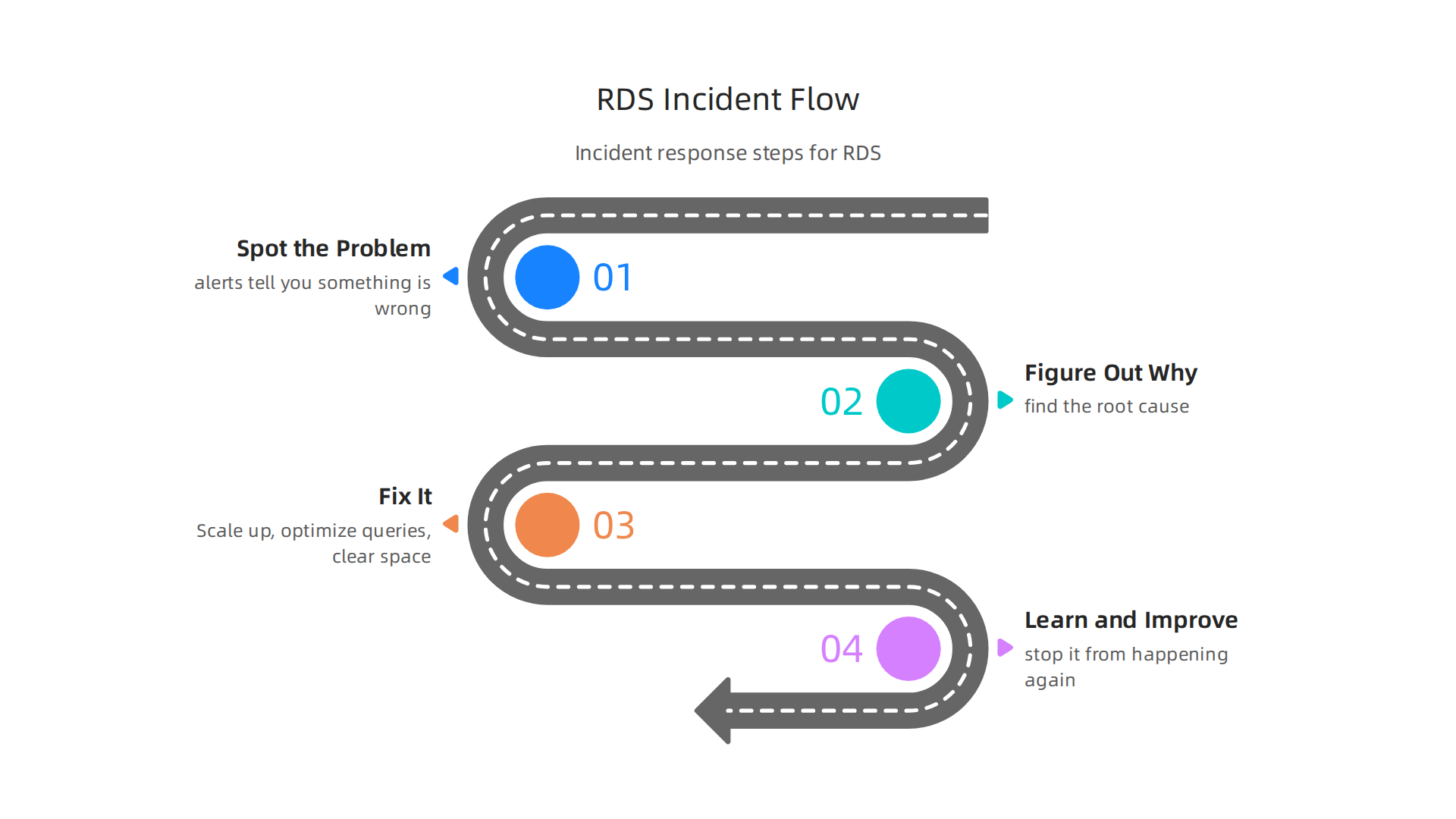
- Spot the Problem: Your alerts should tell you something is wrong. Check the metrics first to see what’s happening (e.g., high CPU, low memory, full storage). A quick look at AWS status monitoring can also help if you suspect a larger issue.
- Figure Out Why: Use tools like Performance Insights and slow query logs to find the root cause. Is it one bad query? Too many users? A new change in your application?
- Fix It:
- Scale Up: Maybe your instance is too small. You might need a bigger database instance for a short time or permanently.
- Optimize Queries: If slow queries are the problem, work with your developers to make them run faster.
- Clear Space: If storage is full, delete old data or snapshots that are no longer needed.
- Restart: Sometimes, a simple restart can clear up temporary issues, but this should be a last resort and done carefully.
- Learn and Improve: After a problem is fixed, understand what went wrong and how to stop it from happening again. This helps you to build fast, resilient systems in the long run.
Having a clear checklist, also called a "runbook," for common issues can help your team act fast and correctly when a database problem occurs. This keeps your applications running smoothly for your users.
Summary
This article explains why Amazon RDS remains a practical choice for developers in 2026 by removing much of the operational burden of running relational databases. It walks through RDS core concepts — instances, engines, endpoints, parameter groups and storage — and compares popular engines including MySQL, PostgreSQL, MariaDB, commercial options, and Amazon Aurora. The guide covers essential topics you need to run production databases: encryption and IAM controls, placing instances in private networks, Multi‑AZ and read‑replica strategies, automated backups and disaster recovery runbooks. You’ll also learn how to find and fix performance bottlenecks (CPU, memory, I/O), pick appropriate instance classes and storage (gp3), and apply indexing, query tuning and scaling patterns. Cost guidance explains instance-hours, storage, I/O, backups and options like Reserved Instances or Savings Plans, while monitoring and incident-response advice shows which metrics and logs to watch. After reading, you’ll be able to choose when RDS fits your project, secure and tune a deployment, plan for high availability, and control costs and outages effectively.