
AI for Software Development What ‘AI Takeover’ Means Now for Teams
· 22 min read

Why the question ‘Will AI take over the world?’ still matters for developers and product leaders
Have you ever wondered if machines will really take over? It’s a big question often asked with a mix of excitement and fear. The idea of artificial intelligence, or AI, becoming smarter than people and changing everything is a popular one. This question, "will AI take over the world," might sound like science fiction, but for people who build software and lead product teams, it actually brings up some very real and important worries in 2026.
It’s not about robots walking around on their own just yet. Instead, it’s about what AI can do today and how it will keep changing our jobs, our teams, and the products we make. The worry isn’t that AI will take over in a sudden event, but more about how quickly AI is improving. For example, AI models showed rapid improvement in areas like coding and math in 2025 and 2026, according to the AI Index Report 2026. However, they still have trouble with deep reasoning and complex problems, with many models failing to achieve high accuracy on expert-level tasks as seen in various benchmarks from 2026 reports GDP.pdf: Benchmarking Grounded Multimodal Reasoning over Professional PDF Documents.
This guide is for developers, product managers, and leaders who need to understand AI in a practical way.

You’ll learn about:
- What AI can really do: We’ll look at its true abilities and where it still has limits.
- The risks and rules: How we can make sure AI is used safely and fairly. This includes thinking about AI ethics for software teams.
- How AI changes your work: What AI tools mean for coding, design, and project planning. Think about how tools like Claude for coding or new software engineering applications are changing daily tasks.
- Steps your team can take now: Simple actions to stay ahead and use AI wisely.
It’s about being ready for the future, not just fearing it. Understanding these points helps you make smart choices for your team and your products.
Get clear daily AI updates and stay ahead of the curve.
What ‘will AI take over the world’ really means for developers and product teams
When we talk about whether AI will take over the world, many people picture robots from movies. But for those of us who build software and create products, the real meaning is much closer to home. It’s about figuring out how this powerful technology changes our daily tasks, our projects, and the future of work. It’s less about a sudden takeover and more about smart planning for what’s here now and what’s coming soon.
We can think of the question "will AI take over the world" in three practical ways for developers and product teams.
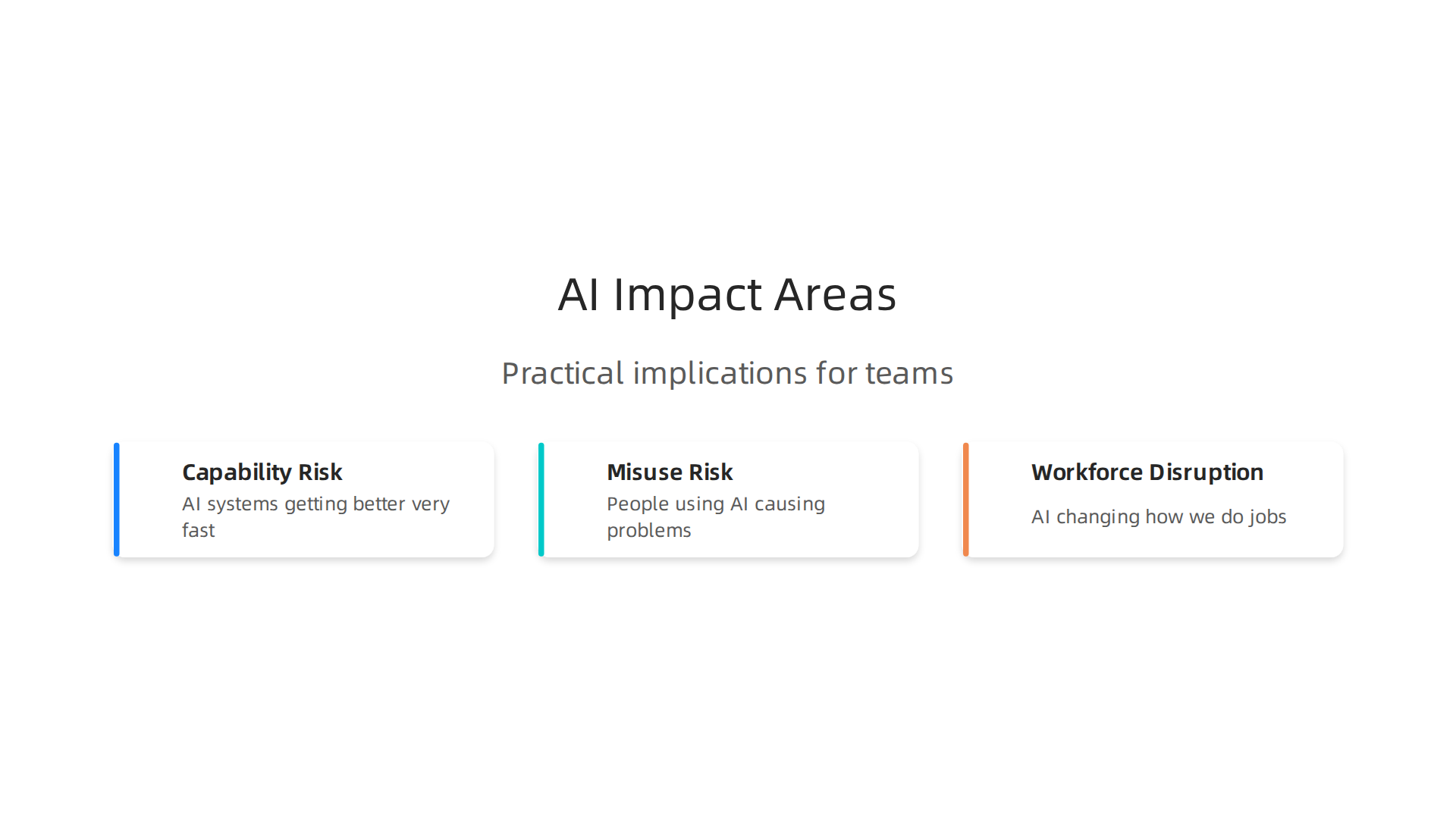
These are not scary movie plots, but real things we need to prepare for.
1. What AI Can Really Do (Capability Risk)
AI systems are getting better very fast. They can now do things that seemed impossible just a few years ago. For example, AI models have gotten much better at coding and solving math problems. But they still have important limits. Many of these models, like the Gemini 3.1 Pro Preview, are strong in many areas, but they still struggle with deep thinking and complicated reasoning. Research in 2026 showed that large language models often have trouble with clear reasoning and might even get basic math wrong sometimes, as noted in studies on Large Language Model Reasoning Failures.
This means that while AI tools can help with many software engineering applications, like writing code or testing, they still need human smarts to guide them. It’s like having a very fast helper who sometimes misses the bigger picture.
2. How AI Can Be Used the Wrong Way (Misuse Risk)
Even if AI isn’t going to become evil on its own, people can use it in ways that cause problems. This is about making sure AI is used safely and fairly. Imagine AI that helps doctors, but gives wrong advice. Or AI that decides who gets a loan, but is unfair to some groups of people.
Developers and product leaders need to build AI tools with strong rules. This includes making sure AI acts in a good way and that we can check its work. The International AI Safety Report 2026 highlights the ongoing need for careful checks of these powerful AI systems. It’s vital to focus on mastering AI response design evaluation and safe implementation to prevent unintended harm. We must always think about how an AI tool could be used to trick people or spread wrong information.
3. How AI Changes Jobs (Workforce Disruption)
Perhaps the biggest change AI brings to the workplace is not taking all our jobs, but changing how we do them. Over half of jobs in the US will be reshaped by AI in the next few years, according to a 2026 report by BCG on how AI will reshape more jobs than it replaces.
Some jobs might need fewer people, while new jobs that work with AI will grow. For instance, jobs that need special AI skills, like prompt engineering, are growing much faster than other jobs. On the other hand, the hiring for some entry-level jobs, like junior software developers, saw a drop in 2025 and 2026, as reported by the Stanford 2026 AI Index. This means that being able to use AI tools, like claude for coding or other software engineering applications, will become a must-have skill.
It’s clear that AI is transforming the tasks that software developers do, and some jobs are becoming more open to automation. This is why it’s so important for people in tech to learn new skills and adapt. If you’re looking to grow your career, understanding how to study AI for software development in 2026 is key. The goal isn’t just to keep your job, but to make your work better and more effective with AI.
The biggest question for software makers isn’t really "will AI take over the world" in a spooky way. It’s more about understanding what these smart tools can do right now and what they can’t.

This helps us work better with AI instead of worrying about it.
What Modern AI Can Do
In 2026, AI models have gotten much better at many tasks. They are very good with language, like writing emails or summarizing long reports. They are also helpful for things like writing computer code. The AI Index Report 2026 shows how fast AI has improved in areas like coding and math.
Models like the gemini api model and tools that use claude for coding are good at helping developers. They can suggest code, find mistakes, and even create parts of a program. This helps make software engineering applications much faster.
Where AI Still Has Limits
Even with all these improvements, AI is not perfect. It still has trouble with deep thinking and real understanding. For example, some AI models can still make simple math errors. Studies show that large language models often have trouble with clear, step-by-step reasoning, as seen in Do LLMs Overthink Basic Math Reasoning? Benchmarking …. They don’t always understand the "why" behind things.
Also, when AI needs to understand different kinds of information at once, like pictures and text, it can still struggle. This is called multimodal reasoning. A 2026 study found that the best AI models could only correctly answer about 30% of questions that needed them to understand both text and images in professional documents, according to GDP.pdf: Benchmarking Grounded Multimodal Reasoning over …. This shows that while AI is smart, it doesn’t think like a human. It follows patterns and rules it has learned.
How We Test AI: Benchmarks and Evaluation
To know if an AI model is good enough for a job, developers use special tests called benchmarks. These tests measure how well an AI performs specific tasks. For instance, there are benchmarks for how well AI can:
- Write code accurately.
- Understand tricky questions.
- Solve math problems.
- Work with images and text together.
These benchmarks help teams decide if an AI model is ready for real software engineering applications. You can find many of these scores in the AI Model Benchmarks and Pricing Dataset 2026. This data helps developers pick the right AI tools. For example, some benchmarks test how well AI handles complex legal ideas, like in the CLAUSE: A Discrepancy Benchmark for Auditing LLMs … report. Another benchmark, MAI-Thinking-1, shows how models like Microsoft AI are built and tested for knowledge and reasoning abilities.
When choosing AI for your projects, it is important to look at these test scores. This way, you can pick an AI that is truly fit for what you need it to do. It’s all about making informed choices to speed up your work and build better software. You can learn more about how to set up your team for success with AI by exploring insights on AI Mastering for Custom Software Teams Your 2026 Playbook.
Staying up to date with the latest in AI is key for developers and product teams in 2026.
Get clear daily AI updates from The AI Newsletter Worth Reading.
AI tools are not just for answering questions or writing basic text anymore. In 2026, they are changing how software teams build and deliver projects every day. This means that we don’t have to wonder if AI will take over the world in a scary way, but rather how it helps us in our work right now.
How AI is already changing software development workflows
Many software teams have already welcomed AI into their daily tasks. In fact, a report from Futurum shows that nearly 97% of software development companies are using AI or thinking about using it in their work processes this year. These smart tools help developers work faster and better in many ways.
Here are some real examples of how AI helps in software engineering applications:
- Writing Code: Tools like
claude for codingand those using thegemini api modelcan write new code for you. They can also suggest ways to fix your code, which saves a lot of time. One study found that AI can help reduce the time it takes to prepare code for review by up to 58%, according to the 90% Of Teams Use Ai Daily report. - Finding Bugs: AI can look through code and find mistakes before they become big problems. This makes software more reliable and reduces the amount of time developers spend fixing things. The best AI code review tools can find many errors, scoring around 50-60% in checks, as noted in the AI Code Review Benchmark 2026.
- Speeding Up Delivery: AI helps with what we call Continuous Integration and Continuous Delivery (CI/CD). This is how teams quickly build, test, and release new software. AI can automate many of these steps, making the whole process smoother.
- Watching Over Software: Once software is running, AI helps keep an eye on it. This is called observability. AI can spot strange behaviors or problems quickly, so teams can fix them before users even notice. This helps maintain high quality for installed apps.
Overall, AI is making developers much more productive. A study from Info-Tech Research Group found that 94% of developers say AI helps them get more done. Some companies even see improvements of 20-50% across different parts of their work, from planning to delivery, according to The State of AI-Native Software Engineering: 2026 Industry Report. This is a big change in how software is made.
To truly use AI well, it’s not just about getting the tools. It’s also about changing how teams work together. This is a concept called Code Flow, which helps understand how software development changes when AI agents are a key part of the process, as introduced by GitKraken.
How to Safely Try New AI Tools and Check Their Value
It’s clear that AI is a powerful helper, but how do you pick the right tools and make sure they are actually useful? Here’s a simple checklist for your team to safely try out new AI tools and measure if they are worth it:
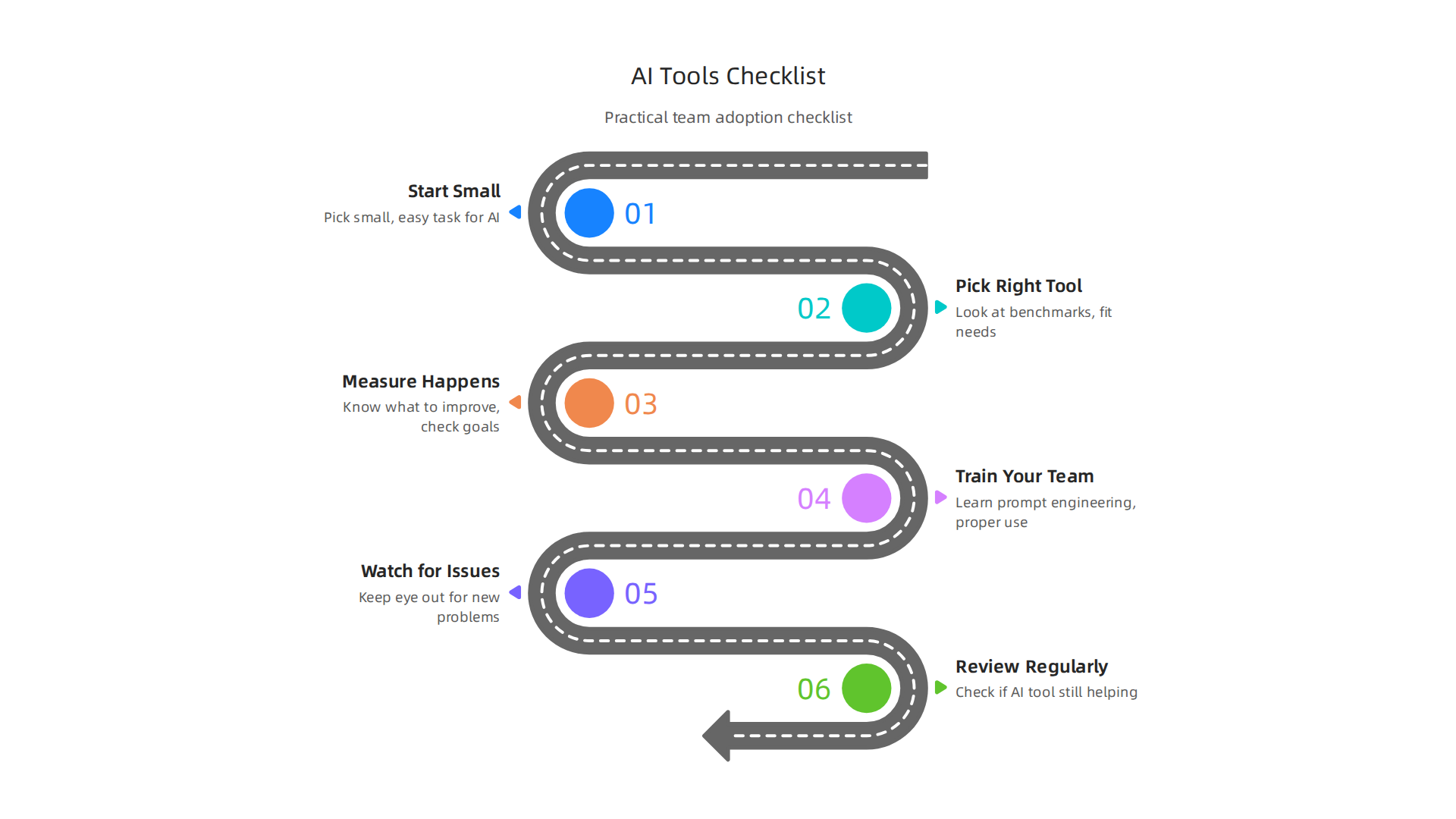
- Start Small: Don’t try to change everything at once. Pick a small, easy task where AI might help, like writing simple test code or summarizing documents.
- Pick the Right Tool: Look at the benchmarks and reviews for tools that fit your needs. For example, if you need coding help, look for well-known
claude for codingorgemini api modeloptions. - Measure What Happens: Before you start using AI, know what you want to improve. Is it speed? Fewer bugs? Then, after using AI for a while, check if you met your goals. This helps you know the real value, or "ROI," of the tool.
- Train Your Team: Make sure everyone knows how to use the AI tool properly. Learning how to ask AI for what you need (this is called prompt engineering) is very important. You can find out more by exploring how to use AI for software development in this developers workflow guide.
- Watch for Issues: Keep an eye out for any new problems the AI might cause. Sometimes, AI can introduce new kinds of errors or slow down other parts of the work. For example, while AI makes developers faster, it can sometimes make the overall software pipeline slower, as an Opsera study found.
- Review Regularly: Check in often to see if the AI tool is still helping. If it’s not, it might be time to try something else.
By following these steps, teams can make sure they are using AI wisely to improve their software engineering applications and not just adding new technology for the sake of it. This smart approach ensures that AI truly helps your team build better software.
While we’ve seen how much AI helps make software better, it’s also very important to think about how to use these powerful tools safely and fairly. Many people wonder, "will ai take over the world?" But really, the focus for software teams in 2026 is on making sure AI serves us well, not the other way around. This means we need good rules and careful thinking about what could go wrong.
Risks, governance, and ethical considerations teams must address
To make sure AI is used the right way in software engineering applications, teams need to put clear rules in place. These rules are called governance controls.
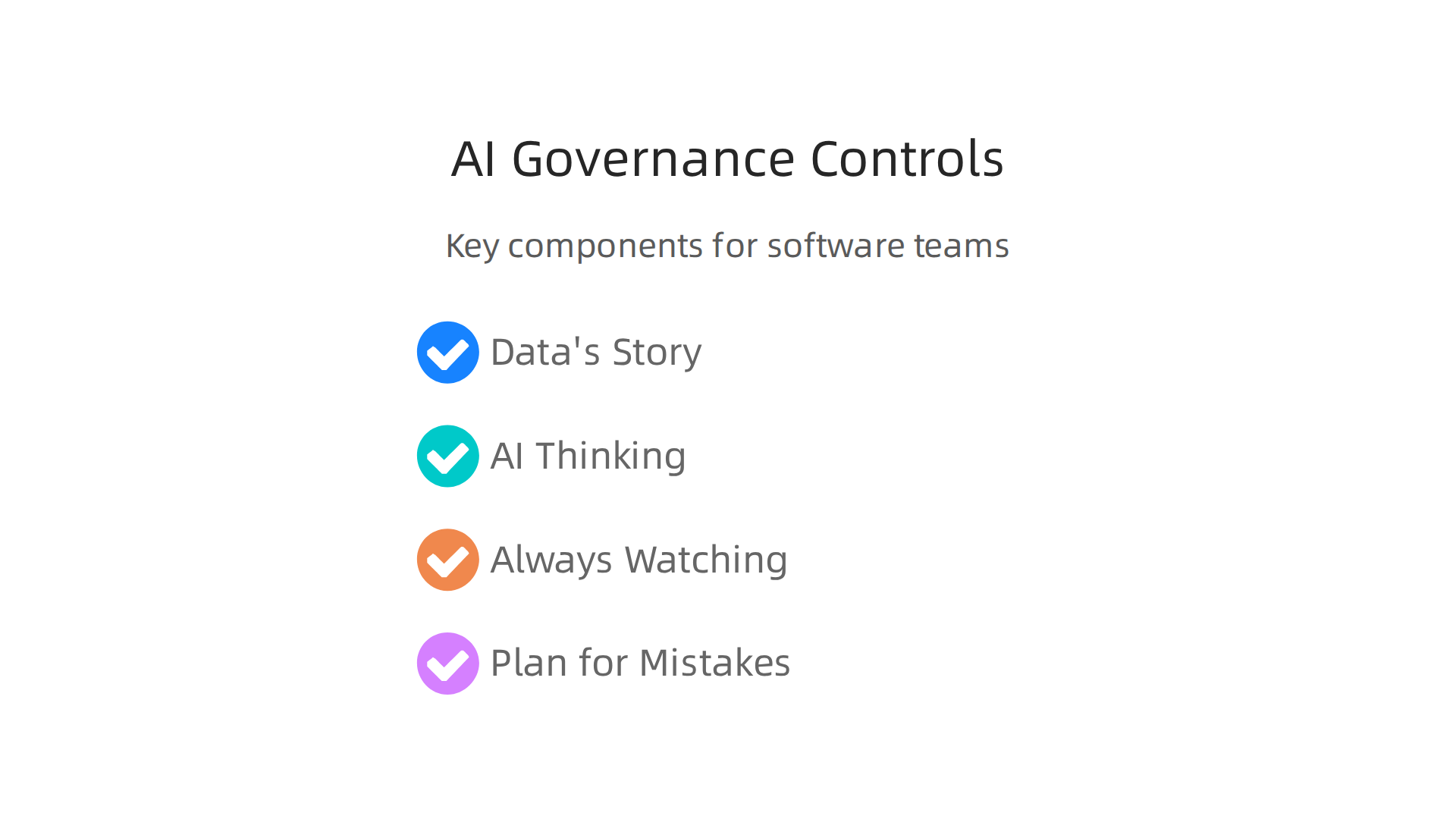
They help reduce mistakes and make sure AI systems are fair and trustworthy.
Here are some important parts of these rules:
- Knowing Your Data’s Story: This means keeping track of where the data that AI learns from came from. It’s like checking the ingredients list on food. If the data is bad or unfair, the AI could learn bad habits. This is called data provenance. It helps make sure AI doesn’t start with bad information.
- Checking How AI Thinks: We need to test AI tools, like
claude for codingorgemini api model, to make sure they don’t have hidden biases or make unfair decisions. This is part of model evaluation. We want to be sure the AI is fair to everyone and works as expected. - Always Watching: Even after an AI tool is working, teams must keep a close eye on it. This is like watching a child in a playground. If the AI starts acting strangely or causing problems, you need to know right away. This is called monitoring. It helps catch issues early.
- Having a Plan for Mistakes: What if an AI tool makes a big error or causes harm? Teams need a clear plan to fix the problem fast. This is called incident response. It helps make sure that if AI goes off track, we know how to bring it back quickly and safely. For more on building trustworthy AI, you might find this guide on AI ethics for software teams helpful.
Governments around the world are also creating new rules for AI. They want to make sure AI is used safely and ethically. In the US, for example, the White House is working on ways to promote smart AI use while keeping things secure, as noted in a 2026 action on Promoting Advanced Artificial Intelligence Innovation and Security.
Different government groups, like the GSA, are setting up their own plans for how to use AI safely. They are building frameworks that allow new ideas but also have strong checks and balances to reduce risks, explains the AI strategies and compliance plan. Also, state laws are starting to take effect in 2026, setting rules for high-impact AI systems, according to a report on Policy and Governance. These rules are important for both software engineers and product managers who decide what software to build.
These rules mean that companies using AI in their software engineering applications need to think carefully about how they develop and use these tools. This includes understanding the risks that AI, like that from etched ai, might bring. It’s about being responsible and making sure AI helps people without causing new problems.
Staying up-to-date on all these changes is crucial for anyone working with AI. For clear daily updates on AI and technology, consider subscribing to The AI Newsletter Worth Reading.
Business strategy: adopting AI while keeping control of product direction
After thinking about how to use AI safely and fairly, product leaders in 2026 face another big task: deciding how to bring AI into their products without losing control.

It’s about finding the right balance between using powerful AI tools and keeping a clear direction for what you’re building. This helps stop worries about "will ai take over the world" by making sure humans guide the process.
Picking the Right Path: Buy, Build, or Mix?
When looking to add AI to software engineering applications, product leaders need a smart plan. They have three main choices:
- Buying Vendor Models: This means using AI tools that other companies have already made, like
claude for codingorgemini api model.- Good side: It’s often faster and can save money because you don’t have to build everything from scratch. You can get started quickly with AI features. Many companies are already using AI in their development workflows, with some reporting significant productivity gains according to a 2026 report on AI Reaches 97% of Software Development Organizations.
- Bad side: You might not have full control over how the AI works or how it might change. This can make it hard to make the AI truly fit your product’s special needs or adapt to new rules.
- Building In-House Models: This means your team creates the AI tools from the ground up.
- Good side: You get full control. The AI can be made exactly how you want it, matching your product’s vision perfectly. This helps ensure your
software engineering applicationsstay unique. - Bad side: It costs a lot more time and money. You need expert AI engineers and a lot of data. It also comes with all the responsibilities of making sure the AI is fair and safe, which we talked about earlier.
- Good side: You get full control. The AI can be made exactly how you want it, matching your product’s vision perfectly. This helps ensure your
- Hybrid Approach: This is a mix of both. You might use some ready-made AI tools for common tasks, but build your own special AI parts for things that make your product stand out. This gives you some control while still getting the benefits of existing solutions. When choosing AI companies to partner with, it’s wise to consider their flexibility for hybrid models.
For example, a company might use a general AI like etched ai for simple tasks but build a custom AI for complex design challenges.
Smart Steps to Bring AI into Your Products
No matter which path you choose, it’s important to bring AI into your business carefully. Here’s how:
- Start Small (Staging and Pilots): Don’t change everything at once. Begin by testing AI in small, controlled parts of your product. This is called a pilot program. It’s like trying a new recipe in a small batch before making it for a big party. This way, if something goes wrong, it’s a small problem that’s easy to fix. For instance, some companies are seeing 20-50% improvements in areas like planning and coding by integrating AI, as highlighted in The State of AI-Native Software Engineering: 2026 Industry Report.
- Measure What Matters (KPIs): You need clear ways to check if the AI is helping. These are called Key Performance Indicators (KPIs). For example, are customers happier? Is your team saving time? Is the product working better? Setting these goals early on helps you know if the AI is truly a good fit and if you are using how to use AI for software development in the right way. While many developers report productivity gains from AI, keeping track of these measures is important, because some studies show that governance maturity still needs to catch up with how fast AI is being adopted, as noted in a 2026 study by the Info-Tech Research Group.
- Learn and Adjust: After a pilot, look at the results. What worked well? What didn’t? Use what you learn to make the AI better or change your plan before rolling it out to more people. This way, you keep control over your product’s direction and ensure AI is always serving your goals, not making decisions on its own. The overall goal is to drive innovation while keeping tight control.
Bringing AI into your products means more than just picking the right tools. It also means preparing your team and your plans for how work gets done. You want to make sure everyone is ready and that changes happen smoothly, so people don’t feel confused or left behind.
Teaching New Skills to Your Team
As AI tools like claude for coding and gemini api model become common for software engineering applications, the skills your team needs will change.

It’s not about if AI will take over the world, but how people will work with AI. Many jobs will be reshaped by AI, with some studies in 2026 suggesting that 50% to 55% of jobs in the US will change because of it, rather than disappear entirely [^1].
Here are some ways to help your team learn new skills:
- Upskilling Existing Staff: This means teaching your current employees how to use AI tools. They can learn things like:
- Prompt Engineering: This is about learning how to ask AI the right questions to get the best answers or code. Think of it like giving clear instructions to a smart helper.
- AI Tool Management: Understanding how to use different AI coding assistants, read their outputs, and fix any mistakes. Tools like Claude Code are seeing high adoption rates because they fit well into existing workflows [^2].
- Data Science Basics: Even if your team doesn’t build AI models from scratch, understanding how data feeds AI is very helpful.
- AI Ethics: Knowing how to use AI fairly and safely is super important. We talked about this before, and it remains a key skill. You can explore more about AI ethics for software teams.
- Training Approaches:
- Workshops and Courses: Offer special classes that teach about new AI tools and methods.
- Hands-on Projects: Let your team try out AI on small projects first. This helps them learn by doing.
- Mentorship: Pair up team members who are good with AI with those who are just starting.
Hiring for the AI Future
Bringing AI into your business might also mean hiring new people with special skills, or looking for different skills in new hires.
For example, jobs requiring specific AI skills, like prompt engineering or machine learning, are growing much faster than other jobs. A 2026 report showed these skills growing eight times faster than the overall job market [^3].
- New Roles: You might need people who are experts in AI development, or who can make sure AI systems work well and are fair.
- Changing Expectations: For roles like junior software engineers, the hiring landscape is shifting. A 2026 report from Stanford AI Index noted a 20% drop in employment for junior software developers (ages 22 to 25) from its peak [^4]. This means junior developers will need to show they can work with AI, not just code traditionally.
- Focus on ‘Human’ Skills: Even with AI, skills like problem-solving, creative thinking, and teamwork become even more important. These are things AI can’t do yet.
Managing Change and Building Trust
People often worry when new tools come in. Questions like "will ai take over the world" can lead to fear. It’s important to guide your team through these changes with clear communication and support.
- Open Talks: Explain why you’re using AI and how it will help the team, not replace them. Make it clear that AI is a tool to make their work better and faster.
- Involve Your Team: Let your team be part of deciding how AI is used. When people feel heard, they are more likely to accept new ideas.
- Address Fears: If people worry about their jobs, show them how their roles will change and what new, exciting work they’ll get to do with AI. Emphasize that AI boosts productivity and rewards good judgment and leadership, according to PwC’s 2026 AI Jobs Barometer [^5].
By planning for skill changes and managing new tools openly, you can help your team feel ready and excited for what AI brings. This way, your software engineering applications will continue to grow, and your team will grow right along with them.
Staying informed about these rapid changes is key for any software professional.
Want to keep up with the latest in AI and tech, explained simply and clearly?
The AI Newsletter Worth Reading
[^1]: AI Will Reshape More Jobs Than It Replaces | BCG
[^2]: AI Coding Tool Adoption 2026: Developer Survey Results
[^3]: AI reshapes global labour market into two distinct paths … – PwC
[^4]: "Stanford’s 2026 AI Index Says Junior Developer Hiring Fell 20 …
[^5]: AI Jobs Barometer – PwC
Summary
This article explains why the question