
Mastering the Software Development Lifecycle: Models, AI, and Best Practices for 2026
· 25 min read

Why the SDLC Still Matters — and What’s New in 2026
Building software today is exciting, but it can also be tricky. Technology changes super fast, especially with new AI tools popping up all the time. This makes it hard for teams to figure out the best way to create new programs and apps.

Many teams struggle to pick the right software system development life cycle (SDLC) methods and make them work for their projects. They wonder how to keep up with all the changes and use new tools like AI effectively.
A software development lifecycle is like a map that guides teams through all the steps needed to build software, from the first idea to its launch and beyond. It helps make sure everyone is on the same page and that the final product works well. Experts agree that the SDLC involves many key stages, such as planning, gathering needs, designing, building, testing, and keeping the software running smoothly after it’s released [^1]. Without a clear plan, projects can get lost or take too long, which is why the SDLC remains important in 2026.
This guide is here to help you understand the core ideas behind different software development lifecycle models. We will look at what each model does well and what its downsides are. You will learn how new AI tools fit into the modern development cycle of software and how they can make your team’s work easier. We will also talk about how to measure success and choose the best approach for your team. This includes looking at things like agile and adaptive software development methods. Our goal is to give you the tools to make smart choices for your projects and stay ahead in the fast-paced world of software building.
For even more up-to-date insights on how AI is shaping the industry, you can also check out The AI Newsletter Worth Reading.
[^1]: What is the Software Development Lifecycle (SDLC)?
SDLC Fundamentals: Key Stages and Core Goals
To help your team build great software, it’s really important to know the basic steps of the software system development life cycle. This process, often called the SDLC, guides a project from a simple idea all the way to a finished program that people can use. While some software development lifecycle models might have slightly different names for each step, they usually follow a similar path.
Here are the main stages of the development cycle of software:
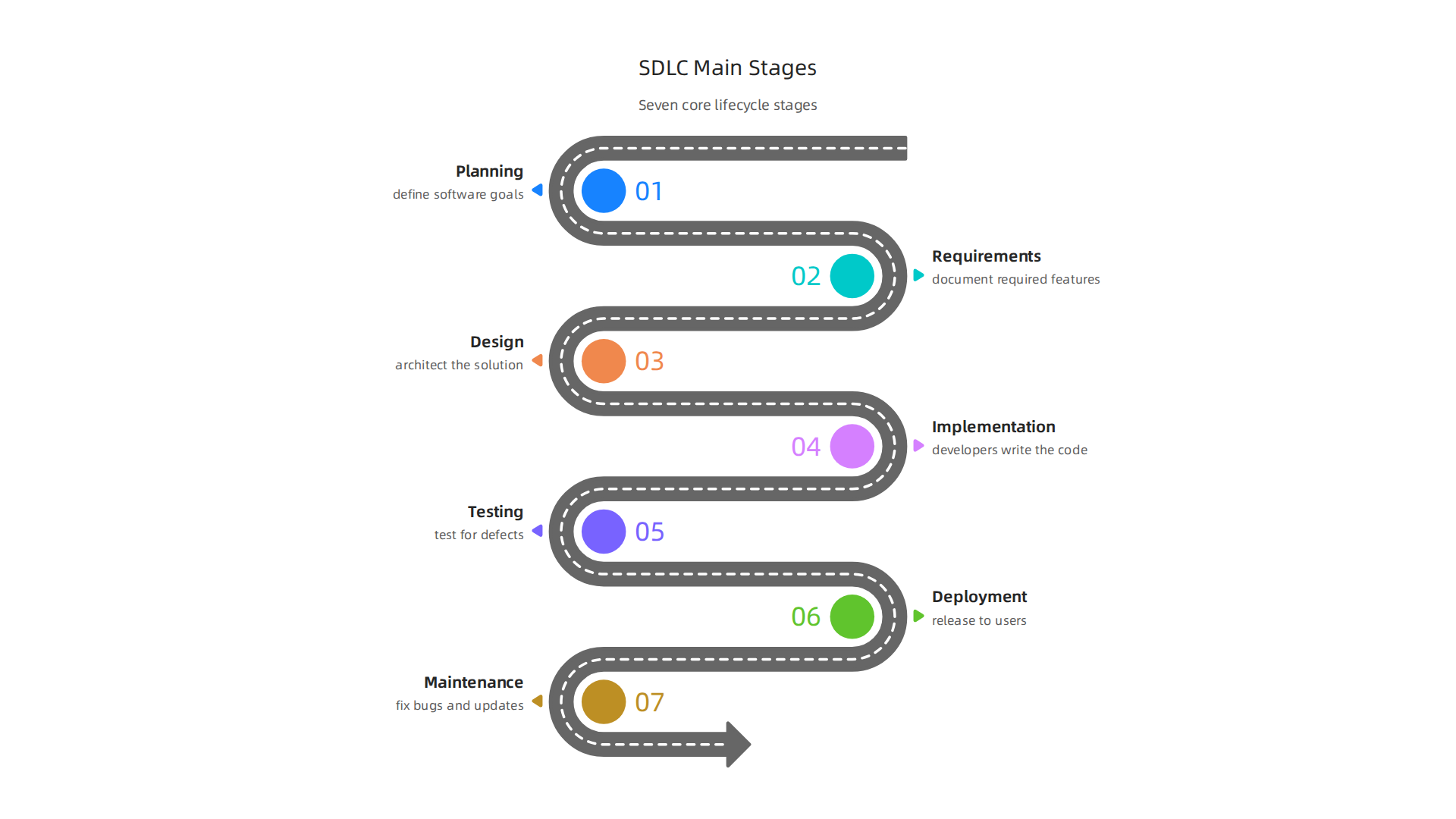
- Planning: This is the first step. Here, teams figure out what the software needs to do, who will use it, and what goals it should meet. They also think about how much time and money the project will take. This stage helps everyone agree on the big picture before starting any work.
- Requirements: In this stage, the team digs deeper to understand all the specific features and functions the software must have. They talk to users and stakeholders to make a detailed list of what the software should be able to do. Think of it like drawing up a detailed blueprint for a house.
- Design: Once the requirements are clear, the team starts planning how the software will be built. This includes deciding on the software’s overall structure, how different parts will work together, and how users will interact with it. They might draw diagrams and create mock-ups.
- Implementation (Coding): This is where the actual building happens. Developers write the code based on the design plans. It’s like the construction phase for a building, bringing the design to life.
- Testing: After the code is written, it needs to be checked carefully for any mistakes or bugs. Testers make sure the software works as expected and meets all the requirements. This step is super important to ensure quality.
- Deployment: Once the software is tested and ready, it’s released to users. This could mean putting an app on an app store or installing a program on computers.
- Maintenance: Even after the software is released, the work isn’t over. The team continues to fix any new bugs that pop up, add new features, and make sure the software keeps running smoothly. This ongoing care is a crucial part of the life cycle development software.
Many experts agree that the SDLC generally involves seven key phases, from planning to ongoing maintenance, ensuring the software stays useful and up-to-date The Seven Phases of the Software Development Life Cycle.
Across all these stages, the main goals of any software system development life cycle are clear. Teams want to achieve:
- Predictability: Knowing when the software will be finished and how much it will cost.
- Speed: Getting the software built and into the hands of users quickly.
- Quality: Making sure the software works well, is reliable, and does what it’s supposed to do without problems.
- Maintainability: Building software that is easy to update, fix, and change in the future.
These goals are very important, especially in 2026, as new tools like AI are changing how we build things. Learning how to use AI for these tasks can really speed up the development process. If you want to dive deeper into how AI is changing the way we build and ship code, you might find this article helpful: AI software development in 2026 transforms how you build and ship code. Staying on top of these trends is key to success in modern adaptive software development.
Now that we know the basic steps and goals of a software system development life cycle, it’s important to understand that there are different ways to put these steps into action. These different approaches are called software development lifecycle models.
Each model has its own strengths and weaknesses, making some better for certain types of projects than others.
Let’s look at three main types: Waterfall, Agile, and Hybrid models.
Waterfall Model: A Step-by-Step Approach
The Waterfall model is like building something with a very clear plan from the start, where each step must be finished before the next one can begin. Think of it like a waterfall flowing downwards, from one phase to the next, without going back up. The stages, such as planning, requirements, design, coding, testing, and deployment, happen in a strict order.
Trade-offs and When to Use It:
- Predictability: Waterfall is great when you need to know exactly how long a project will take and how much it will cost right from the start. This model gives you strong control and helps keep track of everything Comparative analysis of communication in project ….
- Risk: The main risk is that if something changes late in the project, it can be very hard and costly to go back and fix earlier steps.
- Stakeholder Involvement: Users and project leaders usually give their input mostly at the beginning.
- Best for: Projects with very clear, stable requirements that are unlikely to change. For example, if your project needs to follow strict rules or laws, Waterfall’s strong documentation and tracking can be very helpful How to Choose the Best SDLC Model for Your Project.
Agile Model: Flexible and Fast
The Agile model is very different. Instead of one long plan, it breaks the project into many small parts, called "sprints" or "iterations." Each sprint involves a little bit of planning, designing, coding, and testing. This happens over and over, usually every few weeks. After each sprint, the team has a small, working piece of software to show.
Trade-offs and When to Use It:
- Adaptability: Agile is all about being flexible. It can easily handle changes to what the software needs to do, even late in the project. This makes it ideal for projects where needs might change or aren’t fully known at the start Agile vs. Traditional Project Management: A Comparative ….
- Speed: Because it works in small cycles, teams can get working software into users’ hands faster. Studies show that Agile projects often finish 20-40% quicker and lead to happier users compared to older methods Systematic literature review: Long term impact of agile vs ….
- Risk: Risks are found and fixed earlier because of constant testing and feedback.
- Stakeholder Involvement: Users and project leaders are involved all the time, giving feedback after each sprint. This helps make sure the software is truly what they want.
- Best for: Projects where the requirements might change, or where you want to get feedback often and adapt as you go. This is a common approach in adaptive software development.
Hybrid Models: The Best of Both Worlds
Sometimes, a project isn’t a perfect fit for either Waterfall or Agile alone. That’s where Hybrid models come in. These models mix and match parts of both Waterfall and Agile to create a custom approach. For example, a team might use a Waterfall approach for the initial planning and high-level design, where requirements are more stable. Then, they might switch to Agile for the coding and testing phases, allowing for more flexibility as the software is built.
Trade-offs and When to Use Them:
- Balance: Hybrid models try to get the best of both worlds: some predictability and structure from Waterfall, combined with the flexibility and quick feedback of Agile. They allow teams to balance control with the ability to adapt.
- When to Use It: These models are useful for large or complex projects where some parts are very clear and stable, but other parts are likely to change. They are also good when a project has strict rules for planning and documentation but needs quick changes during development. Choosing the best model, or a mix of models, often depends on how certain you are about your project’s needs and how much flexibility you need.
Understanding these different software development lifecycle models helps teams pick the best way to build great software. Being able to choose the right approach, whether it’s the structured Waterfall, the flexible Agile, or a clever Hybrid, is a key skill for developers in 2026. If you’re looking to enhance your understanding of fundamental coding practices and how they fit into these models, learning to master programming language basics can be a great next step.
To keep up with how these development cycle of software models are changing, especially with new tools like AI, staying informed is super important. You can get clear daily AI updates and understand how new tech affects software development.
Get clear daily AI updates from The Deep View Newsletter.
Building on the idea of Agile, it’s helpful to know that "Agile" isn’t just one single method. Instead, it’s a way of thinking about building software that has led to many different tools and ways of working, called Agile frameworks. These frameworks give teams a clear guide on how to be flexible and fast when creating software.
Let’s look at some popular Agile frameworks:
Scrum: Working in Short Bursts
Scrum is one of the most common Agile frameworks. It helps teams work together closely and deliver small, working pieces of software often. It’s built around short work periods called "sprints," which usually last one to four weeks.
Here’s how it works:
- Roles: Everyone has a clear job. The "Product Owner" figures out what needs to be built. The "Scrum Master" helps the team follow Scrum rules and removes roadblocks. The "Development Team" builds the software.
- Meetings: Teams have short daily meetings to check progress, plan what to do in the current sprint, and show off their work at the end of each sprint. They also talk about how to get better.
- Work Tracking: A "Product Backlog" lists all the features or tasks the software needs. For each sprint, a "Sprint Backlog" is made with the items the team plans to finish.
Scrum is great for projects where the team needs to work fast and get feedback often, which fits well with the idea of an adaptive software development process. It helps manage the entire software system development life cycle in a very organized, yet flexible, way.
Kanban: Seeing Your Work Flow
Kanban is another popular Agile framework. It’s different from Scrum because it doesn’t use sprints with fixed times. Instead, it focuses on visualizing all the work and making sure it flows smoothly.
- Visual Board: Teams use a board (physical or digital) with columns like "To Do," "Doing," and "Done." Each task moves across the board.
- Limit Work in Progress: A key rule in Kanban is to limit how many tasks are in the "Doing" column. This helps teams focus, finish what they start, and find problems quicker.
- Continuous Flow: The goal is to keep tasks moving steadily from start to finish, reducing delays.
Kanban is perfect for ongoing support, maintenance, or projects where new work comes in all the time. It gives a clear picture of the development cycle of software for everyone involved. For more details on these approaches, you can check out a general overview of Agile vs. Waterfall Project Management Methodology.
Scaling Agile: For Bigger Teams and Projects
When a company or project gets very big, one small Agile team might not be enough. Imagine you need many teams to build a complex product. This is where "scaling Agile" frameworks come in. They help many Agile teams work together smoothly, making sure everyone is pulling in the same direction.
Some well-known scaling frameworks include:
- SAFe (Scaled Agile Framework): This is a complete system for large organizations that need to use Agile across many teams and departments. It helps with planning, coordinating, and delivering large software solutions.
- LeSS (Large-Scale Scrum): This framework is like applying Scrum rules to many teams working on one product, keeping things as simple as possible.
These frameworks address important scaling challenges like:
- Coordination: How do different teams talk to each other and avoid doing the same work or getting in each other’s way?
- Dependencies: How do we handle when one team needs something from another team before they can finish their work?
Scaling Agile frameworks are especially valuable when many teams are working on a single, large life cycle development software effort. They help ensure that even with a big group, the benefits of Agile like flexibility and quick delivery are not lost. Many companies are seeing positive outcomes from these scaled Agile methods, as they provide a clear structure for larger and more complex projects Comparative Analysis of Agile and Traditional Software Development Methodologies.
As software development lifecycle models continue to evolve, especially with new advances like AI, teams need ways to manage complex projects effectively. Learning how to use AI tools within your development workflow can transform how you build and ship code. You can learn more about how AI software development in 2026 transforms how you build and ship code.
As software development lifecycle models continue to change, especially with new tools like Artificial Intelligence (AI), teams need smart ways to handle complex projects. AI can truly make a big difference in how software is built and delivered.

Let’s look at how AI fits into the software system development life cycle and what challenges it brings.
How AI Adds Value to Software Development
AI tools are changing many parts of the development cycle of software, making teams faster and more efficient.
- Requirements Analysis: At the very start of a project, AI can help teams understand what users need. It can look at lots of information to find key features and make sure everyone is on the same page about what to build. This helps reduce uncertainty in the early stages of design, which is very important for complex projects Uncertainty Management for Knowledge Maturity in a High ….
- Code Generation: AI coding assistants are a huge help today. Tools like Cursor, Copilot, Cody, and others can write code, suggest improvements, or help complete tasks. This speeds up coding and helps developers focus on bigger problems. For more on how these tools work, you might want to read a developer’s guide to AI-assisted code generation in 2026.
- Testing: AI agents can even write tests for the code. This means tests can be created more quickly and often by a separate agent, which helps find problems early and ensures better quality AI Agent Code Governance: Branch Protection, Review Gates, and ….
- Observability: After software is released, AI helps keep an eye on it. It can watch for issues, alert teams to unusual behavior, and help understand how the software is performing in the real world. This continuous monitoring is a key part of an adaptive software development approach.
Risks and How to Handle Them in AI-Assisted Development
While AI offers many benefits, using it in the life cycle development software process also comes with some risks. Teams need to be careful about how they manage these AI tools to ensure software quality and security.
- Governance and Trust: When AI writes code, who is responsible for it? Companies need clear rules, or "governance," for AI-generated code. Frameworks like the NIST’s AI Risk Management Framework, ISO/IEC 42001, and the EU AI Act provide guidelines for how to manage these risks in 2026 AI Code Governance Framework: What’s Required in 2026.
A good way to handle this is to build checks directly into the code generation process, rather than just reviewing harder later AI Code Governance: The Framework 91% of Engineering Teams ….
- Quality and Security: AI-generated code must be just as good and secure as human-written code. This means putting the code through the same security checks like looking for hidden secrets or license issues. It’s also wise to classify AI changes by risk, so not every small AI suggestion needs the same intense review AI Coding Governance Playbook 2026.
- Human Oversight and Review: Even with AI, people are still very important. It is crucial to have human oversight. Someone who understands the bigger picture of the software should always review AI-generated changes AI Code Governance Framework for Enterprise Dev Teams. This "graduated human oversight" helps ensure that AI tools are used safely and effectively Graduated Human Oversight for Agentic Code Generation ….
Staying informed about the latest in AI and software development is key to navigating these changes.
Get clear daily AI updates from The AI Newsletter Worth Reading.
Knowing the risks and benefits of using AI in the software system development life cycle helps us see that choosing the right way to build software is super important. There are many software development lifecycle models, and picking the best one depends on your project’s unique needs. It’s like choosing the right tools for a job; the wrong tool can make things much harder.
How to Choose the Right SDLC for Your Product, Team, and Market
Picking the best development cycle of software means looking at a few key things. Think about your product, the team working on it, and what the market expects. This helps you choose a model that fits, rather than just using one because it’s popular.
Here’s a simple way to decide:
- How clear is your product idea?
- If you’re building something completely new and aren’t sure of all the details yet, a flexible model like Agile is often best. It lets you change things as you learn more Software Development Life Cycle (SDLC) Methodologies for ….
- If you know exactly what you want to build from start to finish, a more step-by-step model like Waterfall can work well. This is good when requirements are stable How to Choose the Best SDLC Model for Your Project.
- Are there strict rules or laws you must follow?
- Some projects, like those for medicine or defense, have many rules (regulatory constraints). For these, models that focus on a lot of paperwork and clear steps, like Waterfall, are often safer because they offer good records of every change.
- How experienced is your team?
- Teams that are good at working together and can make decisions quickly often do well with Agile methods. They can adapt fast.
- Newer teams might do better with more structured models that have clear roles and steps.
- How often do you need to update the software?
- If you need to release new features or fixes often, models like Agile or DevOps are great. They let you make small changes and release them quickly, which is a key part of adaptive software development.
- If updates are rare, a longer life cycle development software process might be okay.
- How much risk can you take?
- Some projects are very risky because they are so new or complex. Iterative models, which build software in small parts, help you find and fix problems early, reducing big risks later.
To help you pick, think about these questions:
| Factor | Ask Yourself | Recommended SDLC Model Example |
|---|---|---|
| Product Vision | Do we know all the features from the start? Or will we learn as we go? | Known: Waterfall; Unknown: Agile |
| Rules & Laws | Are there many strict rules (compliance) we must follow? | Many: Waterfall; Few: Agile |
| Team Skills | Is our team good at making decisions on its own? Or do they need more guidance? | Self-starting: Agile; Guided: Waterfall |
| Update Speed | How often do we need to release new versions or updates to users? | Fast/Often: Agile, DevOps; Slow/Rare: Waterfall |
| Project Risks | Is this project very new or complicated, with many unknowns? | High: Iterative, Spiral; Low: Waterfall |
Many teams today use a mix of models, often combining parts of Agile with elements of other approaches to create their own custom software development lifecycle models. The goal is always to deliver good software reliably. If you want to learn more about how to use AI in your development process, check out this guide on how to use AI for software development in 2026.
Choosing the right development model helps make sure software is good and lasts a long time. But even with the best plans, problems can pop up. One big problem is "technical debt." This is like when you take a shortcut in building something. It saves time now, but makes things harder and more expensive later. For example, quickly patching code instead of fixing the root problem creates technical debt. It’s important to deal with this debt to keep the software system development life cycle running smoothly and to optimize workflows.
Best Practices to Reduce Technical Debt and Optimize Workflows
To avoid technical debt and make sure your development cycle of software stays efficient, here are some good habits:
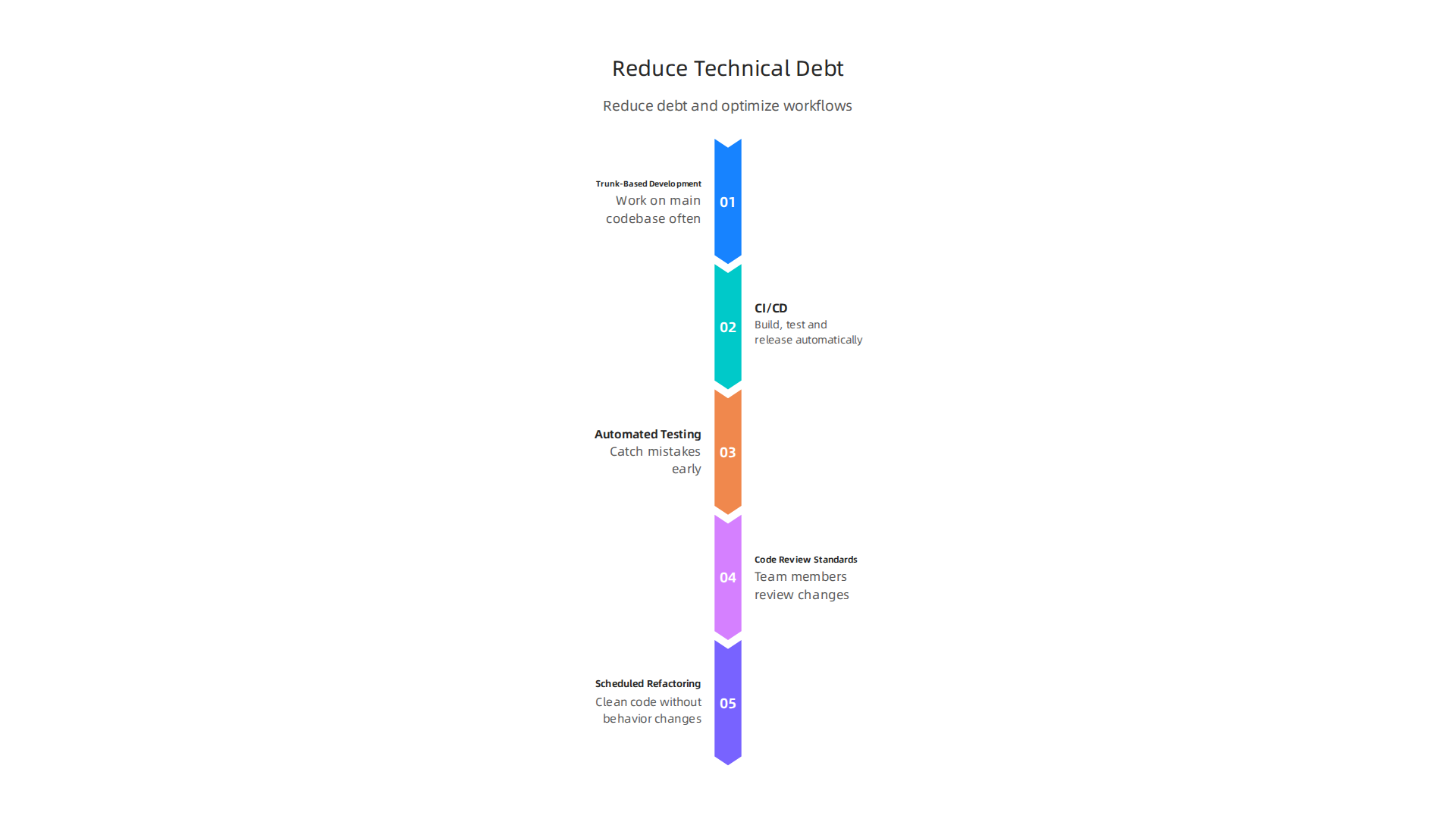
- Trunk-Based Development: This means everyone on the team works on the main code base (the "trunk") often. They make small changes and add them back to the main code many times a day. This helps avoid big conflicts later and makes the life cycle development software process faster. Studies in 2026 show that this method can lead to better and quicker software delivery Trunk-Based Development: The Key to Better and Faster ….
- Continuous Integration and Continuous Delivery (CI/CD): This is a set of tools and steps that help developers build, test, and release software changes automatically and quickly. When new code is added, CI/CD tools check it right away. If there’s a problem, the team knows fast. This makes the whole software system development life cycle much more efficient and reliable, as explained in a 2026 engineering reference CI/CD Pipeline Design in 2026: Engineering Reference.
- Automated Testing: Instead of having people manually check every part of the software, automated tests do it much faster. These tests can run every time code changes, catching mistakes early before they become bigger problems. This is a key part of adaptive software development, letting teams find and fix bugs quickly.
- Code Review Standards: Before new code becomes part of the main software, other team members look at it. They check for mistakes, make sure it follows good rules, and ensure it’s easy to understand. This helps improve the quality of the code and prevents technical debt from building up.
- Scheduled Refactoring: Refactoring means cleaning up code without changing how the software works. It’s like tidying up a messy room. Even when things seem fine, setting aside time to refactor old code keeps it healthy and easier to work with later. This prevents small messy areas from growing into big, costly problems.
These practices help teams build better software faster. They also lower the chances of technical debt, which can slow down future work and cost a lot to fix. Knowing how much technical debt you have is also important. Some teams use a "Technical Debt Ratio" which shows how much time is spent on fixing old problems versus making new things. If this ratio is too high, it’s a sign that debt needs to be addressed urgently Technical Debt Management Strategies for Sustainable Software …. By using these best practices, teams can create a more streamlined and effective software development lifecycle models.
For those interested in how new tools, especially AI, are changing these best practices and development workflows, staying informed is key. To get clear daily updates on AI and broader technology topics, you might find The AI Newsletter Worth Reading helpful.
Tools and Metrics: Measuring SDLC Health and Team Performance
After putting good practices into place to avoid technical debt and make your software development lifecycle models work better, the next step is to know if these changes are actually helping. You need a way to see how well your software team is doing and how healthy your software project is.
This is where special measurements, called metrics, and helpful tools come in. They let you see the real progress of your software system development life cycle.
Important Numbers to Watch
Think of these numbers as a report card for your software team.
They tell you how fast and how well things are going:
- Lead Time: This measures how long it takes from when someone has an idea for a new feature until that feature is live for users. A shorter lead time means your team is fast at turning ideas into reality.
- Cycle Time: This is a bit like lead time but focuses on the actual work. It measures the time from when a developer starts working on a task until that task is finished and ready to go live.
- Deployment Frequency: This number shows how often your team releases new code or updates. Teams that release often usually fix problems faster and get new features out quickly.
- Mean Time to Recovery (MTTR): No software is perfect, and sometimes things break. MTTR tells you how long it takes to fix a problem and get everything working again. A lower number means your team is good at quickly solving issues.
- Change Failure Rate: When your team puts new code out, how often does it cause a problem? This metric tracks that. A low failure rate means your team’s changes are usually good and stable.
By tracking these numbers, teams can better understand their development cycle of software and find areas to improve. For example, knowing your team’s defect density or code duplication can help you measure technical debt more completely, as mentioned in a guide on How to Measure Technical Debt.
Helpful Tools for the Job
To gather these numbers and keep your life cycle development software running smoothly, many teams use different kinds of tools:
- Issue Trackers: Tools like Jira help teams keep track of all their tasks, bugs, and new features. They are great for seeing how long tasks take (lead time, cycle time) and for planning work.
- CI/CD Tools: As we talked about before, Continuous Integration and Continuous Delivery tools automate the process of building, testing, and releasing software. They help measure how often code is deployed and spot problems early. You can even use these pipelines to measure technical debt with continuous integration pipelines.
- Observability Tools: These tools let you watch your live software closely. They can tell you when something goes wrong and help your team quickly find and fix problems, improving your Mean Time to Recovery.
- Test Automation Frameworks: These tools run tests automatically to check if new code works as it should. This is a big part of
adaptive software developmentand helps keep the change failure rate low by catching mistakes before they reach users. - Code Analysis Tools: Tools like SonarQube look at your code to find potential issues, security holes, and areas that might cause technical debt. They help enforce good code review standards.
Modern teams are also finding new ways to use technology. For instance, AI software development in 2026 is changing how we build and ship code, and understanding how to use AI for software development in 2026 is key to staying current. These AI tools can often be integrated into your existing workflows and help automate parts of testing, code review, and even finding issues.
Summary
This article explains why the software development lifecycle (SDLC) remains essential in 2026 and how teams should adapt as tools and expectations change. It walks through the seven core SDLC stages—planning, requirements, design, implementation, testing, deployment, and maintenance—and compares popular models (Waterfall, Agile, Hybrid) so you can pick the right approach for your product, team, and regulatory context. The guide details Agile frameworks like Scrum and Kanban, explains how to scale Agile across large organizations, and shows where AI can add value across requirements analysis, code generation, testing, and observability. It also flags AI risks—governance, security, and the need for human oversight—and recommends practices to limit technical debt, including trunk-based development, CI/CD, automated testing, code reviews, and scheduled refactoring. Finally, the article covers the metrics and tooling you need to measure SDLC health (lead time, cycle time, deployment frequency, MTTR, change failure rate) so you can track progress and iterate safely.