
How to Integrate the FatSecret API for Reliable Nutrition Data in Your Mobile App
· 18 min read

Introduction
More people use apps to track what they eat every day.

In 2026, the demand for accurate nutrition data in mobile apps is higher than ever. Whether you are building a meal planner, a fitness tracker, or a restaurant scanning tool, you need a reliable source of food information. That is where the FatSecret API comes in.
The FatSecret API gives developers access to one of the largest food databases available. It offers nutrition facts, meal tracking, recipe data, and even barcode scanning. Many popular health apps depend on it. But choosing and integrating the right nutrition API is not always easy.
Developers face several challenges. You need to pick an API that fits your project, integrate it cleanly, handle scaling as your user base grows, and keep user trust by delivering correct data. The same problems appear when working with other APIs too. For example, if you are building a messaging feature using a green API, or adding car support with Android Auto apps, or working with a QR code technology company for payments, you still need reliability and clear documentation.
This guide gives you an in-depth look at the FatSecret API. We will cover its main features, step-by-step integration steps, best practices for avoiding common pitfalls, a comparison with similar APIs, and what the future holds. Backed by research and expert insights, you will walk away knowing exactly how to make the most of this powerful tool.
If you work with APIs regularly, you know that staying up to date matters. For daily insights on AI, development workflows, and tech trends, we recommend The AI Newsletter Worth Reading. It delivers clear updates straight to your inbox.
Ready to dive deeper? Let us explore how the FatSecret API can power your next app.
Why Choose FatSecret API for Nutrition Data?
If you are building a nutrition app, the data source you pick matters a lot.

The FatSecret API gives you access to one of the largest food databases in the world. Over 50,000 developers in more than 58 countries use it. That is a strong sign of trust. The platform handles over 700 million API calls every month. That alone tells you it is reliable and fast.
The database includes over 2.3 million verified food items. That covers a huge variety of foods from many countries. Whether your users eat at home, dine out, or grab packaged snacks, you probably have the data they need. The crowd-sourced model means the database grows and improves over time. And because FatSecret verifies the data, you know the numbers are solid. According to the official platform, it is the largest global food database for developers.
Getting started with the FatSecret API is straightforward. The documentation is clear and well organized. You can find code examples and detailed endpoint references. This helps you integrate faster without guessing. Plus, the free tier lets you test everything before committing. That is a big advantage for startups and small teams. In comparisons of nutrition APIs for 2026, FatSecret consistently ranks among the top options. You can see how it stacks up in this Top 8 Nutrition APIs in 2026 (Compared) guide.
Developers who use the API often mention its speed and reliability. You do not want your app to slow down because of slow API responses. FatSecret is built to handle high traffic. Many popular health apps depend on it for daily meal tracking. That gives you confidence that it will work at scale.
If you are planning a full-featured health app, it helps to stay current with how other apps are being built. Check out the latest mobile app development trends in 2026 to make smart design choices.
The FatSecret API is a solid choice for any developer looking for accurate, scalable nutrition data. Next, we will walk through how to set it up step by step.
Key Features and Endpoints of the FatSecret API
Before you start building, it helps to know exactly what the FatSecret API can do. The API is organized into several key endpoints that handle different tasks.
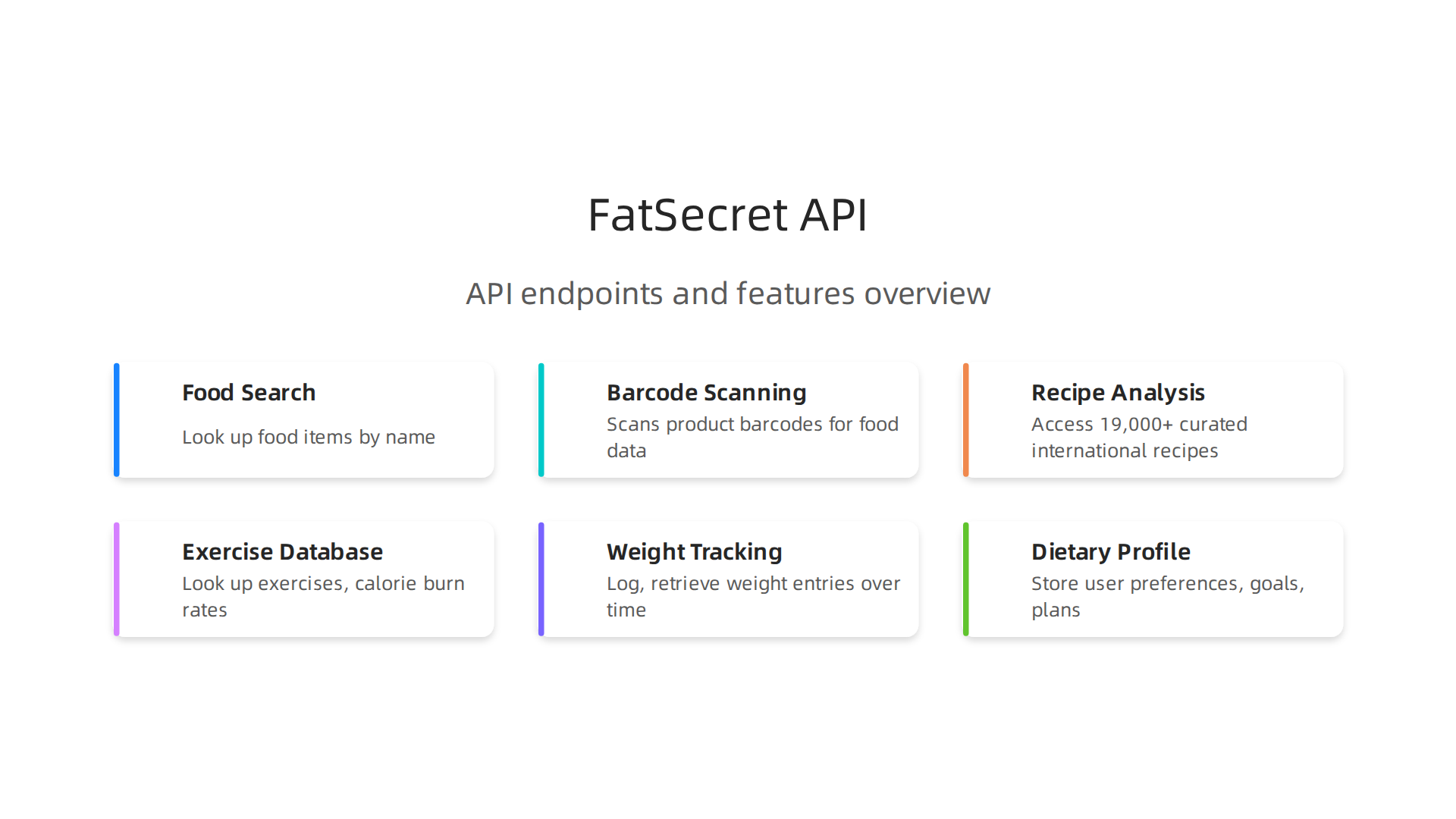
Each endpoint gives you a specific piece of data, so you can pick and choose what your app actually needs.
Authentication and Data Formats
All requests to the FatSecret API use OAuth 2.0 for authentication. This is a standard, secure way to verify that your app is allowed to access the database. You can also use OAuth 1.0 if you prefer. The API returns data in either JSON or XML format. JSON is usually the faster choice for modern apps. You can see the full details in the official FatSecret API documentation.
Food Search Endpoint
This is the endpoint you will use most often. The foods.search method lets you look up any food item by name. You get back details like calories, macronutrients, serving sizes, and even food images. The results are paginated, so you can control how many items appear per page (up to 50). This is great for building a search bar in your app. To understand all the parameters, check out the Food Search API page.
Barcode Scanning
One of the handiest features is the barcode scanning endpoint. When a user scans a product barcode, the API looks up the matching food item in its database. The global coverage for UPC and EAN barcodes is over 90%. This means most packaged foods in stores will be recognized instantly. The technology behind this is similar to what a qr code technology company might use, but it is specialized for food products. This endpoint alone can make your app feel magical for users who want to log meals quickly.
Recipe Analysis and Meal Planning
The API also includes a recipe database with more than 19,000 curated international recipes. You can search for recipes, get cooking directions, and see the full nutritional breakdown. This is perfect if you want to add a meal planning feature. Users can find recipes that match their dietary goals and log them directly. Many android auto apps integrate this type of data so drivers can plan meals hands-free on the road.
Additional Features
Beyond food and recipes, the FatSecret API offers endpoints for:
- Exercise database – Look up exercises and their calorie burn rates.
- Weight tracking – Log and retrieve weight entries over time.
- Dietary profile management – Store user preferences like allergies, goals, and meal plans.
These extra endpoints let you build a complete health and fitness app without needing multiple APIs. If you are building a more complex app, it helps to stay on top of current building practices. You can learn more about startup app development trends in 2026 to make sure your app stays modern and competitive.
Each endpoint is well documented with code examples. The authentication is secure. And the data comes back fast. Now that you know what is available, you are ready to start integrating the FatSecret API into your own project.
Integrating the FatSecret API: A Developer’s Guide
Ready to start coding? Let’s walk through the actual steps to get the FatSecret API working in your project.
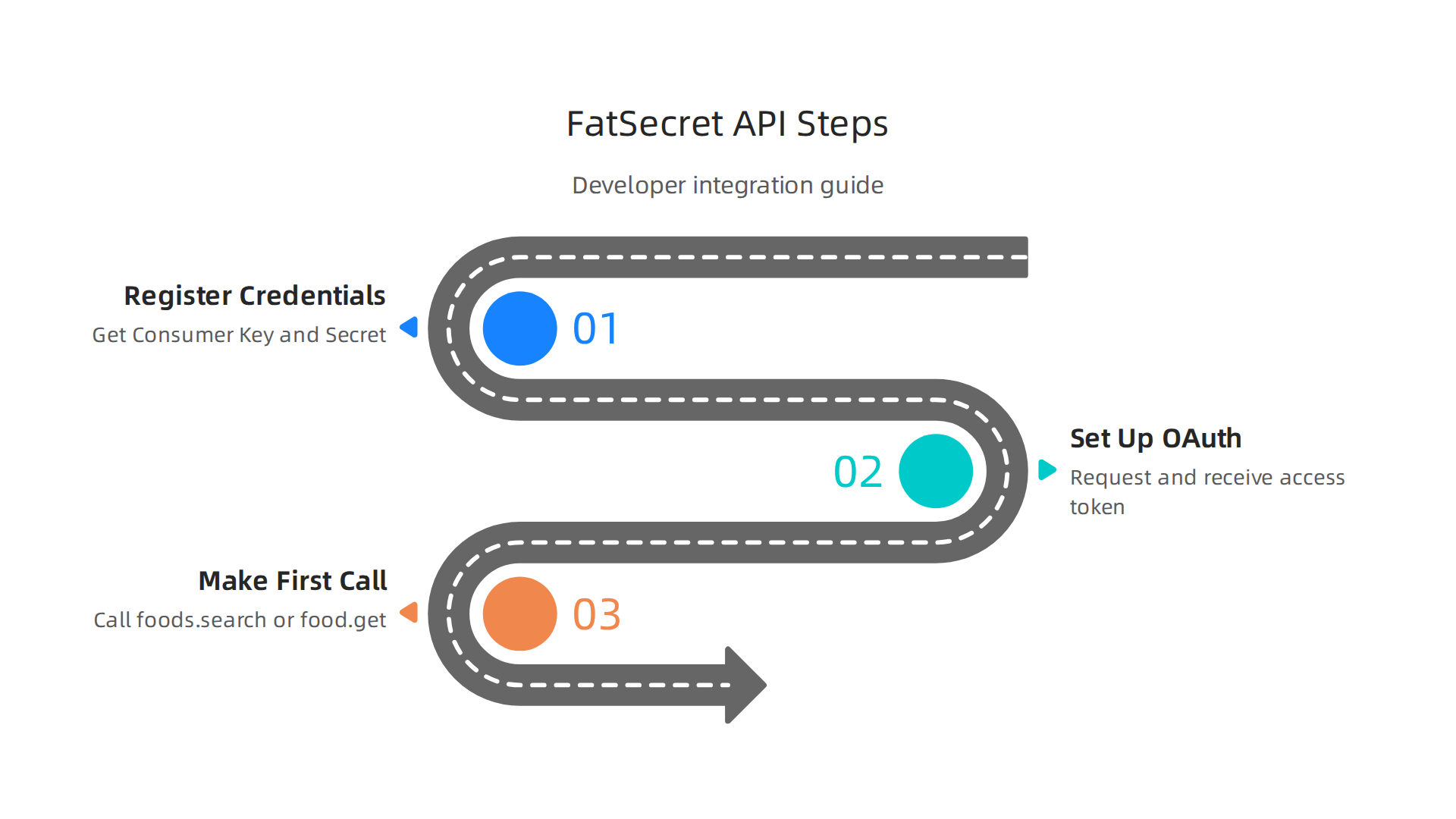
The process is straightforward once you know the three key stages.
Step 1: Register and Get Your API Credentials
First, you need a free FatSecret account. Head over to the official platform and sign up. After you register, you will create an application inside your account dashboard. This gives you two important codes: a Consumer Key and a Consumer Secret. Think of these like a username and password for your app. You need them for every request you send to the API. If you want a quick walkthrough, check out the FatSecret Platform API getting started guide on RapidAPI. It shows exactly where to find your keys.
Step 2: Set Up OAuth Authentication
Now you need to authenticate your app. The FatSecret API supports both OAuth 2.0 and OAuth 1.0. OAuth 2.0 is the newer, more secure option, and it is the one most developers choose in 2026. You will use your Consumer Key and Secret to request an access token. This token proves that your app is allowed to ask for data. The process is simple:
- Send a POST request to the authentication endpoint with your credentials.
- Receive an access token in the response.
- Include that token in the header of every future API call.
The FatSecret team provides code examples in multiple languages to help you get started. You can find ready to use libraries and sample code in the FatSecret API libraries documentation. There is even a Postman walkthrough on GitHub that lets you test the whole authentication flow without writing a single line of code.
Step 3: Make Your First API Call
With your access token ready, you can start pulling nutrition data. The two most common endpoints are foods.search and food.get. Let us look at each one.
foods.search: Send a search term like "banana" or "chicken breast". The API returns a list of matching foods with calories, macros, serving sizes, and images. You can control how many results come back (up to 50 at a time) and which page to show. This is perfect for building a search feature in your app.
food.get: If you already know a food’s unique ID (from a search or a barcode scan), use this endpoint to get the full nutritional breakdown. The response includes every detail you might need, from protein grams to vitamin amounts. You can see the exact parameters and response format in the food.get API documentation.
Both endpoints return data in JSON or XML format. JSON is usually easier to work with in modern apps. After you get the response, parse it in your code and display the information to your user. That is really all there is to it.
If you are building a mobile app, you might also want to stay current with the latest best practices. Take a look at the mobile app development trends for 2026 to make sure your app stands out once it launches.
Once you have these three steps down, you can expand to other endpoints like recipe search, barcode scanning, and exercise tracking. The basic pattern is always the same: authenticate, request, and parse. Now it is your turn to start building.
Best Practices and Real-World Use Cases
Getting your API calls to work is one thing. Making them fast, reliable, and trustworthy for your users is another.

Let us talk about the best practices that separate a hobby project from a production ready app in 2026.
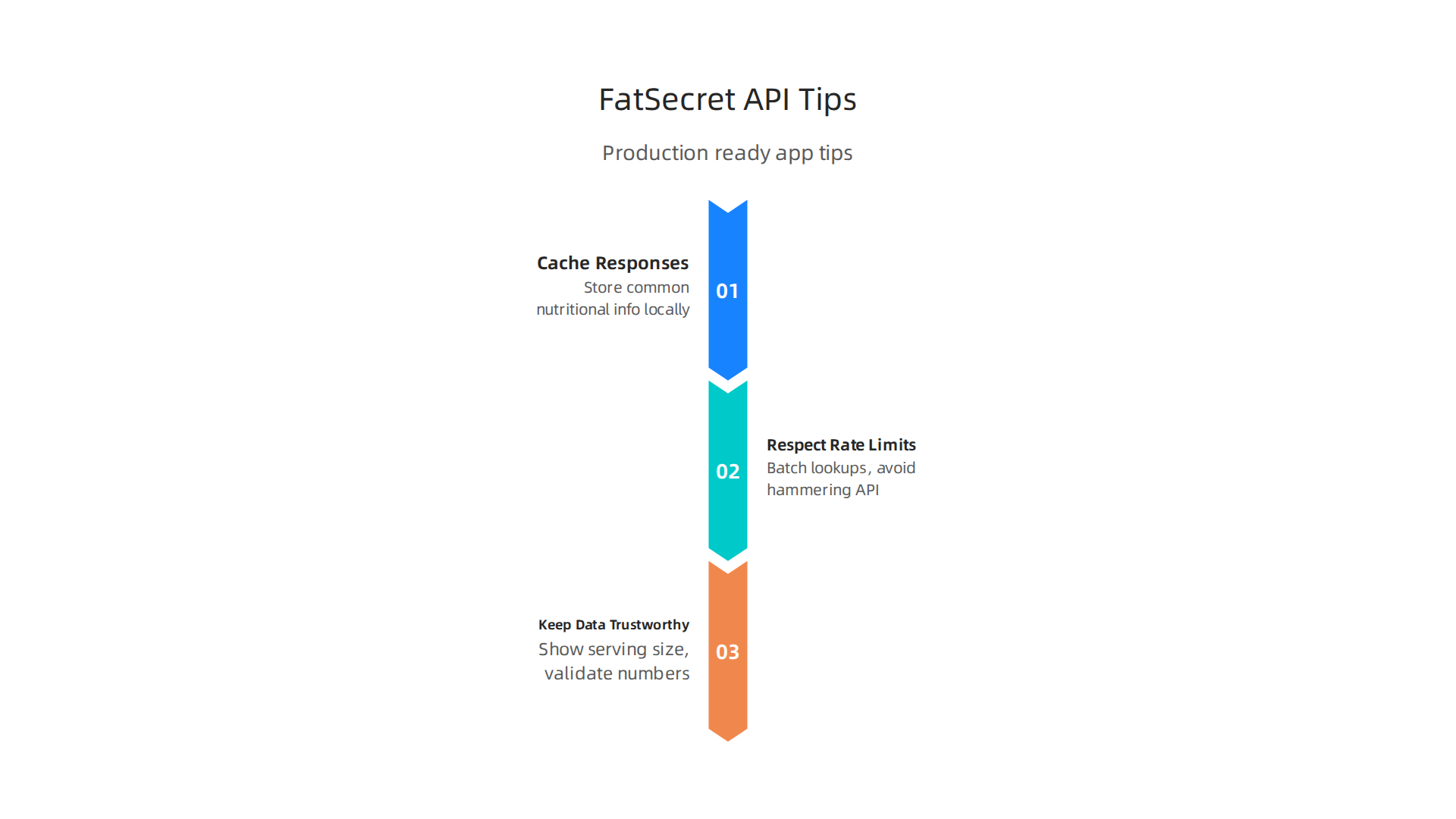
Cache Your Responses
Every API call takes time and counts toward your rate limit. The FatSecret API does not limit you harshly on the free plan, but if your app grows, you will want to be smart about how often you ask for the same data. The simplest fix is caching. Store the nutritional info for common foods like chicken breast or brown rice locally on your device. Next time a user searches for it, serve the data from your cache. This makes your app feel faster and reduces server load. The Top Nutrition APIs for App Developers in 2026 article points out that 70% of users abandon nutrition apps within two weeks if tracking feels too complex. Fast responses keep people coming back.
Respect Rate Limits and Use Smart Requests
FatSecret does not publish a strict per minute limit on their main documentation page, but the general rule is to stay reasonable. Do not hammer the API with 50 requests at once. Instead, batch your lookups when possible. If you need to pull data for a whole recipe, request the individual food IDs one by one with a small delay between calls. Or, if you are building a meal prep app, let users search once for an ingredient and then store the ID locally. The fatsecret Platform API documentation explains how to structure your requests so they are efficient.
Real-World Use Cases That Work
Here is where the FatSecret API really shines:
- Custom calorie counters: Build a simple diary where users log meals and see their daily totals. The
foods.searchandfood.getendpoints give you everything you need. - Meal prep apps: Let users plan a week of meals and automatically calculate macros for each day. Cache the results so they are instant when the user comes back.
- Fitness platform integrations: Connect calorie data with step counters, heart rate monitors, or workout trackers. The Fatsecret API Integration example shows how to sync nutrition data with wearable devices.
One developer even integrated the API into Home Assistant to show daily nutrition on a smart home dashboard. That is a creative use case for the FatSecret community.
Keep Data Trustworthy
Not all food entries are created equal. The FatSecret database covers over 2.3 million verified food items across 58 countries. Still, users might add custom entries or find foods from different regions. A best practice is to always show the serving size and allow users to adjust it. Validate that the numbers make sense. If a "banana" somehow shows 500 calories, flag it. The FatSecret Platform team constantly updates their data, so your app will stay accurate as long as you pull fresh info every few weeks.
Stay on Top of Tech Trends
Building a great app also means keeping an eye on what is new in development tools and AI. The landscape changes fast. That is why many developers subscribe to a daily AI newsletter to stay sharp. If you want clear, no nonsense AI updates delivered to your inbox each morning, check out The AI Newsletter Worth Reading. It is a simple way to keep your skills current without the noise.
FatSecret API vs. Competitors: A Comparative Analysis
Picking the right food API can make or break your app. The FatSecret API is a strong option, but it is not the only player. Let us compare it with Nutritionix, Edamam, and USDA FoodData Central so you can choose the best fit for your project.
Data Coverage: Global Reach vs. Local Strengths
FatSecret stands out for its size. Its database holds over 1.9 million food items across 56 countries. It covers generic foods, branded products, and restaurant menus. The database is multilingual and updated daily. As the Best APIs for Menu Nutrition Data comparison shows, FatSecret also includes barcode scanning and FDA-compliant data.
Nutritionix matches FatSecret’s size with 1.9 million items too, but it focuses on US restaurant chains. It has over 200,000 restaurant menu items and a 92% barcode match rate. If your app targets American users and chain restaurants, Nutritionix might win.
Edamam has a smaller database of about 900,000 foods. But it shines with natural language processing. You can type "1 cup quinoa and black beans" and get a full nutrient breakdown. It also offers recipe analysis and diet filters for 40+ diets.
USDA FoodData Central is the free government dataset. It covers over 380,000 foods with detailed nutrients verified by federal standards. It is the most authoritative source for raw nutrition data.
Pricing: Free to Enterprise
FatSecret gives you a free developer tier with limits. For more data like barcodes and higher volume, you need the Premier tier. That requires a contract and custom pricing. The Top 8 Nutrition APIs in 2026 comparison notes that the "basic tier is limited; the data most apps actually want sits in the Premier tier behind a sales process."
Nutritionix starts at $1,850 per month for enterprise plans. That is steep for solo developers. Edamam is more accessible, starting at $9 per month for a single product. USDA FoodData Central is completely free to use.
Ease of Integration: Documentation Matters
The FatSecret API uses OAuth for authentication. Its documentation is clear and covers the basics. But developer reviews often say it lacks advanced examples compared to Nutritionix. The Food API: 17 Most Popular Food APIs overview mentions FatSecret has "strong international coverage" but does not highlight integration ease.
Nutritionix provides SDKs for web and mobile apps. Its natural language endpoint makes logging food fast and simple. Edamam also has strong NLP and offers sample code in multiple languages. USDA FoodData Central requires more manual work since it is a public dataset without a polished API wrapper.
The Bottom Line
Choose the FatSecret API if you need global multilingual data and a free tier to start. Pick Nutritionix for US restaurant coverage and natural language input. Go with Edamam for recipe analysis and flexible NLP. Use USDA FoodData Central if you want free, authoritative data and do not mind building more infrastructure yourself.
Whichever you choose, building a great app also means staying current with development trends. Keep an eye on mobile app development trends to see how other teams are integrating data into modern apps.
Performance, Support, and the Future of Nutrition APIs
Now that you have a clear picture of how FatSecret stacks up against competitors, let us look at how well the platform performs in real-world use and where it is heading next.
Reliability You Can Count On
When your app depends on a nutrition database, uptime matters. FatSecret delivers strong performance here. The platform offers a Service Level Agreement (SLA) with guaranteed uptime and service level credits for Premier users. According to the FatSecret API editions and pricing page, the SLA includes month-by-month guarantees for paid customers. Developer reports often cite 99.9% or higher uptime for the API.
The scale is impressive too. More than 50,000 developers use the platform, supporting over 700 million API calls every month. That kind of volume shows the infrastructure can handle real traffic. If you are building a consumer app, this reliability means fewer complaints about downtime.
Developer Support That Listens
Support is another area where FatSecret stands out. The platform has a dedicated API support team that responds to scope requests and integration issues. For example, developers can request the image recognition scope by contacting support directly. This hands-on approach helps when you run into OAuth configuration or data access problems.
FatSecret also provides clear documentation for its REST-like API. The FatSecret Platform API guides walk you through authentication, endpoints, and response formats. While some developers wish for more advanced examples, the base documentation gets you started fast.
What Is Coming Next

FatSecret is not standing still. The platform is actively evolving with features like AI-based meal recognition and enhanced personalization. There is already an image recognition scope available for developers who want to let users snap a photo of their food and get nutrition data. You can see evidence of this feature in the FatSecret Platform API community discussion about enabling the image-recognition scope.
These updates point toward a future where tracking nutrition becomes even easier. Imagine a user taking a picture of their lunch and getting instant macros. That is the direction the industry is moving.
Where Nutrition APIs Are Headed
The nutrition API market is growing fast. The U.S. nutrition apps market reached $2.14 billion in 2024, and the demand keeps rising. More developers are connecting nutrition data with wearable devices like smartwatches and fitness trackers. Telehealth platforms also want to integrate diet tracking for patient care.
Staying on top of these shifts helps you build apps that people actually use. For more on how AI and mobile trends are reshaping development, check out this guide on AI as the new standard for developers in 2026.
Stay Ahead of the Curve
The world of nutrition APIs changes quickly. New features, new competitors, and new user expectations arrive every year. To keep your skills fresh and your app relevant, you need reliable industry news. That is why many developers turn to the The AI Newsletter Worth Reading for clear daily AI updates. It helps you spot trends early and make smarter decisions about your tech stack.
Summary
This article is a practical developer guide to the FatSecret API, a large, production-ready food and nutrition data platform used by tens of thousands of apps. It explains what the API offers — from food search, barcode lookup, and recipe analysis to exercise and weight tracking — and walks you through registering, authenticating with OAuth, and making your first API calls. The guide covers best practices for caching, rate-limit handling, and data validation so your app stays fast and trustworthy, and it shows real-world integrations and product ideas you can build. You also get a clear comparison with other nutrition APIs (Nutritionix, Edamam, USDA) to help pick the right data source, plus notes on performance, support options, and upcoming features like image recognition. After reading, you’ll know how to integrate FatSecret into a mobile or web app, what pitfalls to avoid, and how to scale nutrition features for production use.