
AI Coding Assistants 2026 How Cluely AI and Prompt Engineering Solve the Trust Problem
· 20 min read

Introduction
Let’s be honest. If you’re a developer in 2026, you’ve probably tried an AI coding assistant at least once. Maybe you use one every day. The numbers back this up: a massive 84% of developers now use or plan to use AI tools in their workflow, according to a 2025 Stack Overflow survey reported earlier this year. That’s up from 76% just the year before.
But here’s the thing that might surprise you: only 29% of developers actually trust the output those tools produce. Think about that. We’re using AI to generate nearly half the code we commit. Sonar’s 2026 State of Code survey found that 42% of all committed code is now AI-generated or assisted. Yet most of us don’t fully believe what the AI hands back.
That gap between adoption and trust is a real problem. It means developers waste time double-checking everything, rewriting prompts, and fighting with tools instead of shipping features.

The information overload doesn’t help either. New models, new plugins, new “best practices” pop up every week. How do you know what actually works?
This guide is here to cut through the noise. We’ll walk through the current landscape of AI-assisted development, covering practical techniques like prompt engineering, tools that help bridge the AI-to-human gap (including Cluely AI), and how to sharpen your Claude code skills for real productivity. The goal is simple: give you a structured, no-fluff overview of what’s working in 2026.
If you want to stay ahead of the curve without sifting through a hundred tabs every morning, consider subscribing to The Deep View Newsletter.
It delivers clear, daily AI updates straight to your inbox so you can focus on building, not hunting for answers.
Let’s start by looking at where AI coding tools stand today and why trust matters more than ever. For a deeper dive into one of the most popular assistants, check out our guide on Anthropic AI for developers: how Claude supercharges your coding workflow.
The Current Landscape of AI-Assisted Coding in 2026
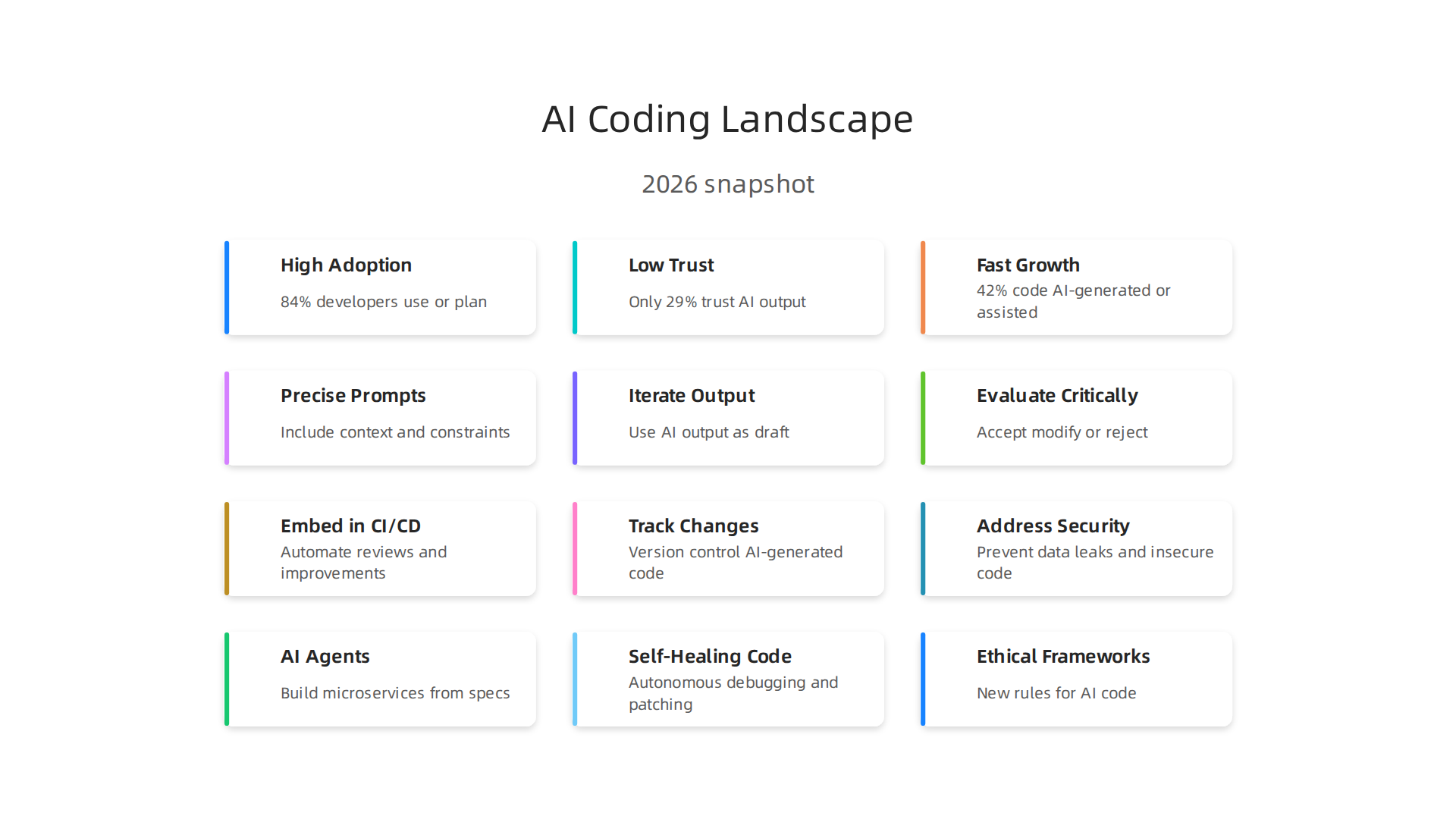
Let’s look at the real numbers for 2026. A massive 84% of developers now use or plan to use AI coding tools, based on a 2025 Stack Overflow survey. That is up from 76% the year before. We have clearly passed the tipping point. AI is no longer a toy for early adopters. It is a standard part of the developer toolkit.
But here is the problem hiding inside that headline number. While almost everyone is using AI, only 29% of developers actually trust the output. Think about that for a second. We are relying on tools we don’t fully believe in. Sonar’s 2026 State of Code Developer Survey of over 1,100 professional developers found that 42% of all committed code is now AI-generated or assisted. That is a massive amount of code. And developers predict that number will jump by over half again by 2027.
So the landscape in 2026 looks like this: high adoption, low trust, and fast growth.
The Major Players and Essential Skills
The market has responded with a wide range of tools. You have the big names like GitHub Copilot and Tabnine, which are great at autocomplete. But a new wave of platforms like Cluely AI is stepping up to solve the trust problem. These tools focus specifically on the bridge between raw AI output and human understanding. They help you validate, explain, and improve the code the AI gives you.
To actually benefit from this shift, you need two things. First, you need to get good at prompt engineering. You can learn a structured approach with a solid GLM coding plan to get better results from your prompts. Second, you need to sharpen your Claude code skills, which means understanding how to guide those models for complex tasks. If you want a deep dive on that, check out our guide on Anthropic AI for developers.
The real magic happens when you improve the ai to human translation. You can learn a science-backed framework for deep comprehension to help you truly understand what your AI coding partner is doing.
Enterprise Adoption and the ROI Reality
Enterprise teams are moving fast. Companies see AI coding tools as a competitive advantage. Data from 2026 shows that organizations with a healthy return on investment report productivity boosts of 2.5 to 3.5 times. The top performers hit 4 to 6 times their previous output. But getting that level of return takes work. It requires a strategic approach to prompt engineering, code review, and tool selection.
The landscape is changing every week. What worked last month might be outdated today. Keeping up with the best way to use Cluely AI, the latest updates to your coding tools, or the newest research on AI code quality can feel like a second job.
That is why staying informed is just as important as staying hands-on. The AI Newsletter Worth Reading, The Deep View Newsletter, delivers clear daily updates straight to your inbox. It helps you cut through the noise so you can focus on building, not hunting for news.
How Cluely AI Stands Out Among AI Coding Assistants
So you have tried GitHub Copilot. Maybe you have tested Codeium too. They are fast. They are good at autocomplete. But here is the thing. They often give you code that feels off. It compiles, but you are not sure if it is correct. That is where Cluely AI changes the game.
Cluely AI focuses on the exact problem we talked about earlier. Only 29% of developers trust AI output, according to the Sonar 2026 State of Code Developer Survey. Cluely was built to solve that trust gap. Instead of just spitting out lines of code, it helps you understand what the AI is doing. It gives you context-aware suggestions that actually fit your project, not just generic snippets.
Let me explain what makes Cluely different from Copilot and Codeium.
Context That Goes Deeper
Most coding assistants look at a few lines of code around your cursor. That is fine for simple autocomplete. But Cluely AI looks at your whole project. It understands your codebase structure, your naming conventions, and even your legacy patterns. This means its suggestions are more accurate from the start. A benchmark study of coding tools found that while Copilot excels at easy tasks, deeper context is still a challenge for many tools. Cluely tackles that directly.
Fewer False Positives, More Real Help
Another frustration with AI assistants is false positives. They suggest something that looks right but breaks your logic. Cluely AI puts a strong focus on reducing these errors. It validates its own output against your project’s context before showing it to you. That saves you from debugging bad suggestions later.
This makes Cluely especially good for refactoring old, messy code. When you are working with legacy systems, you cannot afford random guesses. Cluely understands the existing patterns and suggests changes that match your code style. That is a huge time saver.
Seamless IDE Integration
You do not want to leave your editor to use a different tool. Cluely integrates directly into popular IDEs like VS Code and JetBrains. It sits right where you work. No copying and pasting between windows. No context switching.
If you want to really understand what your AI coding partner is doing, check out our guide on a science-backed framework for deep comprehension. It pairs well with Cluely’s approach.
The Bottom Line
Copilot and Codeium are great for speed. But if you care about accuracy, trust, and working with complex or legacy codebases, Cluely AI is the tool that stands out. It turns the AI-to-human translation problem into a solved one.
The world of AI coding tools changes fast. To keep up with the latest updates on tools like Cluely, Copilot, and more, I recommend The Deep View Newsletter. It lands in your inbox daily with clear, no-fluff insights so you always know what matters.
Core Techniques for Effective AI-Assisted Coding
Knowing which tool to pick is only half the battle. The way you talk to your AI assistant matters just as much. Even the best tool gives bad output if you feed it a vague or lazy prompt. Here are three core techniques that work with Cluely AI, GitHub Copilot, or any other coding assistant.
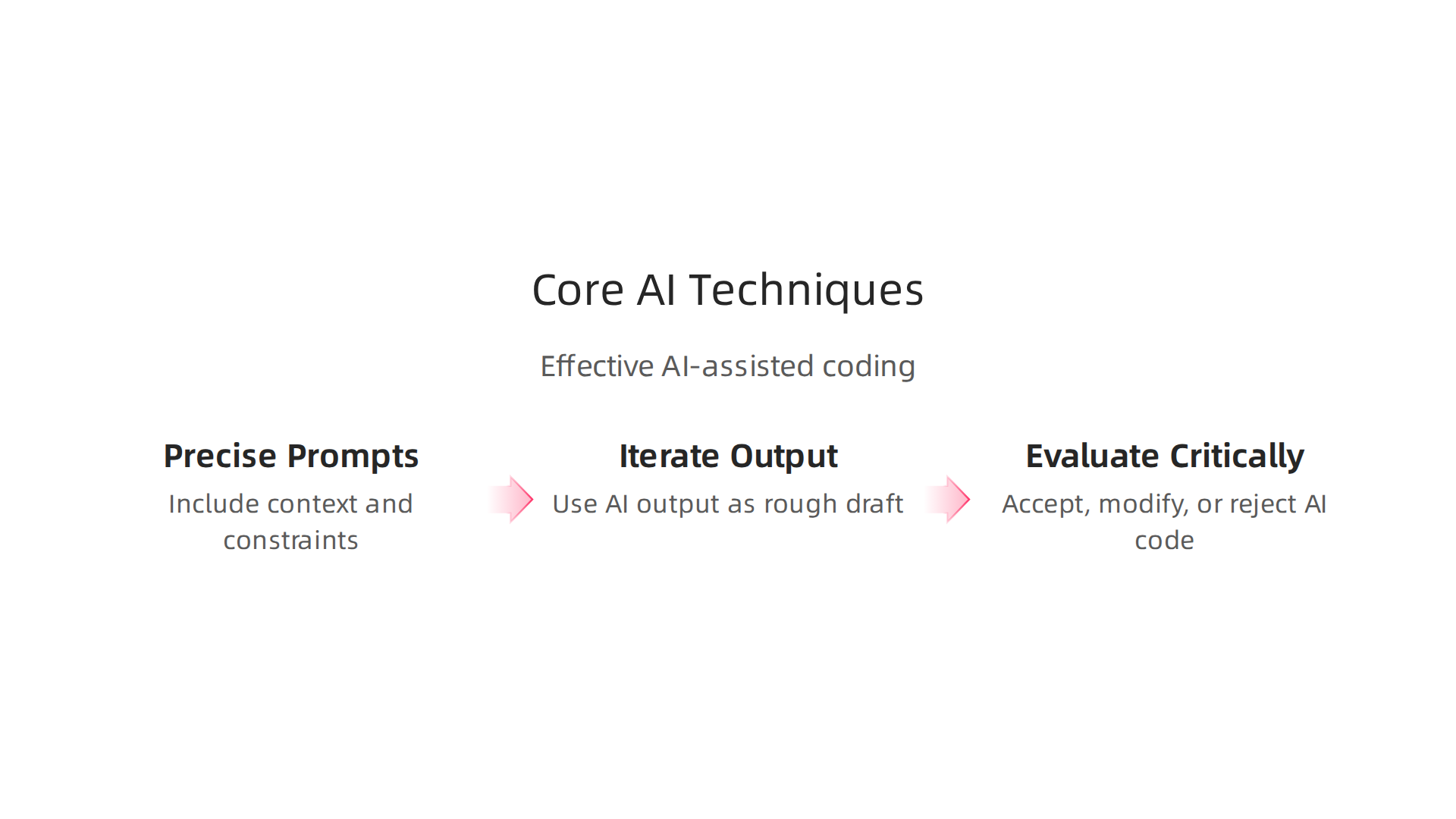
1. Write Precise Prompts with Context and Constraints
Think of your prompt like a user story. Do not say "write a function to sort users." Say "write a Python function that sorts a list of user dictionaries by their last_login field in descending order, handles missing dates gracefully, and raises an error if the list is empty."
That extra context tells the AI exactly what you need. According to a 2026 guide on prompt engineering, giving specific constraints and failure modes leads to much better code. The Codeling blog even suggests you treat prompting like system design. Define the inputs, outputs, edge cases, and what bad behavior looks like. Your AI assistant will thank you with cleaner code.
When you use Cluely AI, this technique works even better because the tool already understands your project context. But no matter what tool you use, start every prompt with a clear goal and a list of constraints.
2. Iterate on AI Output Instead of Starting from Scratch
Here is a secret most experienced developers know. You should never accept the first suggestion from an AI coding tool. Use it as a rough draft. Then tweak it.
For example, ask the AI to generate a basic CRUD endpoint. It gives you something functional but messy. Instead of rewriting it from zero, tell the AI "refactor this to use async database calls" or "add input validation." This iterative approach saves tons of time. Research shows that rewriting prompts for LLMs in the loop improves performance compared to expecting perfect output on the first try.
This is where Claude code skills come in handy. If you are using Claude or other assistants, you can have a mini conversation. Fix one thing at a time. The AI learns what you want.
3. Know When to Accept, Modify, or Reject
This is the hardest skill to build. AI coding tools have gotten better, but they still produce code that compiles but is wrong. You need to act like a code reviewer for everything the AI gives you.
Ask yourself three questions:
- Does this code match my project’s patterns?
- Does it handle edge cases I care about?
- Can I explain what it does to a colleague?
If you cannot answer yes to all three, modify or reject it. This is the core of the ai to human translation problem. The tool suggests, but you decide. A 2026 survey from IBM emphasizes that prompt engineering is not just writing input, it is also evaluating output critically.
Keep Practicing
These techniques work across every AI coding tool on the market. The more you practice prompt engineering, the faster you will get at spotting bad suggestions and crafting ones that work.

If you want to dive deeper into using Claude for coding, check out our guide on Anthropic AI for developers.
To stay on top of the latest AI coding techniques and tool updates, I recommend The Deep View Newsletter. It is a daily email that cuts through the noise and delivers the practical insights you actually need.
Integrating AI Assistants into Your Development Workflow
You already know how to write better prompts and iterate on AI output. But that is just the start. To really get value from tools like Cluely AI, you need to fit them into your everyday development workflow.
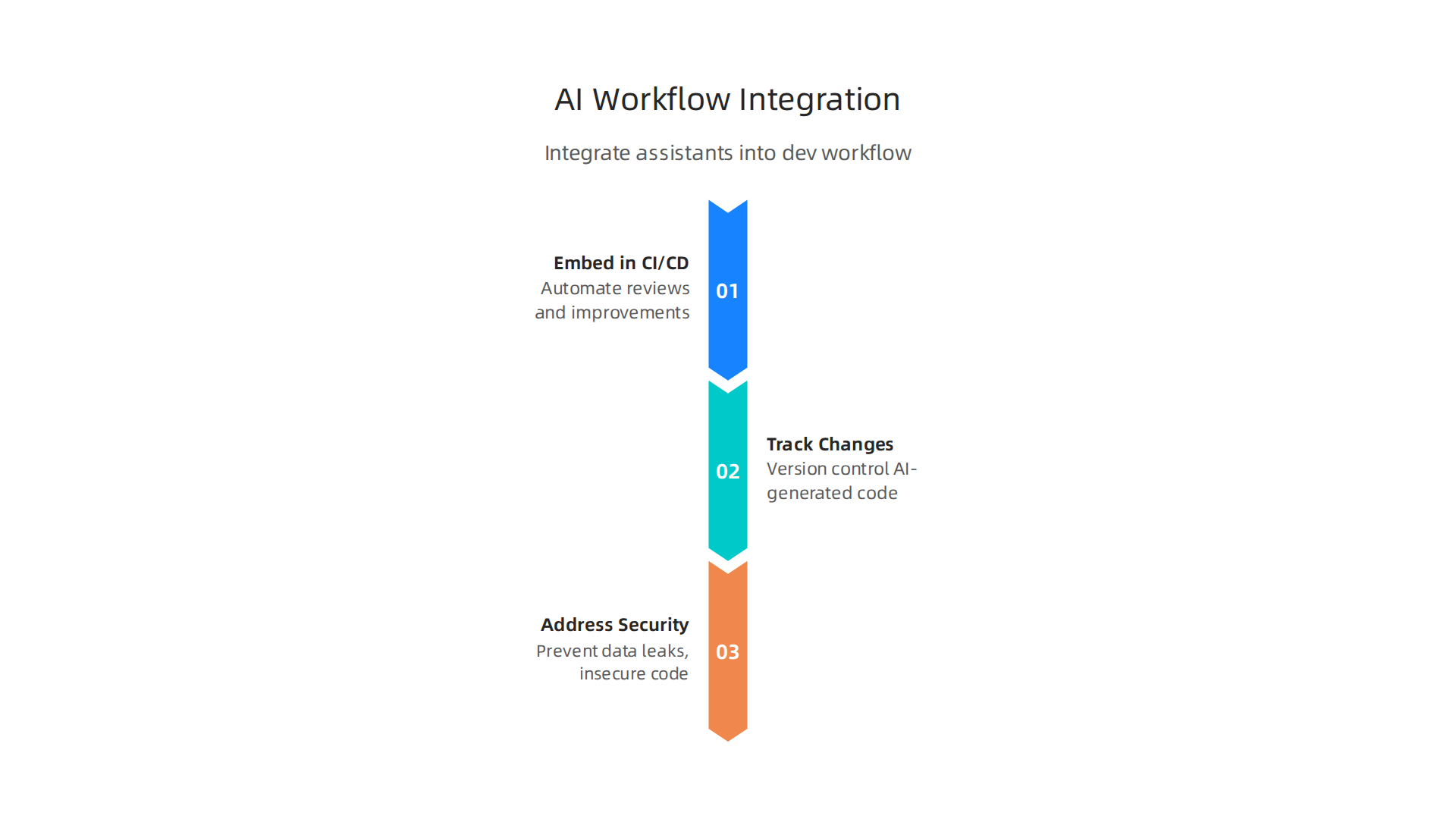
This means connecting your AI assistant to your CI/CD pipeline, your version control system, and your security processes.
Embed AI in Your CI/CD Pipeline for Automated Reviews
Most teams run code through a pipeline that builds, tests, and deploys automatically. Your AI assistant can join that pipeline. Instead of only reviewing code yourself, let the AI catch bugs, suggest improvements, and enforce coding standards before humans ever see the code.
According to a complete guide from GitLab, integrating AI security tooling into your pipeline helps you manage AI dependencies safely and review AI-generated code at scale. Many DevSecOps tools now plug directly into CI/CD systems to scan for vulnerabilities. The top DevSecOps tools for 2026 are built to work right inside your existing pipeline so you can catch problems early.
Track AI-Generated Changes with Version Control
AI assistants can produce a lot of code fast. But you need to know what they changed. That is where version control comes in.
Always commit AI-generated code as clearly labeled changes. Use descriptive commit messages that say "AI-generated fix for login timeout" or "AI refactored database query." This makes it easy to review, roll back, or trace issues later. If your team uses tools like Cluely AI, encourage everyone to follow the same pattern. The Harness blog on AI deployment in 2026 highlights how safe CI/CD practices include tracking which parts of the code came from an AI assistant. Your team will thank you when they need to debug something six months from now.
Address Security and Compliance from Day One
This is the big one. AI coding assistants can introduce security holes if you are not careful. A common mistake is letting the AI write code that uses outdated libraries or insecure patterns. Enterprise environments especially need strict controls.
The team at Knostic explains how to secure AI coding assistants to prevent data leaks and insecure code without slowing development. Another guide from StackHawk recommends configuring AI tools for security-first development from the start. Set rules for what the AI is allowed to generate, like avoiding dangerous functions or enforcing encryption standards. And always run security scans on AI-generated code as part of your pipeline. The SentinelOne guide on CI/CD security best practices covers more than 20 ways to protect your pipeline from vulnerabilities.
One More Step to Master AI Workflows
Bringing AI into your workflow takes practice. Start small: add one AI check to your pipeline, then expand. If you want a deeper look at how AI assistants handle code generation in real projects, check out our guide on the GLM coding plan for AI-assisted code generation.
And to stay ahead of the latest AI workflows and security tips, I recommend the The Deep View Newsletter. It delivers daily, practical insights straight to your inbox so you never miss what matters.
Measuring the Impact: Productivity and Code Quality Metrics
You have set up your AI assistant, integrated it into your pipeline, and started using it every day. But how do you know if it is actually helping? Measuring the real impact of tools like Cluely AI on your productivity and code quality is the only way to make smart decisions

about where to invest your time.
What the Data Says About Productivity Gains
Many developers report a 20 to 40 percent reduction in time for routine coding tasks when using AI assistants. Some vendor studies claim even higher numbers, often 50 to 100 percent. But those numbers come from controlled settings with early adopters, as noted in AI Coding Assistant Stats 2026. Real world results vary a lot.
Actually, a benchmark from METR found that experienced developers were 19 percent slower in some cases when using AI. They felt faster, but the data showed otherwise. This is the productivity paradox of AI. You can feel more productive without actually being more productive. That is why you need real metrics, not just feelings.
The truth is that AI coding tools produce real gains, but they also create an illusion of progress. Traditional benchmarks often miss this, as discussed in Developer Productivity Benchmarks 2026. To avoid the illusion, track specific things: time spent on repetitive tasks, number of commits, and code review turnaround.
Code Quality Is a Mixed Picture
Faster code is not better code if it is full of bugs. Research collected in the Top 6 Cited AI Developer Productivity & Code Quality Research shows mixed results. Some teams see improved maintainability because AI helps write consistent boilerplate. Others see higher bug density and more security holes.
One study found a 23.7 percent increase in security vulnerabilities in AI-assisted code. That does not mean you should stop using AI. It means you need to measure what you are getting. Tools like Cluely AI include analytics that track how much code came from AI suggestions, how often you accept those suggestions, and which parts of the codebase see the most AI contributions.
If you want to get better at using AI effectively, improving your prompt engineering and understanding how AI to human collaboration works is key. These skills directly affect the quality of the code you produce. For a deeper look at structuring your AI assisted coding process, check out our guide on the GLM coding plan for AI assisted code generation.
Start Tracking the Right Things Today
The best approach is to pick three to five metrics and track them before and after introducing an AI assistant. Look at bug density, time spent on pull requests, and how often you need to refactor AI-generated code. Compare those numbers every few weeks. Adjust your prompt engineering and claude code skills based on what you see.
And to stay on top of the latest research on AI productivity and code quality, I recommend The Deep View Newsletter. It delivers practical insights on AI every day so you never fall behind on what actually works.
Overcoming Common Pitfalls with AI Coding Tools
Measuring your metrics is great. But even with the best tracking in place, pitfalls can sneak into your workflow if you are not careful. The biggest trap? Trusting your AI assistant too much.

The Danger of Over-Reliance
It feels good when an AI produces code that seems correct on the first try. But that warm feeling can lead to subtle bugs and security holes. When you stop double-checking, you let mistakes slip through.
According to GitLab’s guide on secure AI-powered code completion, you need to integrate security tooling and carefully review every line of AI-generated code. Without that step, you risk shipping code that passes tests but breaks in production. A StackHawk best practices article agrees. It recommends configuring your AI tools for security-first development from day one. Do not assume the model knows what is safe for your specific project.
Bias in Training Data
AI models learn from public codebases. Those codebases contain insecure patterns, legacy workarounds, and edge cases that fail under real pressure. If you accept the AI’s output without thinking, you import those problems into your own project.
The Knostic article on securing AI coding assistants explains that bias in training data can produce code that looks right but is not robust. You need to treat the AI as a helpful starting point, not a final answer.
Keep Your Review Practices Strong
Here is the thing: AI does not replace code review or testing. It adds to them. Treat AI-generated code like code from a junior developer. It needs your eyes, your experience, and your judgment.
Improving your prompt engineering skills reduces the chance of getting bad output in the first place. IBM’s 2026 guide to prompt engineering emphasizes that clear, detailed prompts produce better and safer code. You are defining the constraints. So define them well.
For a deeper look at how to work effectively with AI tools, check out our guide on Anthropic AI for developers and how Claude supercharges your coding workflow.
Tools like Cluely AI help by showing you exactly where AI contributions land. Use that data to focus your reviews on the parts of your codebase that receive the most AI-generated code. That turns a potential pitfall into a smart, proactive strategy.
Remember, the best ai to human collaboration happens when you stay engaged and critical. The AI gives you speed. You give it quality.
If you want daily insights on AI coding best practices and the latest research, I recommend The Deep View Newsletter. It keeps you informed on what actually works in 2026.
The Future of AI in Software Development: Trends for 2027 and Beyond
You have learned how to avoid pitfalls today. But what about tomorrow? The world of AI coding moves fast, and 2027 is already shaping up to be a big year. Let me walk you through three trends that will change how you work.
AI Agents That Build Entire Microservices
Right now, you use AI to write snippets or functions. Soon, AI agents will take natural language specs and generate whole microservices. You will describe what the service should do, and the agent will spin up the code, tests, and deployment config. A 2026 comparison of tools like GitHub Copilot, Qodo, and Codeium shows how far these assistants have already come (source). The next jump is letting them handle entire services on their own.
This will force you to sharpen your claude code skills and your ability to break big problems into clear natural language prompts. The better your prompt engineering, the better the result.
Self-Healing Code and Autonomous Debugging
Imagine code that fixes itself. In 2027, we will see more tools that detect bugs in production and patch them without a human stepping in. This goes beyond testing. It means real-time monitoring plus AI that rolls back changes or applies fixes. A benchmark study on ChatGPT, Codeium, and GitHub Copilot already shows that ChatGPT excels at debugging (source). The next step is making that automatic.
For this to work, you need a strong ai to human feedback loop. You define the guardrails. The AI handles the routine fixes. Tools like Cluely AI will help you track where those auto-fixes land so you can review them intelligently.
Ethical and Regulatory Frameworks
As AI writes more critical code, governments and organizations will step in. Expect new rules about how AI-generated code is tested and deployed, especially in healthcare, finance, and infrastructure. If you want to stay safe, start building review practices now. Check out our guide on Anthropic AI for developers and how Claude supercharges your coding workflow to see how one tool handles these challenges.
Also, keep an eye on industry trends. Our piece on startup app development trends 2026 offers a broader view of what is coming.
The future is about partnership. The AI will do more. You will oversee more. To stay ahead of these changes, you need to learn constantly. That is why I recommend The Deep View Newsletter. It delivers daily, clear updates on AI breakthroughs and what they mean for developers like you. Do not get left behind.
Summary
This article surveys the 2026 landscape of AI-assisted software development and explains how to get real value from coding assistants without compromising quality. It covers adoption and trust statistics, why many teams use AI but still distrust its output, and how tools like Cluely AI aim to close that gap by providing deeper project context, fewer false positives, and IDE integration. The guide lays out practical techniques—precise prompt engineering, iterative refinement of AI suggestions, and clear review rules—and shows how to embed AI into CI/CD, version control, and security workflows. It also explains how to measure impact with concrete metrics, highlights common pitfalls (over-reliance, biased training data), and previews 2027 trends such as AI agents that build services and autonomous debugging. After reading, developers will know which practices and tools to adopt, how to evaluate AI contributions, and how to keep productivity gains from becoming quality regressions.